How to Join ManageClean: Janitorial Teams Beta on iOS





About ManageClean: Janitorial Teams
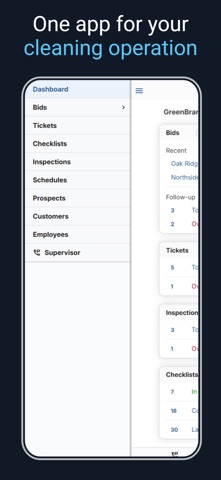
CleanGuru is mobile janitorial software built for commercial cleaning companies. Build bids and proposals, view employee schedules, track time, create work tickets, complete cleaning checklists, and perform quality-control inspections from the app.
REQUIREMENTS
A CleanGuru membership is required. New users can sign up at CleanGuru.com.
JANITORIAL BIDDING AND PROPOSALS
Create accurate janitorial bids and professional proposals without starting from scratch.
- Choose a building type and cleaning frequency to begin a bid.
- Use preloaded building types, cleaning tasks, and industry-specific production rates.
- CleanGuru automatically calculates an estimated cleaning time for each visit.
- Receive a recommended price based on labor, overhead, supplies, and profit goals.
- Enter exact measurements or use Auto-Load to build the job from an estimated building size.
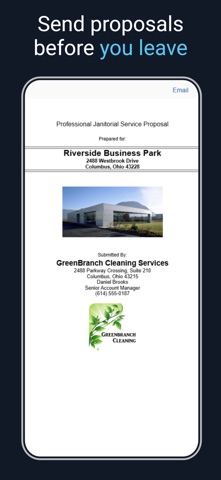
- Create customized proposals with your company logo, references, and detailed job specifications.
- Include a professionally written cover letter as the first page of the proposal.
- Track when proposals are sent, delivered, and opened.
- Add ready-to-use promotional pages and a sample inspection to your proposal.
EMPLOYEE SCHEDULING, TIMEKEEPING, AND WORK TICKETS
Organize employee schedules, track time at each job, and manage special work.
- View employee schedules and add one-time cleaning work from the app.
- Set up recurring schedules using the CleanGuru desktop version.
- Create work tickets in the app for carpet cleaning, tile work, window cleaning, and other special services.
- Let employees check in and out from the app.
- Review alerts for late, off-site, or denied-GPS activity.
MOBILE CLEANING CHECKLISTS
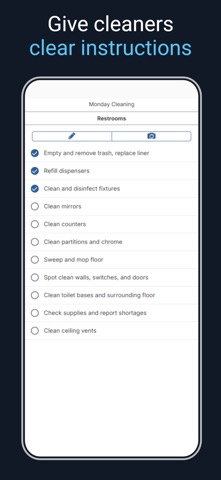
Give cleaners clear instructions for every building.
- Set up task checklists in the CleanGuru desktop version for cleaners to complete in the mobile app.
- Let cleaners mark tasks complete as they work.
- Review checklists from the previous night or another selected period.
- See which checklists were completed and where follow-up may be needed.
QUALITY-CONTROL INSPECTIONS
Complete and review quality-control inspections from your mobile device.
- Create a new inspection from a template or open one that has already been created.
- Rate each area using the preset rating scale for that inspection.
- Continue inspecting without Wi-Fi and sync the results when you are back online.
- When a completed inspection includes deficient items, CleanGuru automatically creates a work ticket listing each deficient item for follow-up.
- Review completed inspections from the mobile app.
- Send customers a visual Performance Review showing inspection results.
FIND RECORDS FAST
Find related information from the mobile app.
- View bids by prospect.
- View bids, work tickets, inspections, and checklists by customer.
SUPPORT AND TRAINING
CleanGuru includes phone and email support, plus customer training, at no additional charge.
Phone: 888-531-4878
Email: [email protected]
Website: CleanGuru.com