How to Join Pranos Hologlass Beta on iOS




About Pranos Hologlass
Your story, on your window.
HoloGlass shows your signs, photos and videos on your car's window, for everyone outside to see. The Pranos app is your direct line from your phone to your window: make something, tap Play, and it's on the glass.
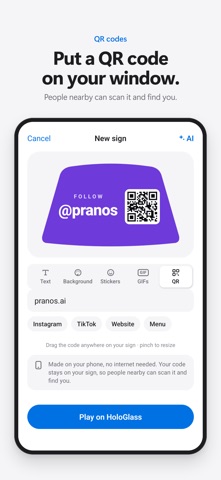
Put a QR code on your window and people nearby can scan it to find your website, menu or social profile.
Just describe it
Type or say what you want, like "Happy birthday Mia, fun, with cake," and Pranos AI designs the sign for you. It can paint a picture behind your words, too. Ask for changes the way you'd ask a friend, like "bigger text, add confetti," then play it on your HoloGlass with one tap.
- Choose Express, Classic or Premium, from quickest to most detailed.
- Most signs are ready in about 15 to 30 seconds.
- Turn on Auto-play and each finished sign goes to your window as soon as it's ready, while you're parked.
- Add your own photo to a sign. Pranos AI never receives your photos.
- Pranos AI is built to turn down signs that look like police or emergency messages, and our tools and AI don't create flashing effects.
Make it yourself
A sign maker with everything close at hand:
- Fonts, from elegant script to bold headline type
- Stickers you can place anywhere
- Solid colors, dots, stripes, confetti or your own photo
- GIFs from your keyboard or Photos, each checked for fast flashing first
- QR codes for your links and handles
Red and blue are left out of the text and background colors, because they can look like emergency lights.
Send and play
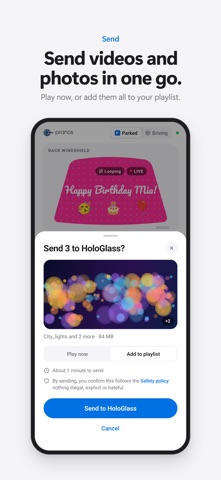
- Send videos and photos from your library, several at once.
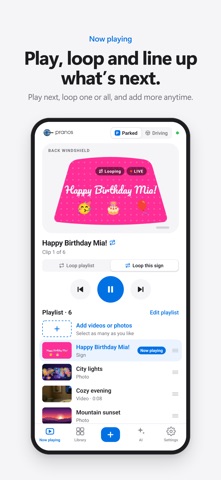
- Build a playlist: what you send plays next. Drag to reorder, and loop one or loop all.
- See a live preview of what's on your window.
- Your Library keeps everything on your HoloGlass, ready to play again.
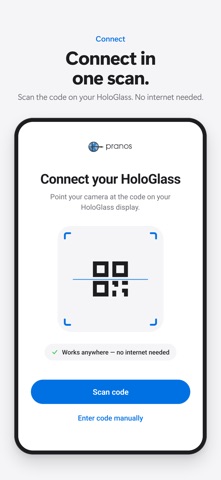
- Your phone connects straight to your HoloGlass, so sending and playing work anywhere, no internet needed.
Parked and Driving
One switch, at the top of Now playing. Before you drive, switch to Driving: what's on your HoloGlass stays put, nothing new plays, and uploading is off until you switch back to Parked.
Video is for when you're parked, where local law allows it. Stopped in traffic isn't parked. Rules for vehicle displays vary, and some places restrict any display on the move, even a still image, so check the rules where you drive, and turn your HoloGlass off where they don't allow it. You're responsible for what shows.
Easy to set up
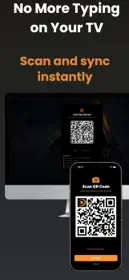
Scan the code on your HoloGlass, or type it in. Give it a name and choose the window it's on. If the connection drops, the app reconnects by itself and tells you what to do next. Built-in diagnostics help our support team help you.
Try it first
No HoloGlass yet? On the Connect screen, tap Enter code manually and type DEMO to explore the app with a sample HoloGlass.
About HoloGlass
This app works with a Pranos HoloGlass system: a unit that mounts inside your car and a screen custom-fit to your car's window. Learn more and order one made for your car at pranos.ai.
Used your HoloGlass with an earlier version of this app? It needs a software update before this version can control it. Some features, like Loop, playlist reordering and moving GIFs, also need the latest HoloGlass software. Email [email protected] and we'll walk you through it.
Pranos AI is optional, needs an internet connection, and asks before it sends anything.
Privacy Policy: https://pranos.ai/policies/privacy-policy
Terms: https://pranos.ai/pages/terms-and-conditions
Support: [email protected] or (415) 761-1328