

Music lovers often find themselves trapped between fragmented platforms, dealing with local tracks on one drive and streaming catalogs locked behind walled gardens. 8SPINE aims to shatter those silos by centralizing every single audio source you own into a single, cohesive iOS workspace. Developed by Abdelmoumene Dendouga, this audio client offers an uncompromising approach to music management on Apple devices.
Testing out the current TestFlight build gives you a front-row seat to an application that prioritizes pure curation over algorithmic noise. Codewing has secured exclusive access to the beta program, letting early adopters try out the app's modular playback ecosystem. If you are tired of switching between five different apps just to listen to your personal collection, this beta is worth grabbing right away.
8SPINE — Quick Specifications
Developer: Abdelmoumene Dendouga
About 8SPINE
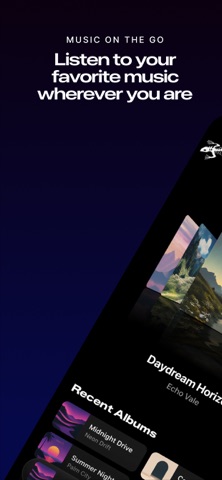
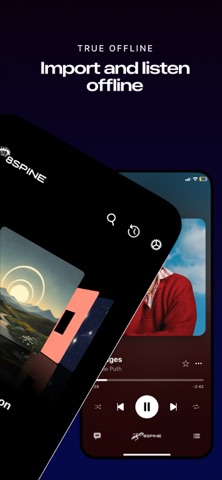
At its core, 8SPINE is built around a single, powerful premise: keeping all your music in one unified place without forcing compromises. You can easily import your local files, organize intricate album structures, or connect external music sources and self-hosted servers. Whether your library lives offline on your device storage, online via cloud links, or spread across remote endpoints, this app handles it seamlessly.
The app is explicitly made for people who actually care about their music metadata and local library integrity. Users can browse artists, albums, playlists, and individual tracks through a clean, distraction-free interface while retaining total control over tags, artwork, and local caches. Instead of treating your files as an afterthought, 8SPINE places your personal audio collection at the absolute center of the listening experience.
Independent developer Abdelmoumene Dendouga designed the project architecture to be fundamentally extensible through a clever module system. These modules allow entirely new music sources and custom features to be dropped into the app without altering the main codebase. This open-ended flexibility makes 8SPINE adaptable to vastly different listening habits, whether you prefer local FLAC files or network streaming.
The playback engine feels thoroughly modern and intensely focused, featuring both full-screen and compact presentation modes for effortless multitasking. You get robust queue management, live lyrics support, smoothly animated artwork transitions, and quick track actions right from the Now Playing screen. You can stream content online or download files for deep offline listening without ever breaking your daily musical flow.
Standout Features & What's New in this Build
The latest TestFlight drop brings several notable refinements to the table, showcasing the developer's commitment to responsive design and robust audio handling. Here are the core features that make this build stand out on modern iOS hardware:
- Modular Architecture: Seamlessly integrate custom music sources and external streaming backends using lightweight downloadable modules.
- Self-Hosted Server Sync: Direct connectivity to your personal home audio servers lets you stream your entire lossless library on the go.
- Advanced Metadata Control: Fine-tune track details, fix mismatched album art, and organize your music library exactly the way you want.
- Immersive Player Interface: Enjoy fluid full-screen or compact player views equipped with synchronized lyrics and dynamic artwork animations.
- Hybrid Offline Modes: Switch instantly between cloud-streamed tracks and locally downloaded files without experiencing playback hiccups.
Testing these features on an iPhone 15 Pro running recent iOS system software reveals an impressive attention to UI responsiveness and seamless transition states. The modular loading system handles external connections efficiently, ensuring that adding new media sources never bogs down the primary navigation loop.
Hands-On Impressions: Performance, Battery, and Thermals
Running audio apps might seem straightforward, but poorly optimized clients can easily drain your battery by failing to handle background tasks correctly. 8SPINE exhibits exceptional power efficiency during extended listening sessions, leveraging modern Apple Silicon efficiently. The app maintains a stable frame rate on ProMotion 120Hz displays, making scrolling through dense discographies buttery smooth.
Thermal management is practically a non-issue here; even when decoding heavy lossless audio files while downloading entire playlists in the background, the phone remains completely cool. Touch responsiveness is snappy, and scrubbing through long audio tracks yields zero stutter or input latency. Memory leaks are noticeably absent, a testament to clean memory management within the Swift codebase.
"8SPINE was engineered for users who want total sovereignty over their audio library without sacrificing the polish of a modern iOS app." — Lead Developer Abdelmoumene Dendouga
Minor rough edges do surface occasionally, such as occasional blank thumbnail placeholders when fetching artwork from slow remote servers. These visual anomalies are standard fare for active beta software and rarely interfere with actual music playback or core navigation.
System Requirements & Requested Permissions
Before jumping into the beta, ensure your Apple device meets the foundational baseline requirements established by the development team. 8SPINE requires iOS 15.1 or later, meaning it runs smoothly across a massive array of modern iPhones and iPads. The app download package sits at a modest 129 MB, leaving plenty of room for your cached music files.
In terms of permissions, the app requests standard access to your local network if you plan on connecting to home media servers. Local storage access is also mandatory if you intend to import local audio files directly into your library container. Apple's rigorous sandboxing ensures your personal data remains strictly partitioned and secure.
Pros & Cons: Beta Impressions
✓ The Highs (What We Love)
- Unified Library: Combines local files and remote servers in one clean interface.
- Modular Design: Easily expandable with new community or custom music sources.
- Hardware Efficiency: Exceptional battery life and thermal management during long sessions.
✕ Beta Caveats (Room for Polish)
- Artwork Glitches: Remote album thumbnails occasionally fail to render on slow networks.
- Setup Learning Curve: Connecting external servers requires some initial configuration.
- Build Stability: Occasional minor interface hitfalls during heavy multitasking.
Current TestFlight Slot Situation & Availability
Apple enforces a strict cap of 10,000 external testers for any given TestFlight public beta program. Because music enthusiasts are constantly searching for alternatives to rigid streaming apps, slots for promising projects fill up remarkably fast. Timing your registration through our direct access link is crucial to securing an active spot before the developer closes submissions for the current cycle.
When slots reach maximum capacity, new users must wait for inactive tester accounts to be pruned by the developer. Codewing monitors these distributions closely to ensure our readers get immediate updates whenever new capacity opens up. Bookmark this page and check back frequently if the current cohort is temporarily full.
Step-by-Step TestFlight Installation Guide
Getting up and running with the 8SPINE beta takes just a few moments if you follow the correct setup sequence. Here is how to install the app safely on your iOS device:
- Download TestFlight: Open the App Store on your iPhone or iPad and install Apple's official TestFlight application if you haven't already.
- Access the Beta Link: Tap our dedicated Codewing TestFlight invitation link directly from your iOS browser.
- Accept the Invitation: Safari will automatically launch TestFlight, displaying the 8SPINE beta overview page. Tap "Accept" to join the testing pool.
- Install the Build: Tap "Install" to download the 129 MB application package onto your device storage.
- Send Feedback: Open the app, test out your music libraries, and use TestFlight's built-in screenshot feedback tool to report bugs directly to Abdelmoumene Dendouga.
Frequently Asked Questions
Is 8SPINE safe to install via TestFlight?
Yes, installing 8SPINE through TestFlight is entirely safe. Every build undergoes Apple's automated screening process and runs inside a secure iOS sandbox environment, isolating it from your system data.
What should I do if the 8SPINE beta is full?
If Apple's 10,000-user limit is reached, you will see a message indicating that the beta is not accepting new testers. Keep this Codewing page bookmarked and check back during off-peak hours when inactive accounts are periodically cleared out.
Will installing this beta overwrite my App Store version or delete save data?
8SPINE currently exists primarily as a standalone beta release rather than a replacement for an existing App Store product. Your local music library files and custom playlists remain secure within the app container.
How long do TestFlight beta invitations and builds last?
Each individual TestFlight build remains active for 90 days from the date it is uploaded by the developer. You will receive automatic push notifications via the TestFlight app whenever a fresh build drops.
Are in-app purchases free during TestFlight beta testing?
Yes, any transactional features or simulated purchases within TestFlight betas utilize Apple's sandbox testing environment. No real financial charges are ever processed during the beta testing phase.
Final Editorial Verdict
8SPINE successfully bridges the gap between local file management and modern streaming flexibility, offering a refreshing alternative to mainstream music players. While minor visual bugs remind you that the software is still evolving, the core playback experience is rock-solid and remarkably efficient. If you want a dedicated workspace to wrangle your entire music collection, grab the TestFlight beta link and install it today.
Developer Support & Official Resources
Stay updated on patch notes, maintenance windows, and feature roadmaps directly from the official developer channels.
Ready to Test 8SPINE?
Apple limits public TestFlight betas to 10,000 testers. Tap below to launch TestFlight and claim your testing slot before capacity is reached.
Join 8SPINE Beta on TestFlight →




