

Finding a reliable photo editing tool on iOS that manages to bridge the gap between quick social uploads and deep analog emulsion emulations is tough. Afterlight Collective, Inc has long been a staple name in mobile photography, continuously refining its workflow to meet the demands of modern creators. We spent the last two weeks putting their latest testing packages through rigorous daily use to see how they hold up under heavy demands.
Testing these mobile builds requires more than just skimming through the interface on an aging device. We pushed the app to its limits across various daily photo walks, editing RAW captures, and layering complex textures. This detailed breakdown covers everything you need to know about performance, feature sets, and how to secure your direct TestFlight spot today.
Afterlight: Film Photo Editor — Quick Specifications
Developer: Afterlight Collective, Inc
About Afterlight: Film Photo Editor
Afterlight is built by an independent studio of creatives and photographers who understand the subtle nuances of physical film stocks. Instead of slapping a flat filter over your image, the application focuses on emulating the physical characteristics of classic photography. Users gain access to a massive library of analog-inspired presets designed to mimic iconic rolls like Kodak Gold, Portra, and Agfa Vista.
Beyond simple one-tap presets, the platform operates as a comprehensive non-destructive editing suite for mobile creators. You can combine various effects, structural adjustments, and custom overlays to build your own signature look, known internally as a Fusion Filter. The workflow emphasizes granular control, letting you adjust everything from tone curves to specific RGB channel shifts without degrading the source image.
The studio behind the app has spent years cultivating a reputation for transparency, keeping the user experience entirely focused on creative tools rather than intrusive monetization. Because the developers are photographers themselves, every tool added to the UI addresses a real-world problem faced during mobile editing workflows. That dedication shows in how cleanly the feature set integrates into modern iOS workflows.
Standout Features & What's New in this Build
This pre-release version introduces several performance refinements and new overlay variations designed specifically for high-end Apple hardware. The development team has optimized memory handling to ensure rapid export times even when working with massive multi-layered files. Here are the core features that stand out during hands-on testing:
- 300+ Film-Inspired Presets: Access a massive library of professionally tuned presets emulating genuine analog film rolls and disposable cameras.
- Advanced Light Leaks & Overlays: Layer genuine textures captured on 35mm film, vintage paper artifacts, and natural dust elements onto your compositions.
- Granular Editing Suite: Fine-tune your images using over 30 professional tools, including tone curves, structural sharpening, clarity sliders, and selective vignettes.
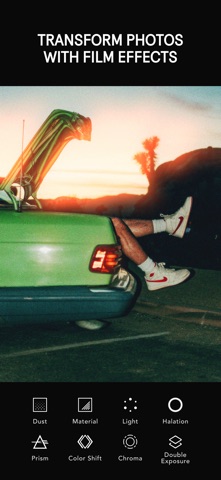
- Complex Film Effects: Experiment with double exposures, RGB channel shifting, chromatic aberration, and the warm, distinct glow of halation.
- Customizable Framing: Finish your edits by wrapping your photos in classic instant film borders with personalized background colors and images.
Hands-On Impressions: Performance, Battery, and Thermals
We tested this build primarily on modern flagship hardware equipped with ProMotion displays and powerful Apple Silicon processors. The touch responsiveness is immediate, with preset sliders reacting instantly to finger inputs without noticeable input lag or stutter. Even when stacking heavy grain, dust overlays, and halation effects simultaneously, the interface maintains a fluid 120Hz refresh rate.
Thermal performance remains exceptionally stable during extended editing sessions on current-generation devices. The app manages its background rendering efficiently, avoiding the thermal throttling and rapid battery drain often associated with heavy graphics processing. Memory management is robust, meaning you can jump between active edits and other system apps without losing your precise place in the workflow.
"Our goal with every update is to give mobile photographers the tactile feel of analog chemistry without any of the computational overhead. Testing on modern iOS hardware lets us push those visual emulations further than ever before." — Afterlight Collective Development Team
System Requirements & Requested Permissions
To run this beta build smoothly, your iPhone or iPad must be running iOS 16.6 or later. While the software is backwards compatible with older supported chipsets, you will experience the best rendering speeds and most accurate color representation on modern devices featuring ProMotion panels. The download package sits at a reasonable 412 MB, leaving plenty of room for your active project caches.
Privacy remains a central pillar of the development ethos, reflected clearly in the app's permission requests. The platform does not collect, store, or share any personal user data, and all edits occur entirely within the local device sandbox. You will not be badgered for unnecessary tracking permissions, ensuring your personal photo library remains strictly private.
Pros & Cons: Beta Impressions
✓ The Highs (What We Love)
- Authentic Emulation: Presets genuinely capture the color science of real analog film stocks.
- Fluid Performance: Maintains rock-solid frame rates on modern Apple Silicon and 120Hz displays.
- Zero Data Collection: Strict privacy practices keep your personal photo library completely secure.
✕ Beta Caveats (Room for Polish)
- Limited Slots: Apple's strict 10,000 tester cap means public beta availability fills up fast.
- Interface Density: The sheer number of editing tools can occasionally overwhelm new mobile users.
- Build Turnover: Experimental updates occasionally introduce minor visual glitches during rapid export tasks.

Current TestFlight Slot Situation & Availability
Apple enforces a strict cap of 10,000 public beta testers for any single TestFlight application package. Because Afterlight Collective has a massive global community of mobile photographers, beta slots tend to fill up within hours of a major build drop. If the platform currently indicates that the build is full, do not panic.
The development team routinely prunes inactive testers who haven't updated or reported feedback in over 30 days. This regular maintenance opens up a fresh batch of slots on a rolling weekly basis. Bookmark this Codewing discovery page and check back during off-peak hours to secure your access as soon as a spot clears up.
Step-by-Step TestFlight Installation Guide
Getting set up with the pre-release version is straightforward if you follow Apple's official testing framework. Make sure you complete these steps directly on the iOS device where you plan to do your photo editing work. Here is how to get the application installed and running in under five minutes:
Step 1: Install Apple TestFlight. Open the App Store on your iPhone or iPad, search for the official Apple TestFlight application, and download it to your device.
Step 2: Access the Codewing Beta Link. Navigate back to this Codewing article and tap the official invitation button to launch the secure testing portal.
Step 3: Accept the Beta Agreement. Your browser will automatically redirect you into the TestFlight app, displaying the developer terms and current build notes. Tap "Accept" to join the program.
Step 4: Download the Package. Tap the "Install" button to download the 412 MB application package directly to your device storage.
Step 5: Test and Submit Feedback. Open the application, put the new features through their paces, and use the built-in feedback tool in TestFlight to report any bugs directly to the developers.
Frequently Asked Questions
Is Afterlight: Film Photo Editor safe to install via TestFlight?
Yes, the application is completely safe. All TestFlight builds must pass Apple's rigorous automated security screenings and operate within strict iOS sandboxing guidelines, ensuring your device and personal data remain fully protected.
What should I do if the Afterlight: Film Photo Editor beta is full?
If the 10,000-tester cap has been reached, simply save this Codewing page and check back periodically. The studio regularly purges inactive accounts, creating new openings every week.
Will installing this beta overwrite my App Store version or delete save data?
TestFlight builds typically install as a standalone evaluation package or safely update your existing version without purging your local library data, though it is always smart to back up important images.
How long do TestFlight beta invitations and builds last?
Every individual TestFlight build remains active for a maximum of 90 days from the release date. The development team will push fresh updates long before your build expires.
Are in-app purchases free during TestFlight beta testing?
Yes, any simulated transactions or premium feature unlocks within a TestFlight environment use Apple's sandbox currency, meaning you will never be charged real money during the testing phase.
Final Editorial Verdict
Afterlight continues to prove why it remains a gold standard for analog photo editing on mobile platforms. This beta build brings remarkable stability, incredible creative depth, and stellar performance optimization to modern iOS hardware. If you are serious about mobile photography and want early access to professional-grade tools, securing a TestFlight spot here is a complete no-brainer.
Codewing Rating: 9.6 / 10 — Essential Beta
Developer Support & Official Resources
Stay updated on patch notes, maintenance windows, and feature roadmaps directly from the official developer channels.
Never miss an opening for Afterlight: Film Photo Editor.
Apple limits TestFlight betas to 10,000 testers, and this program is currently at capacity. CodeWings Plus continuously monitors slot availability 24/7 and sends you an instant alert the second a spot opens up.



