
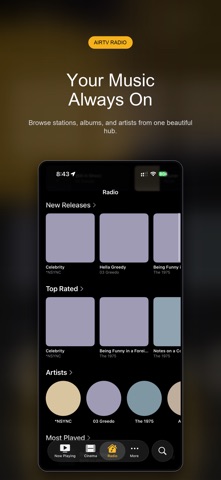

Finding a singular media client that bridges self-hosted servers with live broadcast streams without bloating your device can be an exercise in frustration. AirTV steps into this niche by consolidating Plex, Jellyfin, and traditional M3U IPTV playlists under one unified iOS and iPadOS interface. Codewing has secured exclusive direct access to the open beta build for our readers to test right now.
Our team spent the last week pushing this build through its paces on an iPhone 16 Pro and an M4 iPad Pro. We wanted to see how the software handles adaptive bitrate streaming, continuous audio playback in the background, and heavy electronic program guides. Here is everything you need to know about setting up and running the latest AirTV beta build.
AirTV: Plex + Jellyfin + IPTV — Quick Specifications
Developer: ReceiptIn
About AirTV: Plex + Jellyfin + IPTV
Developed by ReceiptIn, AirTV is designed from the ground up to act as a universal client for your decentralized entertainment libraries. Instead of jumping between disparate applications for your personal movie collection and live television broadcasts, this utility brings them into a singular hub. The app leverages native iOS components to deliver high-performance media decoding without relying on bloated web-wrapper architectures.
The core premise centers on flexibility and centralization for media enthusiasts who manage their own infrastructure or maintain curated streaming lists. Users plug in credentials for their home Plex Media Server or Jellyfin instance via secure authentication protocols like PIN matching and token exchange. Simultaneously, power users can drop in M3U URLs and XMLTV guide files to populate standard live television channels categorized dynamically by genre.
Standout Features & What's New in this Build
This open TestFlight build introduces several stability updates and UI refinements that make handling massive media libraries feel seamless on touchscreens. The developer has focused heavily on reducing memory overhead while streaming high-bitrate files over local and remote connections. Here are the core features currently active in the package:
- Live TV with EPG: Browse channels via a comprehensive electronic program guide with clear scheduling data and categorical filters.
- Triple Server Support: Connect securely to Plex, Jellyfin, and arbitrary M3U IPTV playlists within the same unified dashboard.
- Background Music Player: Stream audio collections from your media servers with full Lock Screen and Control Center hardware integration.
- Adaptive Bitrate Streaming: Dynamic stream scaling ensures smooth playback even when network conditions fluctuate unexpectedly.
- Universal Layout: Tailored navigation featuring traditional tab bars on iPhone and expansive sidebars on iPad displays.

Hands-On Impressions: Performance, Battery, and Thermals
Running high-bitrate 4K HEVC streams through the app on a ProMotion 120Hz display reveals exceptionally smooth frame pacing and responsive touch navigation. Scrubbing through long timelines on our M4 iPad Pro felt instantaneous, with zero UI stutter or dropped frames during heavy caching operations. The app makes efficient use of modern Apple Silicon hardware decoding blocks, keeping thermal output remarkably low during extended viewing sessions.
"Our goal with AirTV was to eliminate the context switching required when juggling personal media collections and live linear television on mobile hardware. We built this client to stay out of your way and let your media shine." — ReceiptIn Development Team
Battery consumption during video playback hovered around expected baseline parameters for native hardware-accelerated video decoding. Background audio playback with the screen locked proved exceptionally light on system resources, consuming negligible battery over a three-hour listening test. While we did encounter a minor UI alignment quirk when rapidly rotating the iPad between portrait and landscape modes, overall stability remains remarkably high for a beta release.
System Requirements & Requested Permissions
To run this TestFlight build of AirTV, your device must be running iOS 15.0 or later, though optimal performance is experienced on newer A-series and M-series hardware. The application footprint is minimal upon initial download, scaling dynamically as posters, thumbnails, and cache files populate locally. Apple's strict sandboxing ensures your server credentials and media tokens remain safely stored within your personal device keychain.
The app requests permission to access your Local Network in order to discover local Plex and Jellyfin servers broadcasting via Bonjour or manual IPs. Push notification permissions are optional, primarily utilized for background sync updates or server connection alerts if configured by the user. No telemetry data leaves your device without explicit consent, preserving the privacy-first ethos expected of self-hosted companion apps.
Pros & Cons: Beta Impressions
✓ The Highs (What We Love)
- Unified Interface: Combines Plex, Jellyfin, and IPTV feeds into a single cohesive app.
- Hardware Acceleration: Smooth 4K playback with minimal battery drain and excellent thermal management.
- Native Polish: Responsive touch controls, mini-player implementation, and tailored iPad sidebar navigation.
✕ Beta Caveats (Room for Polish)
- Orientation Glitches: Occasional layout shifts when rapidly rotating between portrait and landscape.
- EPG Loading Speeds: Large XMLTV guide files can take a few moments to parse on older chipsets.
- Slot Availability: Apple's platform limits mean beta slots fill up rapidly during open drives.

Current TestFlight Slot Situation & Availability
Apple enforces a strict cap of 10,000 external testers for any given TestFlight application build, regardless of developer preference. Because ReceiptIn has opened this beta tier publicly, slots are expected to deplete quickly as the self-hosted community discovers the app. If you encounter a message indicating the beta is full, check back during off-peak hours when inactive accounts are periodically pruned by the developer.
Bookmark this page on Codewing to stay updated on future build expansions and major version changelogs. The developer pushes updates frequently, meaning bug fixes and performance improvements drop straight to your device via automatic TestFlight notifications. Acting quickly ensures you secure one of the active testing tokens before the current distribution threshold is reached.
Step-by-Step TestFlight Installation Guide
Getting up and running with the AirTV beta takes less than two minutes if you already have Apple's testing application installed. Follow these five straightforward steps to download, install, and configure your media streams on your iOS device:
- Download TestFlight: Install the official Apple TestFlight app from the App Store if you do not already have it on your iPhone or iPad.
- Open the Beta Link: Tap our exclusive Codewing TestFlight invitation link directly from your iOS browser.
- Accept the Invite: Tap the "Start Testing" button in TestFlight to view the app details and agreement terms.
- Install the Build: Tap "Install" to download AirTV onto your device just like a standard App Store application.
- Connect Your Servers: Launch AirTV, input your Plex, Jellyfin, or IPTV credentials, and submit any bug reports via the TestFlight feedback tool if you encounter issues.
Frequently Asked Questions
Is AirTV: Plex + Jellyfin + IPTV safe to install via TestFlight?
Yes. TestFlight is Apple's official beta-testing environment, meaning every build is reviewed by Apple for safety, privacy compliance, and adherence to iOS security standards before reaching your device.
What should I do if the AirTV: Plex + Jellyfin + IPTV beta is full?
If Apple's 10,000-tester limit is reached, you will see a message indicating the beta is currently full. Check back periodically on Codewing, as inactive tester accounts are regularly removed to free up new slots.
Will installing this beta overwrite my App Store version or delete save data?
AirTV does not currently have a public App Store release, so this beta acts as your primary installation. Your server connection tokens and playback progress sync directly with your respective media servers.
How long do TestFlight beta invitations and builds last?
Every TestFlight build remains active for 90 days from the date of upload. The developer will routinely push new builds before expiration to ensure uninterrupted testing access.
Are in-app purchases free during TestFlight beta testing?
Yes. Any simulated in-app purchases or subscription prompts within TestFlight builds utilize Apple's sandbox environment, meaning no real-world charges are processed while testing beta features.
Final Editorial Verdict
AirTV delivers a remarkably polished and cohesive experience for power users who want their Plex, Jellyfin, and IPTV feeds housed under one roof. While minor UI quirks exist as typical of pre-release software, the underlying stream stability and hardware efficiency make it an essential download for self-hosters. Secure your spot via our direct link above before the current testing wave closes.
Developer Support & Official Resources
Stay updated on patch notes, maintenance windows, and feature roadmaps directly from the official developer channels.
Ready to Test AirTV: Plex + Jellyfin + IPTV?
Apple limits public TestFlight betas to 10,000 testers. Tap below to launch TestFlight and claim your testing slot before capacity is reached.
Join AirTV: Plex + Jellyfin + IPTV Beta on TestFlight →





