


The mobile racing genre on iOS has long needed a title that respects the intricate mechanics of professional motorsport. Developer Vincenzo Cosentino has answered this call with Ala Mobile, a feature-rich racing simulator designed exclusively for Apple devices.
We grabbed the latest TestFlight build and put it through its paces on our primary testing devices. If you want to get behind the virtual steering wheel early, here is everything you need to know about joining the beta.
Ala Mobile — Quick Specifications
Developer: Vincenzo Cosentino
About Ala Mobile
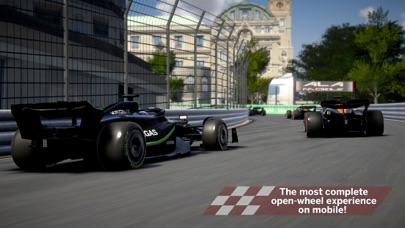
Ala Mobile throws you straight into the nerve-wracking intensity of a championship starting grid. Players must carefully manage tire temperatures during the formation lap, balance clutch engagement, and line up their front wings down to the millimeter before the red lights go out.
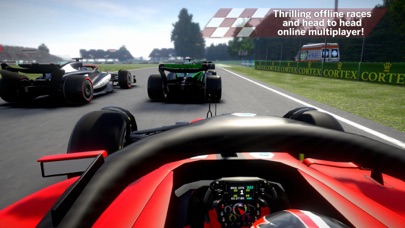
The game features twenty fully customizable cars and fifteen real circuits modeled after iconic global tracks. Competitors face off against an aggressive AI that forces you to pick your braking zones and overtake with absolute precision.
Core Mechanics and Developer Vision
Beyond standard race weekends, Ala Mobile incorporates deep tactical layers like live team radio chatter and five distinct tire compounds that alter handling dynamics. Real-time vehicle damage dictates how aggressively you can take high-speed apexes without ruining your aerodynamic balance.
Vincenzo Cosentino has built this project from the ground up to capture the precise engineering of open-wheel racing. The attention to mechanical feedback elevates it far above standard arcade racers found on the App Store.
Standout Features & What's New in this Build
This open beta build introduces several key additions that showcase the developer's technical roadmap. The implementation of realistic tire wear and dynamic thermal degradation drastically changes race strategy.
- Real-Time Damage Physics: Impact forces directly compromise your front wing, suspension, and overall downforce profile mid-race.
- Five Tire Compounds: Softs, mediums, hards, intermediates, and full wets require careful strategy management based on track evolution and weather.
- Active Team Radio: Receive dynamic audio feedback regarding gap times, pit windows, and car health directly from your race engineer.
- Fifteen Real Circuits: Master complex elevation changes and technical sector layouts inspired by legendary world-class motorsport venues.
Hands-On Impressions: Performance, Battery, and Thermals
Testing this build on modern Apple Silicon hardware reveals impressive optimization and frame pacing. The physics engine and dynamic lighting render smoothly, taking full advantage of ProMotion 120Hz displays for razor-sharp steering inputs.
Thermal regulation remains well within normal operating parameters during extended twenty-lap race stints, though battery drain is noticeable due to the intense graphical load. Touch controls are remarkably snappy, though controller support integration remains a high priority request for future builds.
"We designed Ala Mobile to make every single thousandth of a second on track feel earned, translating the intense engineering of professional racing straight into your hands." — Vincenzo Cosentino
System Requirements & Requested Permissions
To run this TestFlight build smoothly, your iOS device must be running iOS 15.0 or later. While the game scales decently across older hardware, an A14 Bionic chip or newer is recommended for optimal frame rates at high graphical settings.
The app requests standard sandbox permissions, requiring local network access for upcoming multiplayer telemetry and push notifications solely for race event alerts. Apple's secure sandboxing ensures your personal device data remains completely isolated.
Pros & Cons: Beta Impressions
✓ The Highs (What We Love)
- Realistic Physics: Tire degradation and dynamic damage alter handling authentically.
- Circuit Variety: Fifteen detailed tracks provide immense replay value.
- Display Fluidity: Excellent frame pacing and responsiveness on high-refresh-rate screens.
✕ Beta Caveats (Room for Polish)
- Thermal Load: Extended sessions can cause noticeable battery depletion.
- UI Scaling: Menu elements occasionally require tighter touch targets on smaller screens.
- Controller Support: Physical gamepad integration is still in early calibration stages.
Current TestFlight Slot Situation & Availability
Apple enforces a strict cap of 10,000 testers per TestFlight public link, meaning demand quickly outstrips supply for anticipated titles like this. Vincenzo Cosentino has opened this beta tier broadly, but slots will fluctuate as inactive users are pruned from the database.
If you encounter a full capacity message when opening the invite, do not panic. Developers routinely purge inactive user profiles ahead of major milestone updates, freeing up new entry tokens.
Step-by-Step TestFlight Installation Guide
Getting set up with the Ala Mobile beta takes less than two minutes if you follow these precise steps:
- Download and install the official Apple TestFlight application from the iOS App Store if you do not already have it on your device.
- Open Safari on your iPhone or iPad and tap our dedicated Codewing TestFlight invitation link.
- Accept the beta invitation prompt to connect your Apple ID to the Ala Mobile testing pool.
- Tap the "Install" button to download the latest signed development build directly to your home screen.
- Launch the game, test the features, and submit any bugs through the built-in TestFlight feedback tool.
Frequently Asked Questions
Is Ala Mobile safe to install via TestFlight?
Yes, every build distributed through TestFlight is formally reviewed by Apple's automated security pipelines and operates securely inside a sandboxed environment.
What should I do if the Ala Mobile beta is full?
Bookmark this Codewing discovery page and check back during off-peak hours when the developer periodically expands capacity or removes inactive testers.
Will installing this beta overwrite my App Store version or delete save data?
TestFlight builds operate as separate preview packages alongside standard applications, though major structural updates can occasionally reset local beta progression data.
How long do TestFlight beta invitations and builds last?
Individual TestFlight builds expire automatically ninety days after upload, requiring regular minor patches pushed directly through the Apple ecosystem.
Are in-app purchases free during TestFlight beta testing?
Yes, any simulated microtransactions or store tests utilize Apple's developer sandbox billing, meaning you will never be charged real currency.
Final Editorial Verdict
Ala Mobile is shaping up to be an essential download for racing enthusiasts looking for authentic motorsport simulation on mobile hardware. Vincenzo Cosentino has crafted a promising foundation that balances technical depth with smooth iOS performance.
Score: 8.5 / 10
Developer Support & Official Resources
Stay updated on patch notes, maintenance windows, and feature roadmaps directly from the official developer channels.
Ready to Test Ala Mobile?
Apple limits public TestFlight betas to 10,000 testers. Tap below to launch TestFlight and claim your testing slot before capacity is reached.
Join Ala Mobile Beta on TestFlight →






