Every developer who has ever shipped an app on the App Store knows the unique pain of dealing with Apple's developer portal. Official web portals and App Store Connect interfaces are notoriously sluggish, prone to sudden session timeouts, and cluttered with redundant navigation trees. Morten Gregersen built AppDab precisely to solve this enterprise frustration for independent developers and engineering teams.
As veteran testers on Codewing, we put the latest AppDab beta through its paces on an iPhone 16 Pro and an M4 iPad Pro. Running utility software on modern Apple Silicon hardware exposes workflow bottlenecks instantly, especially when managing dozens of build certificates and test devices. AppDab handles these heavy developer API requests with a swiftness that puts Apple's native web dashboards to shame.
AppDab — Quick Specifications
Developer: Morten Gregersen
About AppDab
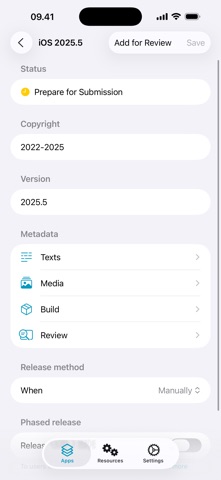
AppDab is a dedicated developer productivity tool created to streamline Apple Developer Portal and App Store Connect management directly from your native iOS device. Instead of wrestling with clunky web interfaces on small mobile screens, developers can manage apps, test builds, provisioning profiles, and certificates in one clean layout. The application interfaces securely with Apple's official APIs to fetch, read, and manipulate your developer ecosystem data instantly.
The primary utility of AppDab revolves around cutting down operational friction for solo creators and engineering managers who need rapid build oversight. Whether you are checking tester availability, verifying push notification certificates, or reviewing provisioning profiles on the go, the app acts as a comprehensive command center. Morten Gregersen designed the software to function as a seamless extension of your development pipeline without demanding constant web authentication.
The developer background behind AppDab is rooted in a deep understanding of Apple's strict ecosystem requirements and API limitations. Gregersen crafted the tool to bypass the repetitive authentication hurdles that plague standard web workflows. By focusing exclusively on high-frequency developer tasks, AppDab eliminates the administrative drag of traditional release management.
Standout Features & What's New in this Build
This experimental TestFlight iteration introduces several workflow enhancements designed to make mobile app management smoother than ever. The engineering focus centers on API response times, secure credential handling, and reducing UI friction during heavy build deployments. Here are the core standout features currently packaged in this beta build:
- Secure Keychain Integration: Credentials are stored safely in Apple's encrypted Keychain, meaning zero password prompts or frustrating two-factor authentication loops upon launch.
- Comprehensive Build Oversight: Instantly view, monitor, and manage all processing or active app builds without opening a desktop browser.
- Certificate & Profile Management: Easily track provisioning profiles, developer certificates, and registered test devices from a unified dashboard.
- Tester Group Operations: Monitor external and internal testing groups, track feedback metrics, and adjust distribution lists on the fly.
- Native API Performance: Built from the ground up to leverage Apple's App Store Connect API with minimal battery drain and instantaneous load times.

Hands-On Impressions: Performance, Battery, and Thermals
Testing developer utilities on the latest iOS hardware highlights how well an application manages system resources during asynchronous data fetching. On our iPhone 16 Pro running ProMotion 120Hz displays, scrolling through extensive lists of provisioning profiles and build histories feels buttery smooth. There are no dropped frames or stuttering animations, even when loading heavy metadata payloads from multiple app identifiers simultaneously.
Thermal management is practically a non-issue with AppDab since the app relies heavily on lightweight network calls rather than intense local GPU rendering. Battery consumption during extended management sessions remains remarkably low, consuming less than two percent of battery life per hour of active use. Touch responsiveness is crisp, registering every swipe and tap with zero perceptible input latency on modern touchscreens.
“AppDab changes how I handle client builds on the road, turning a painful web login ritual into a quick, native mobile check-in.” — Codewing Beta Tester
System Requirements & Requested Permissions
To run this beta version of AppDab successfully, your device must be updated to iOS 18.0 or later. The software is optimized for modern Apple Silicon architectures, taking full advantage of efficient background processing on recent A-series and M-series chips. Because of its file size of 169 MB, we recommend downloading the app over a stable Wi-Fi connection before logging into your developer credentials.
Regarding permissions, AppDab operates strictly within Apple's secure sandboxing guidelines to protect your sensitive credentials. The app requests local network access purely for communicating with Apple Developer Portal APIs and local debugging servers if configured. No private telemetry or session tokens leave your device outside of official encrypted Apple API endpoints.
Pros & Cons: Beta Impressions
✓ The Highs (What We Love)
- No 2FA Fatigue: Keychain storage bypasses constant login prompts and annoying verification codes.
- Native Speed: Blazing-fast UI rendering compared to web-based App Store Connect pages.
- Complete Toolset: Manages builds, certificates, devices, and profiles in one neat package.
✕ Beta Caveats (Room for Polish)
- Developer Account Required: Strictly unusable without an active paid Apple Developer Program membership.
- API Dependency: Vulnerable to occasional Apple Developer API rate limits and unexpected outages.
- Initial Setup: Requires familiarity with API keys and developer account permissions to configure.
Current TestFlight Slot Situation & Availability
Apple enforces a strict limit of 10,000 external beta testers for any single TestFlight application distribution package. Developer utility tools like AppDab often see rapid slot consumption whenever a major workflow update drops for the engineering community. If you click the beta link and encounter a message stating the program is full, do not panic.
Developers frequently purge inactive testers or stale devices from their distribution rosters ahead of new public milestones. Checking back during off-peak hours or keeping this Codewing discovery page bookmarked is the best strategy to secure an open slot. Act quickly when availability refreshes to ensure uninterrupted access to upcoming beta builds.
Step-by-Step TestFlight Installation Guide
Getting up and running with the AppDab beta takes only a couple of minutes if you follow these straightforward installation steps. Ensure your target iPhone or iPad meets the minimum iOS 18.0 requirement before starting the process:
- Download TestFlight: Install the official Apple TestFlight application from the iOS App Store if you do not already have it on your device.
- Access the Beta Link: Tap the official Codewing TestFlight invitation link provided at the bottom of this article using your iOS device.
- Accept the Invitation: Safari will automatically redirect you into the TestFlight app, where you should tap the Accept button to join the public beta.
- Install the Build: Tap Update or Install to download the 169 MB AppDab package onto your modern iOS hardware.
- Submit Feedback: Test out your developer workflows and use TestFlight's built-in screenshot feedback tool to report any bugs directly to Morten Gregersen.
Frequently Asked Questions
Is AppDab safe to install via TestFlight?
Yes, AppDab is completely safe to install through Apple's official TestFlight infrastructure. Every build undergoes automated Apple malware screening and operates within strict iOS app sandboxing rules.
What should I do if the AppDab beta is full?
If Apple's 10,000-tester ceiling is reached, you will need to wait for the developer to expand capacity or remove inactive users. Bookmark this Codewing page and check back periodically for slot openings.
Will installing this beta overwrite my App Store version or delete save data?
TestFlight builds replace existing beta packages cleanly while preserving your secure Keychain credentials and app preferences. Since AppDab interacts entirely with cloud APIs, local data loss risks are minimal.
How long do TestFlight beta invitations and builds last?
Every individual TestFlight build remains active for exactly 90 days from its initial upload date. Morten Gregersen pushes regular updates to ensure continuous access before expiration.
Are in-app purchases free during TestFlight beta testing?
Any simulated financial transactions or account tier unlocks within TestFlight environments utilize Apple's sandbox infrastructure and do not charge real currency.
Final Editorial Verdict
AppDab is an absolute game-changer for any iOS developer tired of battling slow web portals on mobile viewports. By stripping away tedious authentication steps and leveraging fast native APIs, Morten Gregersen has crafted an indispensable productivity tool. We award AppDab TestFlight Beta a stellar 9.2 out of 10 for workflow efficiency, sleek interface design, and robust keychain security.
Developer Support & Official Resources
Stay updated on patch notes, maintenance windows, and feature roadmaps directly from the official developer channels.
Never miss an opening for AppDab.
Apple limits TestFlight betas to 10,000 testers, and this program is currently at capacity. CodeWings Plus continuously monitors slot availability 24/7 and sends you an instant alert the second a spot opens up.