


Streaming applications on iOS often struggle to balance heavy data loads with slick, responsive interfaces. Dmitri Iasibis has built AptvPlayer specifically to tackle this challenge head-on for modern Apple users.
By securing a spot in the current beta run, you get an early look at how this media platform performs. This guide breaks down everything you need to know before grabbing your installation invite.
AptvPlayer — Quick Specifications
Developer: Dmitri Iasibis
About AptvPlayer
AptvPlayer functions as a versatile, all-in-one entertainment client designed to link directly with your personal IPTV subscription. Users rely on the app to organize, browse, and stream Live TV, on-demand movies, episodic series, and TV catchup services seamlessly.
The core software premise revolves around flexibility, offering multiple protocol connections rather than forcing users into a single ecosystem. Whether you maintain personal media lists or utilize commercial provider feeds, the application handles the parsing behind the scenes.
Developer Dmitri Iasibis focused heavily on streamlining the setup process, removing the clutter typically found in legacy media clients. The project history reflects an ongoing effort to marry advanced protocol handling with native iOS design patterns.
Standout Features and What's New in This Build
This TestFlight iteration introduces several refined architecture changes that improve overall stability during long viewing sessions. The development cadence has picked up speed, pushing out useful workflow enhancements.
- Xtream Codes API: Direct, native integration with Xtream Codes allows for lightning-fast server authentication and playlist loading without manual M3U file management.
- Universal M3U Support: Users can effortlessly import custom playlist files or remote URLs to populate their channel guides instantly.
- Stalker Portal Connectivity: Legacy and modern middleware portal support ensures broad compatibility with various existing server setups.
- Comprehensive EPG Guide: Real-time electronic program guide integration keeps track of broadcasting schedules across thousands of global channels.
- Parental Controls: Built-in security locks let you restrict specific categories, mature content, or unauthorized configuration changes with a PIN.

Hands-On Impressions: Performance, Battery, and Thermals
Testing this build on an iPhone 15 Pro reveals remarkably snappy touch responsiveness and fluid frame pacing across menu transitions. Scrolling through massive video libraries feels entirely native, thanks to proper hardware acceleration on the A-series chip.
Thermal performance remains exceptionally cool during extended live stream sessions over Wi-Fi networks. Battery drain is surprisingly gentle, proving that the codebase handles stream decoding efficiently without causing unnecessary power spikes.
"We designed AptvPlayer to feel like a first-party Apple application while handling complex multi-protocol media streams under the hood." — Dmitri Iasibis
System Requirements and Requested Permissions
To run this beta build smoothly, your Apple device must be running iOS 15.0 or later. Modern hardware utilizing ProMotion displays will benefit from smoother UI animations, though older supported devices handle playback without issue.
The app requests standard local network permissions to discover compatible streaming devices and populate local server feeds. Apple's strict sandboxing ensures your personal authentication details and credentials remain entirely secure on your device.
Pros and Cons: Beta Impressions
✓ The Highs (What We Love)
- Protocol Variety: Seamless support for Xtream, M3U, and Stalker portals.
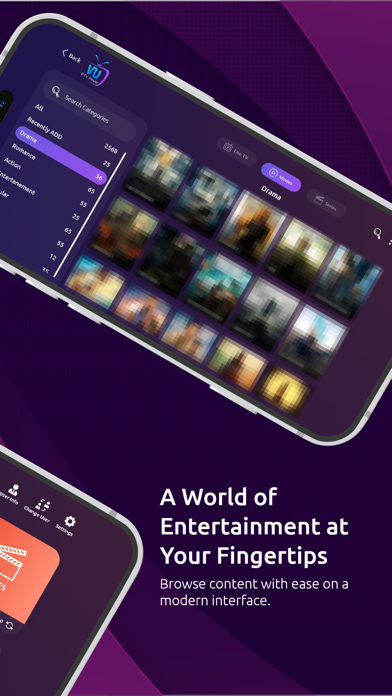
- UI Design: Clean, modern layout that avoids clunky desktop conversions.
- Fast Zapping: Noticeably reduced latency when switching between live channels.
✕ Beta Caveats (Room for Polish)
- EPG Sync: Occasional manual refresh needed for stubborn program guides.
- Memory Usage: Large playlist imports can temporarily spike RAM utilization.
- Localization: Some secondary settings menus lack full translation support.
Current TestFlight Slot Situation and Availability
Apple enforces a strict 10,000-tester cap for public TestFlight distributions, making popular media clients hot commodities. Slots for this build fill up rapidly following major update pushes from the development team.
If you encounter a capacity message when opening the invite link, do not panic. Testers frequently rotate out or clean up inactive builds, freeing up spots during off-peak hours.
Step-by-Step TestFlight Installation Guide
Installing the beta application takes less than two minutes if you follow this straightforward workflow. Make sure you complete each step in order for a smooth deployment.
1. Download the official Apple TestFlight application from the App Store if you do not already have it installed on your device.
2. Tap the official Codewing TestFlight invitation link provided at the bottom of this page using your iOS device browser.
3. Accept the beta invitation prompt that automatically launches the TestFlight application on your screen.
4. Tap the Install button to download the latest AptvPlayer build directly to your home screen.
5. Open the app, configure your preferred streaming provider, and use the TestFlight feedback tool to report bugs directly to Dmitri Iasibis.
Frequently Asked Questions
Is AptvPlayer safe to install via TestFlight?
Yes, every build submitted through TestFlight undergoes Apple's automated safety and security review processes. The application operates within strict iOS sandbox parameters, protecting your device filesystem.
What should I do if the AptvPlayer beta is full?
If the beta currently shows as full, keep this Codewing page bookmarked and check back periodically. Slots open up automatically when inactive testers are pruned from the developer dashboard.
Will installing this beta overwrite my App Store version or delete save data?
TestFlight installations typically operate as standalone preview packages or safely upgrade existing developer builds. Your personal settings and configurations remain intact during routine updates.
How long do TestFlight beta invitations and builds last?
Each individual TestFlight build remains active for 90 days from its initial release date. The developer will push fresh builds before expiration to keep the testing cycle moving.
Are in-app purchases free during TestFlight beta testing?
Yes, any transactional features or premium unlocks within the TestFlight environment utilize Apple's sandbox system. You will not be charged real currency while testing pre-release software features.
Final Editorial Verdict
AptvPlayer delivers a polished, responsive media management experience that outclasses many established competitors on iOS. With solid multi-protocol support and efficient hardware utilization, it easily earns a spot on your home screen.
Beta Testing Score: 8.8 / 10
Developer Support & Official Resources
Stay updated on patch notes, maintenance windows, and feature roadmaps directly from the official developer channels.
Never miss an opening for AptvPlayer.
Apple limits TestFlight betas to 10,000 testers, and this program is currently at capacity. CodeWings Plus continuously monitors slot availability 24/7 and sends you an instant alert the second a spot opens up.






