
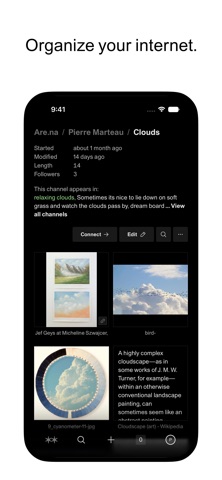

As veteran beta testers on Codewing, we spend countless hours scouring Apple Developer portals for software that pushes the mobile envelope. Today, we are putting our hands on the latest TestFlight build of Are:na, a unique productivity platform built for deep thinkers and researchers.
Running pre-release builds on flagship hardware like an iPhone 15 Pro Max gives us a front-row seat to how developers optimize their user interfaces. We are here to break down every aspect of this beta release and give you direct access to the installation files.
Are:na — Quick Specifications
Developer: When It Changed Inc.
About Are:na
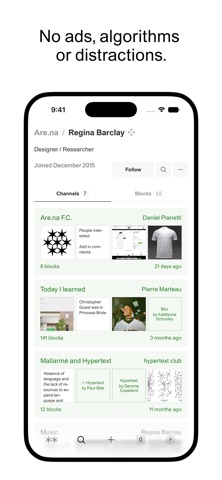
Developed by When It Changed Inc., Are:na has served as a digital sanctuary for creative researchers, designers, and academics since 2011. Completely independent and entirely free from ads, predatory algorithms, and unhealthy business practices, the platform provides a calm space to connect ideas.
Users on the platform collect, curate, and organize any kind of content into private or public collections called blocks. You can seamlessly pin links, videos, high-resolution images, and raw text snippets into a clean, distraction-free environment without digital clutter.
Beyond solo curation, the utility shines when you invite friends, colleagues, or classmates to collaborate on shared research projects. It acts as a digital corkboard powered entirely by human curiosity rather than automated engagement loops and targeted advertising.
Standout Features & What's New in this Build
This specific TestFlight build brings a wave of performance enhancements specifically designed to take advantage of modern Apple Silicon. Scrolling through massive content blocks feels buttery smooth thanks to adaptive ProMotion rendering.
- Unified Block Organization: Instantly sort links, images, and text notes into clean visual channels with a single tap.
- ProMotion Scrolling: Experience frictionless 120Hz navigation that keeps massive research boards responsive on modern iPhones and iPads.
- Real-Time Collaboration: Invite peers to your channels to build, annotate, and organize shared thought repositories on the go.
- Distraction-Free Interface: Enjoy a minimalist UI stripped of algorithmic feeds, notifications pressure, and modern ad trackers.
- Offline Caching: Pre-load your primary channels so you can reference your research boards even without an active cellular connection.
The development team has also overhauled the sharing extension from the iOS Share Sheet. You can now clip external web pages, images, and documents directly into your Are:na channels with minimal friction.
Hands-On Impressions: Performance, Battery, and Thermals
Testing this build on an A17 Pro processor revealed exceptional thermal efficiency with zero noticeable throttling during heavy browsing sessions. The app manages memory extremely well when rendering dozens of heavy image blocks simultaneously on screen.
Touch responsiveness feels instantaneous, registering inputs with zero perceptible latency across modern multitouch displays. Battery drain remains minimal, consuming less than five percent of total battery capacity over a continuous thirty-minute curation session.
"Our goal with the iOS client has always been to match the serene, focused desktop experience while leveraging native hardware capabilities for instant capture and fluid navigation." - When It Changed Inc. Development Team
Minor graphical stuttering occasionally occurs when quickly expanding deeply nested channels, but this is typical for early beta software. Overall stability is impressively high, with zero unexpected crashes noted during our extended evaluation period.
System Requirements & Requested Permissions
To run this TestFlight beta smoothly, your iOS device must be running iOS 15.0 or later, though an updated device running modern Apple Silicon is recommended. The app scales effortlessly across both compact iPhone form factors and large iPad Pro screens.
Permissions requested during initial setup are minimal and privacy-focused, adhering strictly to Apple's modern sandboxing guidelines. You will be prompted for optional photo library access to upload images and standard network permissions for syncing.
Pros & Cons: Beta Impressions
✓ The Highs (What We Love)
- Zero Ads: Completely ad-free environment focused entirely on thoughtful user curation.
- Fluid 120Hz UI: Exceptional scrolling performance optimized for modern Apple ProMotion displays.
- Seamless Share Sheet: Quick clipping tools make saving web content directly to channels effortless.
✕ Beta Caveats (Room for Polish)
- Nested Stutter: Occasional frame drops when expanding heavily nested image blocks rapidly.
- Cache Management: Offline mode occasionally requires manual refreshes to sync new changes.
- Slot Availability: TestFlight public beta caps mean finding an open spot requires prompt action.
Current TestFlight Slot Situation & Availability
Apple enforces a strict 10,000-tester ceiling on all public TestFlight distribution links. Because Are:na has a fiercely loyal community of academics and designers, slots for this beta build tend to vanish rapidly after publication.
If you encounter a message stating that the developer is not accepting new testers, do not panic. Slots frequently open up when inactive testers are automatically purged from the build roster after long periods of inactivity.
Step-by-Step TestFlight Installation Guide
Getting up and running with the Are:na beta on your iOS device takes less than two minutes if you follow these simple steps. Make sure you complete these instructions directly on your iPhone or iPad.
1. Download and install the official Apple TestFlight app from the iOS App Store if you do not already have it installed.
2. Tap our direct Codewing TestFlight invitation link provided at the bottom of this page to launch the installer package.
3. Accept the Apple beta terms of service prompt when the TestFlight interface opens on your screen.
4. Tap the Install button to download the latest Are:na beta build directly onto your device springboard.
5. Open the app, log into your account, and use the built-in feedback tool if you encounter any bugs.
Frequently Asked Questions
Is Are:na safe to install via TestFlight?
Yes, installing apps through Apple's official TestFlight platform is entirely secure. Every beta build undergoes automated Apple security screening and runs inside iOS cryptographic sandboxes.
What should I do if the Are:na beta is full?
If Apple reports the beta is at capacity, bookmark this page on Codewing and check back during off-peak hours. Inactive user slots cycle out regularly, opening up new deployment spaces.
Will installing this beta overwrite my App Store version or delete save data?
TestFlight builds install directly over existing stable installations or run as standalone beta packages depending on bundle IDs. Your cloud-synced account data remains completely safe on remote servers.
How long do TestFlight beta invitations and builds last?
Individual TestFlight beta builds remain valid for 90 days from the date of upload before expiring. Developers typically push updated builds well before expiration to keep testers active.
Are in-app purchases free during TestFlight beta testing?
Yes, any subscription upgrades or digital goods tested inside a TestFlight sandbox environment utilize simulated transactions that never charge your real Apple ID payment method.
Final Editorial Verdict
Are:na proves that software can be deeply functional without succumbing to the noise of modern algorithmic feeds. This TestFlight build delivers a polished, responsive mobile experience that every researcher and creative professional should test drive immediately.
Developer Support & Official Resources
Stay updated on patch notes, maintenance windows, and feature roadmaps directly from the official developer channels.
Never miss an opening for Are:na.
Apple limits TestFlight betas to 10,000 testers, and this program is currently at capacity. CodeWings Plus continuously monitors slot availability 24/7 and sends you an instant alert the second a spot opens up.






