

Mobile digital painting has come a long way from the days of sluggish brush rendering and cramped interface layouts. Today, professionals and hobbyists alike expect desktop-grade performance from their tablets and smartphones. Artstudio Pro arrives on iOS to answer that demand with a heavily optimized Metal-backed architecture.
We spent the last week pushing this beta build to its absolute limits on an M2 iPad Pro and an iPhone 15 Pro. The results highlight a graphics app built specifically to handle massive canvases without missing a single stylus stroke. Let us walk through everything you need to know before grabbing the installation link.
Artstudio Pro — Quick Specifications
Developer: Sylwester Los
About Artstudio Pro
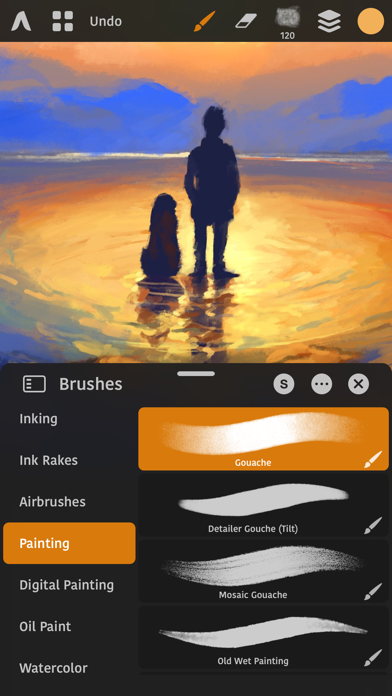
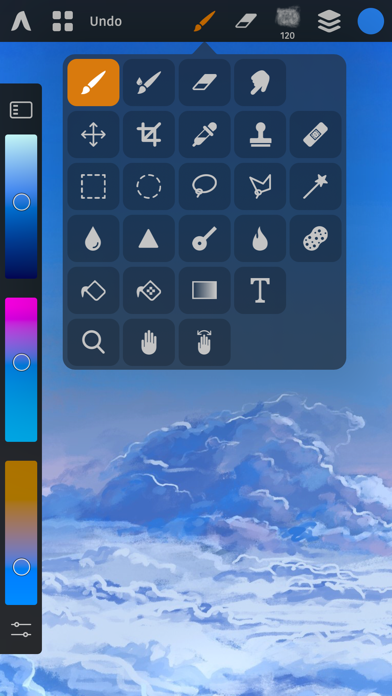
Developed by Sylwester Los under the Lucky Clan banner, Artstudio Pro functions as a comprehensive graphics suite tailored for illustration, photo manipulation, and precise retouching. It borrows heavily from desktop heavyweights while maintaining a touch-first interface optimized for Apple Pencil. Users can juggle multiple open documents, build complex compositions using an unlimited layer stack, and utilize twenty-seven distinct workflow tools ranging from advanced selection vectors to responsive wet paint simulations.
The core engine behind the software relies entirely on GPU-accelerated Metal processing designed to maximize 64-bit multi-core hardware. Whether you are sketching loose concept art, retouching RAW photographs, or stitching together multi-layered matte paintings, the application avoids the sluggish bottlenecks typically found in mobile ports. Full iCloud Drive integration ensures your massive project files sync safely across devices without losing fidelity.
Sylwester Los has a long-standing reputation for engineering uncompromising creative tools for Apple platforms. Artstudio Pro serves as the spiritual successor to older vintage drawing apps, completely rewritten from the ground up for modern silicon. The development team frequently patches performance hiccups and listens closely to community feedback gathered through rigorous beta cycles.
Standout Features & What's New in this Build
This particular TestFlight build introduces several under-the-hood stability tweaks alongside powerful asset importing capabilities. It is designed to test resource allocation when pushing canvas resolutions up to 64 megapixels on supported hardware.
- Realistic Color Pigment Blending: Mimics traditional physical media by allowing colors to mix dynamically on the canvas just like real oil paint or acrylics.
- Advanced Brush Engine: Features over 150 built-in presets and a granular editor boasting more than 100 customizable settings for bespoke stroke dynamics.
- Comprehensive Asset Import: Seamlessly parses third-party ABR and TPL brush files, translating original stamp shapes and settings directly into native engine values.
- Non-Destructive Adjustments: Offers fifteen distinct image correction layers and nine vector-style layer effects like drop shadows, bevels, and inner glows.
- Integrated Animation Timeline: Enables frame-by-frame movement creation complete with onion skinning and direct export to MP4, HEVC, and animated PNG formats.
Hands-On Impressions: Performance, Battery, and Thermals
Testing an app of this caliber reveals immediate insights into how well modern iOS hardware manages heavy GPU payloads. On an M2 iPad Pro paired with Apple Pencil Gen 2, stroke latency is practically non-existent thanks to the 120Hz ProMotion display refresh rate. Even when working across dozens of layered folders at 4K resolution, pinch-to-zoom gestures remain buttery smooth and free of checkerboard rendering delays.
Thermal management is equally impressive, though extended painting sessions will naturally draw down your battery percentage at a steady clip. The device chassis remained only mildly warm during heavy stress tests involving wet brush blending and massive filter applications. Frame pacing stays locked firmly at sixty frames per second during standard brush strokes, avoiding the jarring micro-stutters that plague lesser mobile art applications.
“Our goal with the ArtEngine was to eliminate the friction between mental intent and digital execution, ensuring artists never have to wait for the software to catch up to their hands.” — Sylwester Los, Lead Developer
System Requirements & Requested Permissions
To run this beta build smoothly, your Apple device must be running iOS 15.0 or later. While the application scales down to fit standard iPhones, an iPad with an M-series chip offers the ideal workspace for managing complex layers and high-resolution canvases.
Permissions requested during initial launch are minimal and strictly functional. The app requests read and write access to your local Photos library for exporting artwork and importing reference images, alongside standard iCloud container permissions for background project syncing. No intrusive tracking or aggressive location pings are present within the app sandbox.
Pros & Cons: Beta Impressions
✓ The Highs (What We Love)
- Metal Optimization: Incredible rendering speed even on massive multi-megapixel canvas sizes.
- Brush Compatibility: Flawless importing of industry-standard .ABR Photoshop brush files.
- Desktop Feature Set: Robust adjustment layers, clipping masks, and layer styles rivaling desktop software.
✕ Beta Caveats (Room for Polish)
- UI Density: Floating panels can feel slightly cramped on smaller iPhone screens without a tablet layout.
- Memory Footprint: Large history states consume significant RAM, occasionally triggering background purging.
- Export Limitations: Free test versions lock away certain production-tier file formats until registration.
Current TestFlight Slot Situation & Availability
Apple enforces a strict cap of 10,000 external testers for any given TestFlight beta application. Because Artstudio Pro enjoys a dedicated global following of digital illustrators, beta slots tend to fill up rapidly whenever the developer pushes a major changelog update. If you tap the installation link and discover the build is currently full, do not panic.
Slots occasionally open up when Apple prunes inactive users who haven't launched the app in weeks. Checking back during off-peak hours or keeping an eye on community announcements is your best strategy for securing an open spot. Act quickly when you see availability open up.
Step-by-Step TestFlight Installation Guide
Getting up and running with the beta build on your iOS device takes less than two minutes. Follow these simple instructions to begin testing right away:
- Download TestFlight: Open the App Store on your iPhone or iPad and download Apple's official free TestFlight application if you haven't already.
- Tap the Beta Link: Open this page on your target iOS device and tap the official TestFlight invitation link provided below.
- Accept the Invitation: Safari will automatically redirect you into the TestFlight app where you can review the build details and tap Accept.
- Install the Build: Tap Install to download Artstudio Pro onto your device home screen alongside your stable applications.
- Send Feedback: If you encounter bugs or visual glitches while painting, use the built-in TestFlight screenshot gesture to report issues directly to Sylwester Los.
Frequently Asked Questions
Is Artstudio Pro safe to install via TestFlight?
Yes, absolutely. All TestFlight distributions must pass Apple's rigorous automated security screenings and operate securely within isolated system sandboxes.
What should I do if the Artstudio Pro beta is full?
Bookmark this page and check back periodically. Developer slots fluctuate as inactive tester accounts are routinely purged from the system roster.
Will installing this beta overwrite my App Store version or delete save data?
TestFlight builds generally install as standalone testing packages alongside your production apps, though it is always wise to back up important documents via iCloud.
How long do TestFlight beta invitations and builds last?
Every individual TestFlight build remains active for ninety days from its initial upload date before expiring, requiring routine updates through the app.
Are in-app purchases free during TestFlight beta testing?
Yes. Apple's beta environment simulates all financial transactions using sandbox tokens, meaning you will never be charged real money for testing premium features.
Final Editorial Verdict
Artstudio Pro successfully bridges the gap between lightweight mobile sketching tools and heavyweight desktop creative suites. It delivers blistering Metal performance, precise Apple Pencil tracking, and a feature set that satisfies demanding professional workflows. For digital artists looking to squeeze every drop of performance out of their modern iPads and iPhones, participating in this beta is an absolute no-brainer.
Beta Testing Score: 9.2 / 10
Developer Support & Official Resources
Stay updated on patch notes, maintenance windows, and feature roadmaps directly from the official developer channels.
Never miss an opening for Artstudio Pro.
Apple limits TestFlight betas to 10,000 testers, and this program is currently at capacity. CodeWings Plus continuously monitors slot availability 24/7 and sends you an instant alert the second a spot opens up.


