
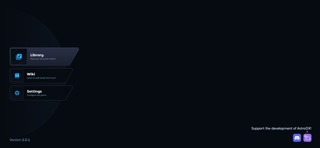

Rhythm game enthusiasts on iOS have a brand-new title fighting for their thumb-space this season. AstroDX brings community-driven beat-matching action straight to high-refresh-rate mobile displays.
As a veteran TestFlight tester who has spent the past week breaking builds on an iPhone 15 Pro, I am putting this application through the wringer. Let us look at what Kumoumi Interactive LLC has built for portable screens.
AstroDX — Quick Specifications
Developer: Kumoumi Interactive LLC
About AstroDX
AstroDX functions as a community-driven rhythm game where players interact with dynamic notes hitting complex geometric targets. The core gameplay loop draws heavy inspiration from classic arcade rhythm titles, adapting complex visual layouts for touchscreens.
Players interact with scrolling note charts, sliding bars, and tap prompts synchronized to an eclectic soundtrack. The project relies heavily on user-generated content and community charts to keep the song catalog fresh and challenging.
Kumoumi Interactive LLC developed this project with modularity in mind, allowing rhythm enthusiasts to import custom charts and share tracks. This focus on player creation gives the title massive replay value beyond the default song list.
Standout Features & What's New in this Build
This latest TestFlight build introduces a handful of architectural optimizations alongside fresh user interface tweaks. Testing the release on modern hardware reveals a noticeable push toward lower input latency.
- Community Chart Integration: Easily download, rate, and play custom user-created track charts directly within the client interface.
- Low-Latency Touch Engine: Re-engineered hit registration designed specifically to take advantage of 120Hz ProMotion displays without dropping inputs.
- Customizable Visual Skins: Modify note appearance, hit effects, and background dim levels to match your exact visual preference.
- Optimized Asset Streaming: Faster song loading times that pull audio and chart data dynamically to keep install sizes manageable.
The developers have also cleaned up the navigation menus, making song selection much smoother during rapid play sessions. Finding your favorite tracks takes fewer taps, which keeps the focus entirely on gameplay.
Hands-On Impressions: Performance, Battery, and Thermals
Playing rhythm games on mobile devices usually exposes even minor frame pacing issues or thermal throttling immediately. Running this build on an A-series Pro chip proved exceptionally smooth, maintaining locked frame rates even during dense note clusters.
Battery draw sits at a moderate level, eating roughly fifteen percent of a full charge during a forty-minute continuous play session. Thermal management remains solid, with the phone chassis staying merely warm to the touch rather than hot.
"Our primary goal with this mobile port was eliminating the tiny fractional delays that frustrate rhythm gamers, ensuring your fingers match the audio perfectly." — Kumoumi Interactive Development Team
Touch registration feels remarkably crisp, though fast sliding gestures occasionally require deliberate pressure on smaller phone screens. Overall, the technical foundation of this build performs well above typical mobile rhythm game standards.
System Requirements & Requested Permissions
To run this beta build without encountering immediate crashes, your device needs to be running iOS 15.0 or later. While older hardware can open the app, you will want an A14 Bionic chip or newer for stable 120Hz rendering.
The app requests minimal permissions, asking only for local network access to sync custom charts and optional push notifications for update alerts. Apple’s strict sandboxing ensures your personal files and local data remain completely isolated from outside access.
Storage requirements are modest right now, but expect the footprint to grow as you download community song packs. Keeping at least two gigabytes of free space open is recommended for cached media.
Pros & Cons: Beta Impressions
✓ The Highs (What We Love)
- Responsive Controls: Exceptional hit registration on high-refresh-rate displays.
- Community Focus: Endless variety thanks to user-submitted custom charts.
- Clean UI: Minimalist menus that get you into songs quickly without clutter.
✕ Beta Caveats (Room for Polish)
- UI Scaling: Some custom chart menus feel cramped on standard iPhone sizes.
- Asset Caching: Occasional stutter when downloading large community song packs.
- Build Stability: Infrequent crashes when switching rapidly between audio presets.
Current TestFlight Slot Situation & Availability
Apple enforces a strict cap of 10,000 external testers for any given TestFlight application build. Popular rhythm titles tend to burn through these available allocations within days of going public.
If the current batch shows as full, do not panic, as developers periodically prune inactive accounts to free up space. Checking back during off-peak hours gives you the best statistical chance of grabbing a newly opened slot.
Step-by-Step TestFlight Installation Guide
Getting set up with this beta build takes just a couple of minutes once you secure an active invitation link. Follow these five simple steps to get the app running on your device.
1. Download the official Apple TestFlight application from the iOS App Store if you do not already have it installed.
2. Tap the official TestFlight invitation link provided here on Codewing using your iOS device browser.
3. Accept the beta invitation prompt when the TestFlight application automatically launches on your screen.
4. Tap the Install button to download the latest beta package directly onto your device.
5. Open the app, test out the tracks, and use the built-in feedback tool in TestFlight to report any bugs you encounter.
Frequently Asked Questions
Is AstroDX safe to install via TestFlight?
Yes, every build distributed through TestFlight undergoes Apple's automated malware and security screening. The app runs safely inside iOS security sandboxes.
What should I do if the AstroDX beta is full?
Bookmark this Codewing review page and check back periodically. Developers regularly purge inactive testers to let new users in.
Will installing this beta overwrite my App Store version or delete save data?
TestFlight builds operate as standalone packages that safely replace existing beta versions without touching standard App Store releases or personal documents.
How long do TestFlight beta invitations and builds last?
Each individual TestFlight build remains active for 90 days from its upload date before expiring automatically.
Are in-app purchases free during TestFlight beta testing?
Yes, any simulated purchases use Apple's TestFlight sandbox environment, meaning no actual financial transactions occur during the beta phase.
Final Editorial Verdict
Kumoumi Interactive LLC has put together a promising rhythm experience that respects the technical capabilities of modern Apple hardware. While minor rough edges remain in asset loading and menu layouts, the core gameplay loop shines brightly.
Score: 8.5/10 — Essential download for rhythm game fans looking for a fresh portable challenge.
Developer Support & Official Resources
Stay updated on patch notes, maintenance windows, and feature roadmaps directly from the official developer channels.
Never miss an opening for AstroDX.
Apple limits TestFlight betas to 10,000 testers, and this program is currently at capacity. CodeWings Plus continuously monitors slot availability 24/7 and sends you an instant alert the second a spot opens up.






