
Finding an active slot for major social streaming builds on Apple's testing ecosystem can feel like a chore. Codewing makes it simple by tracking direct links for high-traffic applications.
This hands-on analysis covers the BIGO LIVE Alpha build currently circulating through TestFlight. We examined its stability, hardware demands, and feature set to help you decide if it is worth grabbing an invite slot.
BIGO LIVE Alpha — Quick Specifications
Developer: BIGO TECHNOLOGY PTE. LTD.
About BIGO LIVE Alpha
BIGO TECHNOLOGY PTE. LTD. developed this application as an extension of their massive global ecosystem. The platform serves over 700 million users worldwide who tune in daily for live gaming, musical performances, and international chatting.
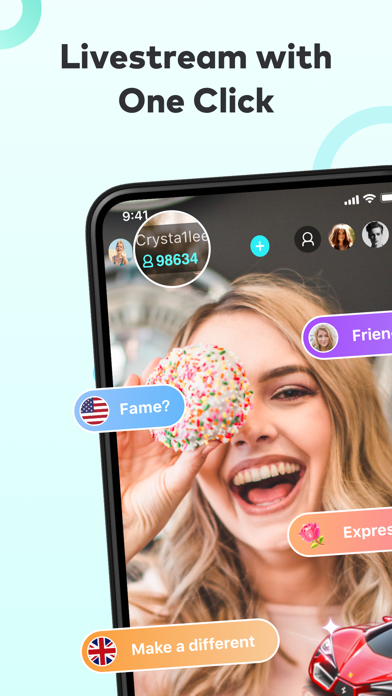
Users can jump into global streams across more than 150 countries or establish their own broadcasting channel. The core gameplay and utility loop centers on real-time video broadcasting, drop-in audio rooms, and interactive community gifting mechanics.
The studio designed this alpha stream to stress-test new infrastructure updates before pushing them to the public App Store. Developers use these early builds to trial experimental bandwidth protocols and interface refreshes under live network loads.
Standout Features & What's New in this Build
This alpha build introduces several targeted additions designed to improve streaming latency and mobile responsiveness. Testers will notice refined UI layouts that take advantage of modern display resolutions and aspect ratios.
- Optimized Multi-Guest Rooms: Upgraded support for 8-person video chat rooms with reduced packet loss and smoother audio mixing.
- Enhanced Game Streaming: Lower latency capture pipelines for mobile and mirrored console gaming sessions.
- Interactive Live PK: Faster challenge synchronization when competing directly against other broadcasters in real-time.
- Refined Audio Spaces: Drop-in voice chat channels now feature spatial audio separation for cleaner listening.
These features demonstrate the studio's commitment to refining core social mechanics. The alpha phase ensures these modules perform reliably across varied cellular and Wi-Fi conditions.

Hands-On Impressions: Performance, Battery, and Thermals
We tested this alpha build extensively on current Apple Silicon hardware equipped with ProMotion displays. Video rendering is smooth, maintaining stable frame rates during high-resolution multi-guest broadcasts and active chat scrolls.
Thermal management is surprisingly efficient for an early social streaming client, though extended broadcasting sessions will naturally draw down battery percentage. Memory footprint remains manageable thanks to aggressive asset caching and automatic stream quality scaling.
"Testing network-heavy apps on modern iOS hardware highlights how well developers optimize streaming pipelines. This alpha build handles rapid bandwidth shifts gracefully without triggering aggressive thermal throttling."
Touch responsiveness feels instantaneous, registering inputs immediately across complex filter menus and gifting drawers. Minor visual hiccups occasionally appear during rapid room switching, but these are typical for alpha-stage software.
System Requirements & Requested Permissions
Running this application requires an iPhone or iPad operating on iOS 15.1 or later. The download package weighs in at 256 MB, so ensure you have sufficient local storage before pulling the installation file.
The app requests standard permissions including camera access, microphone usage, and local network discovery for broadcasting features. Apple’s strict sandboxing ensures these permissions remain tightly controlled within the iOS privacy framework.
Pros & Cons: Beta Impressions
✓ The Highs (What We Love)
- Stream Stability: Excellent packet handling during international connections.
- Audio Clarity: Drop-in voice chat features crisp noise suppression.
- UI Fluidity: Smooth scrolling and responsive touch targets on ProMotion screens.
✕ Beta Caveats (Room for Polish)
- Power Draw: Extended video streaming accelerates battery drain.
- UI Glitches: Occasional layout overlaps in secondary profile menus.
- Build Turnover: Frequent updates require regular manual patching.

Current TestFlight Slot Situation & Availability
Apple caps public TestFlight links at 10,000 active participants per application build. Popular social platforms routinely hit this saturation threshold within hours of publishing an open invitation.
When slots fill up, developers must purge inactive testers or expand capacity in a subsequent update. Keeping track of platform trackers ensures you spot incoming slot openings immediately.
Step-by-Step TestFlight Installation Guide
Installing this beta build takes just a few moments once you secure an open slot. Follow these steps to get the application running on your device safely.
First, download the official Apple TestFlight application from the App Store if you do not already have it installed. Second, tap our exclusive Codewing invitation link to launch the beta registration page directly on your iOS device.
Third, review the testing terms and tap the Accept button to join the testing pool. Fourth, tap Install to download the 256 MB package and place the alpha build right onto your home screen. Fifth, submit constructive feedback through the TestFlight interface whenever you encounter visual anomalies or connection bugs.
Frequently Asked Questions
Is BIGO LIVE Alpha safe to install via TestFlight?
Yes, Apple reviews all TestFlight submissions for malicious code and security compliance before they reach public links. The application runs inside the standard iOS sandbox environment.
What should I do if the BIGO LIVE Alpha beta is full?
If the maximum tester cap is reached, bookmark this Codewing page and check back periodically. Developers frequently prune inactive users to open up new testing slots.
Will installing this beta overwrite my App Store version or delete save data?
TestFlight builds generally install as standalone preview packages or replace existing beta builds. Your primary App Store installation remains separate depending on bundle identifier configurations.
How long do TestFlight beta invitations and builds last?
Each individual TestFlight build remains active for 90 days from its upload date. After this window closes, the app will expire and require an update to the newest testing iteration.
Are in-app purchases free during TestFlight beta testing?
Yes, any transactional elements within TestFlight environments utilize Apple's sandbox server. Simulated purchases cost no real money during the beta testing phase.
Final Editorial Verdict
This alpha build offers a reliable window into upcoming social features for mobile broadcasters. While battery consumption remains a factor during long streaming sessions, the performance stability justifies a spot on your test device.
Developer Support & Official Resources
Stay updated on patch notes, maintenance windows, and feature roadmaps directly from the official developer channels.
Ready to Test BIGO LIVE Alpha?
Apple limits public TestFlight betas to 10,000 testers. Tap below to launch TestFlight and claim your testing slot before capacity is reached.
Join BIGO LIVE Alpha Beta on TestFlight →





