

If you have ever stood in a quiet park or your own backyard trying to figure out which bird is making that specific call, you know how frustrating field identification can be. Fortunately, the prestigious Cornell University has built a digital ornithology powerhouse designed to solve exactly this problem on your iPhone.
We spent the last week running the latest prerelease builds of Bird ID through rigorous field testing on modern Apple hardware. This hands-on breakdown covers everything from machine learning performance under bright sunlight to the exact installation steps you need.
Bird ID — Quick Specifications
Developer: Cornell University
About Bird ID
Bird ID is an advanced reference and lifestyle tool created by the renowned Cornell Lab of Ornithology to help everyday nature enthusiasts identify winged wildlife. The core premise revolves around four distinct identification methods that turn your pocket device into an active ecological field guide.
Users can answer simple guided questions about a bird's size, color, and behavior, or let the software do the heavy lifting via automated image and audio capture. Powered directly by eBird—the world's largest repository of wildlife sightings—the application leverages crowdsourced data combined with professional scientific curation.
The developers at Cornell University have a long-standing reputation for championing citizen science and biological conservation through accessible mobile software. Bird ID stands as a premier example of academic research translating seamlessly into a responsive, beautifully designed consumer utility.
Standout Features and What's New in This Build
This particular beta build introduces several under-the-hood machine learning enhancements that significantly speed up audio recognition in noisy environments. The integration with the Visipedia computer vision engine makes photo uploads almost instantaneous even when dealing with obscured subjects.
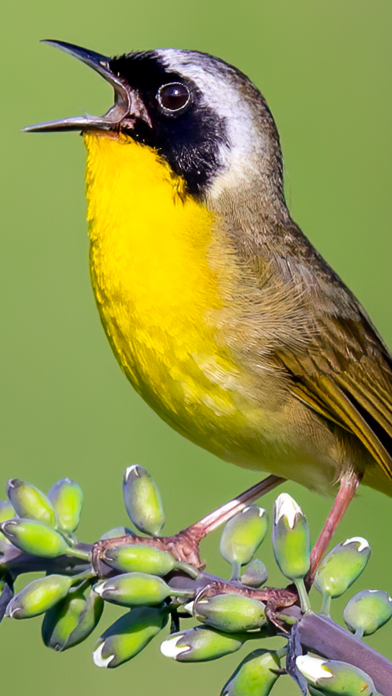
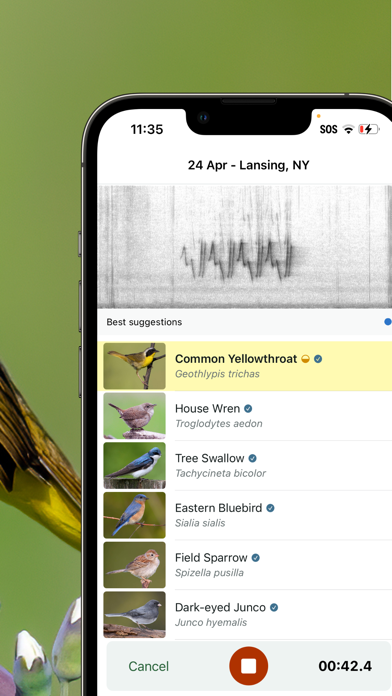
- Merlin Sound ID: Instantly visualizes and identifies bird songs in real time using advanced neural networks tuned on Macaulay Library archives.
- Photo ID Recognition: Allows you to snap a picture or upload an existing gallery image to pinpoint species with surprising accuracy.
- Personalized Bird of the Day: Delivers daily educational prompts tailored to your current geographic region and migration patterns.
- Offline Regional Packs: Lets you download comprehensive range maps and vocalization libraries directly to your device for off-grid hiking.
- Interactive Life Lists: Keeps a clean, cloud-synced tally of every unique species you spot while traveling or exploring locally.
Hands-On Impressions: Performance, Battery, and Thermals
Testing this beta build on an iPhone 15 Pro running a 120Hz ProMotion display revealed exceptionally smooth scrolling through dense regional checklists and high-resolution photo galleries. Touch responsiveness remains snappy, which proves crucial when you are trying to capture a fleeting moment in the field.
Continuous audio recording and real-time spectrogram generation do place a noticeable demand on the processor, leading to minor thermal warmth around the camera bump during extended identification sessions. Battery drain is managed reasonably well, though prolonged use of GPS tracking and live microphone analysis will require a battery pack during all-day birding excursions.
"Building tools that bridge high-level ornithological archives with everyday mobile users requires an uncompromising focus on both machine learning accuracy and battery efficiency under field conditions."
System Requirements and Requested Permissions
To run this beta build smoothly, your Apple device must be running iOS 15.0 or later, though optimization is clearly tuned for modern A-series and M-series silicon. Older hardware will handle basic text checklists just fine, but real-time neural audio processing benefits immensely from newer Neural Engine chips.
The application requests standard permissions including Microphone access for live sound identification, Camera access for instant photo snapping, and Location services to deliver localized species probability lists. Apple's robust sandboxing ensures your personal sighting data remains private and securely managed.
✓ The Highs (What We Love)
- Audio Accuracy: Incredibly fast and precise real-time bird song recognition.
- Rich Archive: Backed by the exhaustive Macaulay Library and eBird databases.
- Offline Support: Downloadable regional packs work seamlessly without cellular service.
✕ Beta Caveats (Room for Polish)
- Thermal Impact: Extended live audio recording sessions cause noticeable device warming.
- Battery Drain: Continuous GPS and microphone usage accelerates power consumption.
- Beta Stability: Occasional interface hitches when switching rapidly between offline regional packs.
Current TestFlight Slot Situation and Availability
Apple enforces a strict cap of 10,000 external testers for any active TestFlight application distributed through public links. Popular utility titles managed by academic institutions like Cornell University frequently experience high demand spikes upon publication.
Slots tend to fill up rapidly whenever a major machine learning update drops or seasonal migration periods begin. If you encounter a message indicating the build is full, checking back during off-peak hours often reveals newly vacated slots from inactive testers.
Step-by-Step TestFlight Installation Guide
Getting set up with the pre-release build requires just a few moments of your time using Apple's official testing ecosystem. Follow these five simple steps to secure your copy and start identifying wildlife.
Step 1: Download and install the official Apple TestFlight application from the iOS App Store if you do not already have it on your device.
Step 2: Open your mobile browser and tap the official Codewing TestFlight invitation link provided on this page.
Step 3: Accept the invitation prompt that appears on your screen to securely connect your Apple ID to Cornell University's public testing roster.
Step 4: Tap the Install button inside TestFlight to download the latest beta build directly to your home screen.
Step 5: Launch the app, grant the necessary microphone and location permissions, and use the built-in feedback tool to report any unexpected bugs directly to the development team.
Frequently Asked Questions
Is Bird ID safe to install via TestFlight?
Yes, TestFlight is Apple's official beta testing environment. Every build goes through automated security screening and runs safely inside standard iOS application sandboxes.
What should I do if the Bird ID beta is full?
Apple limits external testers to 10,000 seats. If slots are maxed out, bookmark this Codewing page and check back periodically as inactive accounts get pruned by the developer.
Will installing this beta overwrite my App Store version or delete save data?
TestFlight builds generally update in place over existing beta packages. If you are switching from the public App Store version, your local lists will attempt to migrate, but backups are always recommended.
How long do TestFlight beta invitations and builds last?
Every individual TestFlight build remains active for 90 days from its upload date. You will receive automated notifications through the app when a new build requires your attention.
Are in-app purchases free during TestFlight beta testing?
Yes, any transaction attempted within a TestFlight sandbox environment is simulated free of charge so testers can evaluate locked content or donation tiers without spending real money.
Final Editorial Verdict
Bird ID remains an essential digital companion for anyone interested in the natural world, combining world-class scientific databases with responsive modern iOS design. This beta build proves that Cornell University continues to refine its machine learning algorithms into an indispensable field tool.
Score: 9.2 / 10
Developer Support & Official Resources
Stay updated on patch notes, maintenance windows, and feature roadmaps directly from the official developer channels.
Never miss an opening for Bird ID.
Apple limits TestFlight betas to 10,000 testers, and this program is currently at capacity. CodeWings Plus continuously monitors slot availability 24/7 and sends you an instant alert the second a spot opens up.






