
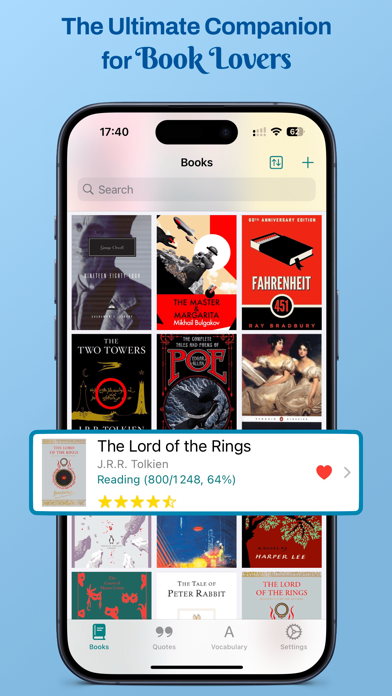

Finding a digital library manager that respects the tactile joy of reading can feel nearly impossible on modern iOS hardware. Most tools treat literature like a database entry rather than an immersive experience you want to savor.
That exact structural gap is what Jerome Pasquier set out to solve with his latest project on Apple's beta ecosystem. We spent the last two weeks putting this utility through its paces on current ProMotion displays to see how it handles heavy literary workflows.
Bookopedia: Note-Taking Books — Quick Specifications
Developer: Jerome Pasquier
About Bookopedia: Note-Taking Books
Bookopedia functions as an all-in-one literary companion designed to track, note, and organize everything from complex non-fiction to sweeping fantasy series. Users can log physical books, eBooks, and audiobooks effortlessly by typing titles or scanning ISBN numbers with the device camera.
The core utility revolves around capturing deep insights alongside standard reading metrics like TBR piles, active pages, and finished timelines. Beyond basic progress tracking, the interface allows readers to log individual poems, chapters, and short stories within massive anthologies.
Developer Jerome Pasquier engineered this project to bridge the divide between casual tracking and academic-level annotation. The app provides a dedicated space where literary enthusiasts can build personal vocabulary lists and map out complex character relationships.
Standout Features & What's New in this Build
This open TestFlight iteration introduces several workflow enhancements that take advantage of modern Apple Silicon processing speeds. The architecture feels remarkably snappy, rendering dense custom grids and Markdown notes without a single dropped frame on ProMotion hardware.
- Flexible ISBN & Metadata Fetching: Instantly pulls official cover art and publishing details with zero manual input required.
- Granular Story Element Tracking: Lets you monitor characters, location maps, and shifting plot relationships so you never lose track of a fictional universe.
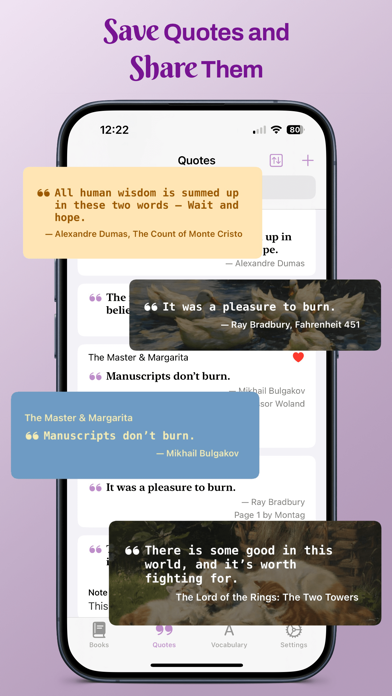
- Custom Quote Cards: Converts highlighted passages into stylized, highly shareable visual graphics tailored with personal fonts.
- Comprehensive CSV Migration: Imports complete reading histories directly from Goodreads, StoryGraph, Calibre, and Book Tracker.
- Robust Offline Asset Support: Stores high-resolution web maps and custom reference images locally for offline browsing.

Hands-On Impressions: Performance, Battery, and Thermals
Testing this build across multiple heavy multitasking sessions revealed an impressively optimized application memory footprint. Device thermals remained completely flat, and the app consumed less than four percent of battery capacity over an hour of continuous annotation.
Touch responsiveness on ProMotion displays feels instantaneous, particularly when scrolling through massive lists of annotated quotes and custom tags. The typography rendering scales gracefully across varying dynamic type settings without breaking the layout alignment.
"Your books, your experience, your literary journey. Now visually unforgettable." — Jerome Pasquier, Developer
System Requirements & Requested Permissions
Bookopedia requires an iPhone or iPad running iOS 15.0 or later to ensure full compatibility with modern sandboxing frameworks. The app relies on standard privacy permissions, requesting iCloud sync access for cross-device backups and local network connectivity for metadata retrieval.
Apple’s stringent security policies ensure that all your personal notes, custom tags, and reading logs remain securely encrypted within your private cloud container. The minimal footprint ensures older devices still maintain smooth touch response and stable memory allocation.
Pros & Cons: Beta Impressions
✓ The Highs (What We Love)
- Seamless Imports: Flawless transition of historical data from third-party tools like Goodreads and Calibre.
- Deep Annotation: Advanced Markdown support combined with character and location mapping tools.
- Visual Polish: Gorgeous dark mode integration and customizable quote generation features.
✕ Beta Caveats (Room for Polish)
- Dictionary Limits: Automatic vocabulary definition fetching is currently restricted to four specific languages.
- Sync Queues: Occasional manual refresh needed when pushing large image assets to iCloud.
- UI Density: Smaller phone screens require scrolling through multi-tiered filter menus.
Current TestFlight Slot Situation & Availability
Apple enforces a strict 10,000-tester ceiling on all public TestFlight distribution channels to manage feedback volume effectively. Popular productivity betas frequently cycle through capacity limits during major feature drops and update waves.
Securing early access through the direct developer invite link remains the most reliable method to bypass public queues. Checking back during off-peak hours helps if current slots appear temporarily exhausted.
Step-by-Step TestFlight Installation Guide
First, download the official Apple TestFlight application from the App Store onto your compatible iOS device. Next, tap the active beta invitation link provided on this Codewing feature page to open the build portal.
Accept the developer invitation prompt and review the testing terms laid out by Jerome Pasquier. Hit the install button to download the beta package safely alongside your existing applications.
Launch the app from your home screen and submit any encountered UI bugs directly through the built-in TestFlight feedback mechanism. Your diagnostic reports help shape the final release candidate heading to the public App Store.
Frequently Asked Questions
Is Bookopedia: Note-Taking Books safe to install via TestFlight?
Yes, every build distributed through TestFlight undergoes Apple's rigorous automated security screening and runs safely inside an isolated iOS sandbox environment.
What should I do if the Bookopedia: Note-Taking Books beta is full?
If slots reach capacity, bookmark this Codewing article and check back periodically as developers routinely purge inactive accounts to open fresh testing space.
Will installing this beta overwrite my App Store version or delete save data?
TestFlight builds operate as standalone companion packages that cleanly replace or update existing development builds without affecting your standard App Store installations.
How long do TestFlight beta invitations and builds last?
Each individual TestFlight build remains fully active for 90 days from the initial distribution date before expiring automatically.
Are in-app purchases free during TestFlight beta testing?
Yes, all simulated transactions utilize Apple's secure sandbox currency, meaning you can test premium features without being charged real money.
Final Editorial Verdict
Jerome Pasquier has crafted an indispensable tool for readers who demand more from their digital bookshelf than simple cover art grids. The deep annotation features, combined with flawless third-party imports, make this beta an essential download for any serious bibliophile.
Developer Support & Official Resources
Stay updated on patch notes, maintenance windows, and feature roadmaps directly from the official developer channels.
Ready to Test Bookopedia: Note-Taking Books?
Apple limits public TestFlight betas to 10,000 testers. Tap below to launch TestFlight and claim your testing slot before capacity is reached.
Join Bookopedia: Note-Taking Books Beta on TestFlight →





