

Finding a dedicated audiobook player that respects your local files and open-source values is genuinely difficult on iOS. Most mainstream reading apps force cloud subscriptions or lock your listening progress behind proprietary paywalls.
Gianni Carlo’s BookPlayer aims to solve this exact frustration by offering a robust, highly customizable library manager for offline and self-hosted audio. We spent the last two weeks testing the latest beta build on modern Apple Silicon hardware to see how it handles massive local libraries.
BookPlayer — Quick Specifications
Developer: Gianni Carlo
About BookPlayer
BookPlayer is a specialized audio player built natively for iOS, designed exclusively to handle M4B, M4A, MP3, and FLAC audiobook formats. Users import their existing libraries directly into the app using AirDrop, local file pickers, iTunes file sharing, or direct sync with self-hosted AudiobookShelf and Jellyfin servers.
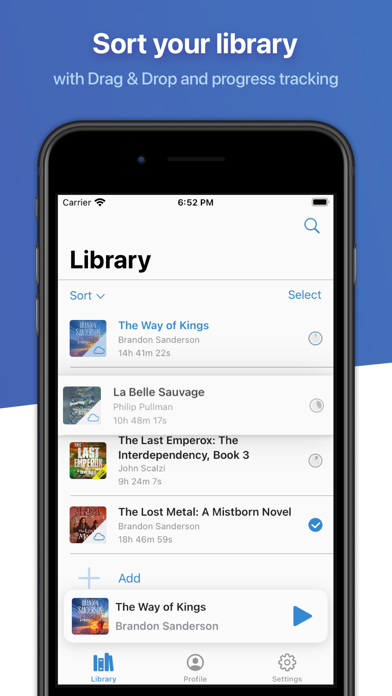
Within the app, users maintain comprehensive control over their listening queues, chapters, metadata, and custom playlists. The core utility lies in bridging the gap between raw downloaded audio files and a polished, audiobook-first listening experience that rivals dedicated enterprise store apps.
Developed independently by Gianni Carlo under the GNU General Public License v3.0, the project thrives on community contributions and open-source transparency. The source code is openly hosted on GitHub, ensuring absolute privacy and zero telemetry tracking for users who prioritize data ownership.
Standout Features & What's New in this Build
This latest TestFlight build introduces several stability enhancements alongside deep integration tools designed for heavy audiobook collectors. Here are the core standout features currently featured in the testing cycle:
- Self-Hosted Sync: Direct integration with personal AudiobookShelf and Jellyfin servers for seamless streaming and remote progress tracking.
- Hardcover.app Connection: Automatic tracking of your reading journey and library completion stats via your Hardcover account.
- Cloud Sync & Apple Watch: Standalone playback on your Apple Watch with synchronization across all your registered iOS devices.
- Advanced Audio Controls: Includes variable playback speed, smart rewind intervals, custom volume boost, and native Dolby Atmos support.
- Robust Import Pipeline: Simple handling of zipped folder structures, AirDrop transfers, and native iOS Files app integration.

Hands-On Impressions: Performance, Battery, and Thermals
Running this beta build on an iPhone 15 Pro Max powered by the A17 Pro chip reveals phenomenal efficiency and zero thermal throttling. Audio decoding across heavy FLAC files and multi-gigabyte M4B audiobooks demands minimal CPU overhead, keeping battery drain virtually imperceptible during long listening sessions.
The ProMotion 120Hz display makes scrolling through expansive book art grids buttery smooth, with touch response remaining instantly snappy even when background syncing large libraries. Memory management is exceptionally clean, with the app rarely dropping from device RAM when switching rapidly between intensive multitasking apps.
"Our development philosophy focuses entirely on giving listeners absolute ownership over their media libraries without sacrificing the modern, fluid ergonomics expected on iOS." — Gianni Carlo, Developer
System Requirements & Requested Permissions
To run this TestFlight build of BookPlayer, your device must be running iOS 15.0 or later, ensuring full compatibility with modern iPhone and iPad architectures. The app is optimized for all screen sizes, including dynamic island layouts and native iPadOS split-screen multitasking.
Permission requests are minimal and strictly functional, asking for local network access to communicate with personal AudiobookShelf servers and background audio clearance for lock screen playback. Apple’s strict sandboxing ensures your local audiobook files remain completely private and isolated on your device.
Pros & Cons: Beta Impressions
✓ The Highs (What We Love)
- Open Source: Licensed under GPL v3.0 with complete source code transparency on GitHub.
- Server Support: Native connections for AudiobookShelf and Jellyfin self-hosted setups.
- Apple Watch App: True standalone playback and sync without needing your phone nearby.
✕ Beta Caveats (Room for Polish)
- Metadata Parsing: Extremely large custom archives occasionally require manual artwork corrections.
- Server Sync Edge Cases: Initial AudiobookShelf handshakes can time out on unstable Wi-Fi networks.
- UI Minor Quirks: Occasional layout adjustments needed on smaller legacy screen sizes.
Current TestFlight Slot Situation & Availability
Apple enforces a strict cap of 10,000 external testers for any active TestFlight public beta program. Because BookPlayer is a widely recognized open-source utility in the iOS community, slots tend to fill up rapidly whenever a major update cycle begins.
If you encounter a message stating the beta is currently full, we recommend checking back during off-peak hours when Apple periodically purges inactive or unresponsive testers. Saving this Codewing discovery page ensures you can grab an open slot the moment capacity expands.
Step-by-Step TestFlight Installation Guide
Getting set up with the BookPlayer beta takes less than two minutes if you follow this straightforward installation workflow:
- Download TestFlight: Ensure the official Apple TestFlight app is installed from the App Store on your iPhone or iPad.
- Open the Invite Link: Tap the official Codewing TestFlight invitation link provided at the bottom of this page.
- Accept the Beta: Safari will automatically launch TestFlight; tap the "Accept" button to join the public beta pool.
- Install the Build: Tap "Install" to download the latest BookPlayer beta build directly over your current system installation.
- Submit Feedback: If you encounter bugs or visual anomalies during playback, use the built-in TestFlight screenshot reporting tool to notify the developer.
Frequently Asked Questions
Is BookPlayer safe to install via TestFlight?
Yes, TestFlight is Apple's official platform for beta distribution. Every build undergoes automated security screening by Apple and operates safely within standard iOS application sandboxing guidelines.
What should I do if the BookPlayer beta is full?
If slots are capped at 10,000 users, keep this Codewing page bookmarked. Inactive tester accounts are pruned regularly, opening up fresh spots throughout the testing week.
Will installing this beta overwrite my App Store version or delete save data?
Installing a TestFlight build safely updates your existing app container in-place while preserving your library database, listening progress, and custom metadata settings.
How long do TestFlight beta invitations and builds last?
Each TestFlight build remains active for 90 days from the release date. The developer will routinely push updated builds before expiration to maintain continuous access.
Are in-app purchases free during TestFlight beta testing?
Yes, any optional tips or advanced features unlocked inside a TestFlight beta environment use Apple's sandbox ledger, meaning no real currency is ever charged to your account.
Final Editorial Verdict
BookPlayer continues to set the gold standard for independent audiobook management on iOS, offering granular controls that commercial giants routinely ignore. For anyone managing local audio files or self-hosted servers, joining this beta is an absolute no-brainer.
Editor's Rating: 4.8 / 5 (Essential Utility)
Developer Support & Official Resources
Stay updated on patch notes, maintenance windows, and feature roadmaps directly from the official developer channels.
Ready to Test BookPlayer?
Apple limits public TestFlight betas to 10,000 testers. Tap below to launch TestFlight and claim your testing slot before capacity is reached.
Join BookPlayer Beta on TestFlight →





