


Mobile app development has historically required a hefty Mac, Xcode, and a solid understanding of Swift. Montereys Coast, Inc. is flipping that script entirely with their latest creation.
If you want to jump straight into the action, you can grab the official beta invitation right now via the Castle - Make and Play TestFlight Link.
Castle - Make and Play — Quick Specifications
Developer: Montereys Coast, Inc.
About Castle - Make and Play
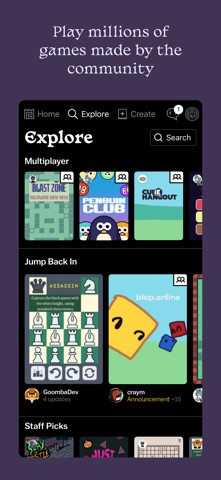
Castle functions as an interactive social network where playing user-generated games is just as frictionless as scrolling a modern feed. Users can open the app, swipe through a continuous stream of miniature titles, and instantly tap to play animations, interactive fiction, and arcade physics puzzles.
Beneath the social feed lies a surprisingly deep visual editor tailored specifically for mobile touchscreens. Creators do not need to write raw code to get started because the app utilizes a modular library of game objects, physics parameters, and audio clips.
The Montereys Coast, Inc. team built this environment to lower the barrier to entry for creative programming. Players can remix any game they encounter in the wild, dissecting how an author built a custom mechanic before tweaking the code or graphics to add their own personal touch.
Standout Features & What's New in this Build
This open beta build brings several crucial performance tweaks and UI adjustments designed to make publishing games as seamless as recording a short-form video. The development crew has focused heavily on reducing friction between drawing an asset and assigning physics properties to it.
- Instant Remixing: Every single piece of content hosted on the platform can be duplicated and edited with a single tap, encouraging community collaboration.
- Robust Physics Engine: Creators can assign gravity, elasticity, and collision boundaries to hand-drawn vectors without touching complex mathematics.
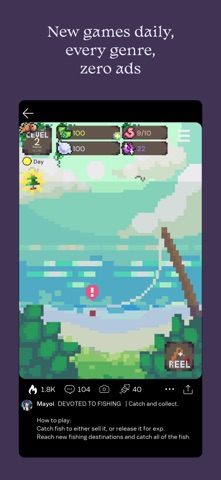
- Zero Ad Feed: The discovery algorithm serves up thousands of community-crafted experiences daily without interrupting your play sessions with forced banner ads.
- Integrated Audio Studio: Build custom sound effects and background loops directly inside the app using built-in synthesizers and microphone recording tools.
Hands-On Impressions: Performance, Battery, and Thermals
Testing this build on an iPhone 15 Pro reveals remarkably responsive touch latency, which is essential for fast-paced platformers and arcade minigames. The ProMotion 120Hz display makes canvas drawing buttery smooth, tracking Apple Pencil inputs on compatible iPads with practically zero perceptible lag.
"We wanted to design a digital playground where building a game feels as casual and expressive as sharing a sketch in a notebook." — Montereys Coast, Inc. Development Team
Thermal management during extended design sessions remains stable, though complex games featuring hundreds of active physics bodies can push older A-series processors. Battery draw is well-optimized during standard social browsing, though heavy particle effects in user creations will predictably accelerate power consumption.
System Requirements & Requested Permissions
To run this TestFlight beta smoothly, your iOS device needs to be running iOS 15.1 or later. The app scales nicely across various screen sizes, making efficient use of both compact iPhone displays and expansive iPad Pro canvases.
Upon first launch, the app requests standard permissions including local network access for multiplayer synchronization and optional notification alerts for social interactions. Apple's strict sandboxing ensures that all your creative assets remain securely stored within your local app container until published.
Pros & Cons: Beta Impressions
✓ The Highs (What We Love)
- Frictionless Creation: Transforming simple drawings into interactive physics objects takes seconds.
- Endless Variety: The community discovery feed delivers infinite fresh content across bizarre genres.
- Responsive UI: Touch controls feel snappy and precise on modern Apple hardware.
✕ Beta Caveats (Room for Polish)
- Thermal Spikes: Heavily scripted community games can trigger noticeable warmth on older chassis.
- Asset Organization: Large personal libraries lack robust folder sorting tools in the current build.
- Sync Hiccups: Occasional cloud saving delays occur when switching rapidly between editing and playing.
Current TestFlight Slot Situation & Availability
Apple enforces a strict ceiling of 10,000 testers per public TestFlight link, meaning popular sandbox apps experience rapid slot depletion. Montereys Coast, Inc. has configured this current build as an open beta, but historical trends suggest slots fill up within days of major feature drops.
If you encounter a message stating the beta is currently full, do not panic because inactive tester slots are periodically pruned by the developer dashboard. Checking back during off-peak hours often yields an open spot for eager creators.
Step-by-Step TestFlight Installation Guide
Installing this beta package takes less than two minutes once you have your iOS device ready. Follow these five straightforward steps to get up and running:
1. Download the official Apple TestFlight application from the iOS App Store if you do not already have it installed on your device.
2. Tap the direct beta invitation link provided on this page, or open it directly within your mobile Safari browser.
3. Accept the prompt to open the link inside the TestFlight application, which will load the dedicated project page for Castle - Make and Play.
4. Tap the blue "Install" button to download the 75 MB package and place the beta build securely on your iOS home screen.
5. Open the app, test out your favorite community creations, and use TestFlight's built-in screenshot feedback tool to report any bugs directly to the developers.
Frequently Asked Questions
Is Castle - Make and Play safe to install via TestFlight?
Yes, all TestFlight applications run inside Apple's cryptographically secure sandbox environment, isolating them from your private system data and ensuring safety.
What should I do if the Castle - Make and Play beta is full?
Bookmark this Codewing review page and check back periodically, as Montereys Coast, Inc. frequently expands capacity or clears inactive testers from the roster.
Will installing this beta overwrite my App Store version or delete save data?
TestFlight builds generally operate as standalone packages or update existing beta installations cleanly without disrupting official production store data.
How long do TestFlight beta invitations and builds last?
Each individual TestFlight build remains active for 90 days from its upload date, after which time you will need to update to a newer beta version.
Are in-app purchases free during TestFlight beta testing?
Apple's beta testing environment completely simulates transactions using a dedicated sandbox payment gateway, meaning any purchases will not charge your real credit card.
Final Editorial Verdict
Montereys Coast, Inc. has crafted an exceptionally engaging ecosystem that successfully bridges the gap between passive gaming and active digital creation. The smooth touch controls, combined with a thriving community feed, make this beta an essential download for anyone curious about mobile game design.
Score: 4.6 / 5 — Essential Beta
Developer Support & Official Resources
Stay updated on patch notes, maintenance windows, and feature roadmaps directly from the official developer channels.
Ready to Test Castle - Make and Play?
Apple limits public TestFlight betas to 10,000 testers. Tap below to launch TestFlight and claim your testing slot before capacity is reached.
Join Castle - Make and Play Beta on TestFlight →


