
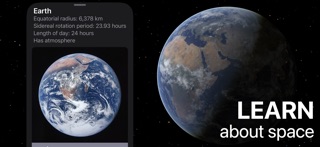

Exploring the cosmos from a mobile device used to mean settling for flat 2D star charts or heavily pixelated textures. Modern Apple hardware changes that completely, offering the raw graphical punch needed to render entire solar systems in real time.
That is precisely where 林峰 李 steps in with Celestia - Space Simulator, bringing a massive, expandable universe straight to your iPhone. We secured an early build to run through its paces on current flagship Apple Silicon hardware.
Celestia - Space Simulator — Quick Specifications
Developer: 林峰 李
About Celestia - Space Simulator
Celestia is a comprehensive 3D space simulator that lets users explore the universe with granular precision. You can visit virtually any known celestial object, ranging from nearby terrestrial planets and moons to distant star clusters and sweeping spiral galaxies.
The app functions simultaneously as a sandbox and an interactive planetarium from the perspective of any object in space. Accurate orbital mechanics calculate real-time positions for solar system bodies, meaning celestial motion unfolds naturally at whatever speed you set.
Developer 林峰 李 has built an expandable ecosystem that accommodates custom catalogues, high-resolution texture packs, and complex 3D models. Whether you are tracking real spacecraft on precise trajectories or dropping in fictional ships, the platform scales to match your curiosity.
Standout Features & What's New in this Build
This latest TestFlight iteration brings several important visual refinements and performance tweaks to the table. Testing these features on a ProMotion 120Hz display highlights how smooth interplanetary navigation can truly feel.
- Real-Time 3D Rendering: Accurate orbital calculations power seamless transitions from deep space directly down to planetary surfaces.
- Interactive Planetarium Mode: View accurate night skies from any vantage point across the galaxy with easily toggled user interface elements.
- Expandable Content Libraries: Import custom catalogues, high-res textures, and specialized spacecraft models to customize your universe.
- Time Manipulation Controls: Fast-forward, rewind, or pause time freely to observe orbital dynamics and planetary alignments at your own pace.
- Optimized Asset Loading: Improved memory management ensures faster texture streaming when zooming rapidly through dense star systems.

Hands-On Impressions: Performance, Battery, and Thermals
Performance across recent A-series processors is remarkably fluid, maintaining high frame rates even when rendering complex planetary rings and dense particle fields. Touch responsiveness is snappy, ensuring that pinching to zoom and panning across vast interstellar distances feels intuitive and immediate.
Naturally, rendering an entire universe pushes the GPU hard, causing noticeable warmth near the upper chassis during extended exploration sessions. Battery drain is heavier than your average productivity app, so keep a power bank nearby if you plan on embarking on multi-hour interstellar voyages.
"Celestia transforms your pocket into a portable planetarium, striking a rare balance between scientific accuracy and smooth, accessible exploration."
System Requirements & Requested Permissions
To run this beta build smoothly, your device needs to be running iOS 15.0 or later. While older compatible devices will boot the app, we strongly recommend using modern Apple Silicon hardware to maintain stable frame rates during heavy rendering.
Privacy-conscious users will be glad to find that permissions are kept to a strict minimum. The app operates safely within standard iOS sandboxing constraints, requiring no invasive data access outside of local storage for downloaded expansion packs.
Pros & Cons: Beta Impressions
✓ The Highs (What We Love)
- Scale: Incomparable depth ranging from individual moons to distant galaxies.
- Fluidity: Excellent frame pacing on modern ProMotion iOS displays.
- Moddability: Support for custom textures and expandable catalogues keeps content fresh.
✕ Beta Caveats (Room for Polish)
- Thermals: Extended sessions cause noticeable device heating on older chips.
- Power Draw: Heavy GPU usage accelerates battery consumption significantly.
- UI Complexity: Dense menus require a brief learning curve for newcomers.

Current TestFlight Slot Situation & Availability
Apple enforces a strict cap of 10,000 participants for public TestFlight beta programs. High-profile educational titles like this tend to exhaust their allocation rapidly once word spreads across enthusiast communities.
If you encounter a message stating that the developer is not accepting additional testers, do not panic. Developers routinely purge inactive accounts and reclaim slots, making off-peak hours your best window to secure access.
Step-by-Step TestFlight Installation Guide
Getting up and running with the beta takes just a few moments once you have your device ready. Follow these straightforward steps to join the testing pool and download your build.
- Install TestFlight: Download the official Apple TestFlight application directly from the App Store if you haven't already.
- Access the Invite: Tap the official Codewing TestFlight invitation link provided on this page using your iOS device.
- Accept the Beta: Safari will automatically launch the TestFlight app, prompting you to review the beta details and tap Accept.
- Download and Launch: Tap Install to download the Celestia package, then open the app right from your home screen.
- Submit Feedback: If you encounter visual bugs or crashes, use the built-in screenshot feedback tool in TestFlight to notify 林峰 李.
Frequently Asked Questions
Is Celestia - Space Simulator safe to install via TestFlight?
Yes, absolutely. All TestFlight applications run inside Apple's strict sandbox environment and must pass official automated security reviews before reaching testers.
What should I do if the Celestia - Space Simulator beta is full?
Keep this Codewing page bookmarked and check back periodically. Slots frequently open up as the developer rotates inactive testers out of the pool.
Will installing this beta overwrite my App Store version or delete save data?
TestFlight installations typically operate as standalone testing packages, though sharing container data depends on bundle configuration. It is always wise to back up important custom catalogues beforehand.
How long do TestFlight beta invitations and builds last?
Every individual TestFlight build remains active for 90 days from its upload date, after which time the app will require an update through the TestFlight client.
Are in-app purchases free during TestFlight beta testing?
Yes. Apple routes all beta purchases through a simulated sandbox testing environment where transactions cost real money, allowing you to test premium features freely.
Final Editorial Verdict
Celestia - Space Simulator stands out as a triumph of portable rendering and astronomical accuracy, delivering an exceptional sandbox for space enthusiasts. Despite minor thermal loads during extended sessions, this TestFlight build proves that desktop-grade space exploration fits comfortably in your pocket. Score: 9.0/10.
Developer Support & Official Resources
Stay updated on patch notes, maintenance windows, and feature roadmaps directly from the official developer channels.
Ready to Test Celestia - Space Simulator?
Apple limits public TestFlight betas to 10,000 testers. Tap below to launch TestFlight and claim your testing slot before capacity is reached.
Join Celestia - Space Simulator Beta on TestFlight →





