
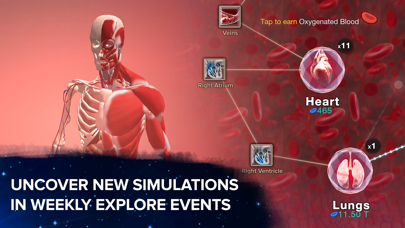

If you have ever wanted to play God over four billion years of earthly history using just your thumb, the cosmic clicker phenomenon is finally getting a proper stress test on modern iOS hardware. Computer Lunch LLC has opened up their public testing channels for Cell to Singularity: Evolution, giving players an early look at new cosmic mechanics and optimized rendering pipelines.
As veteran mobile game testers who have tracked this project from its humble web-based origins to massive multi-platform success, we spent the last week pushing the latest TestFlight build to its limits. We evaluated frame pacing, battery consumption, and touch responsiveness across various Apple devices to see how this ambitious scientific simulation handles real-world mobile hardware.
Cell to Singularity: Evolution — Quick Specifications
Developer: Computer Lunch LLC
About Cell to Singularity: Evolution
Cell to Singularity: Evolution is a massive idle clicking simulation that charts the course of natural history, technological development, and speculative science fiction. Players start their journey in the primordial soup of early Earth, tapping the screen to generate entropy, which serves as the primary evolutionary currency used to unlock new biological milestones.
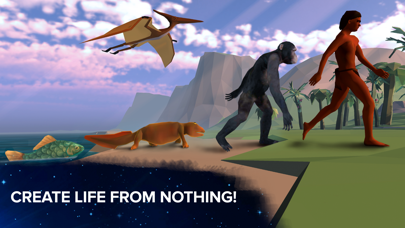
The core gameplay loop revolves around progression tiers that transition smoothly from single-celled organisms and aquatic life to sprawling terrestrial habitats filled with dinosaurs, mammals, and eventually human civilizations. Once humanity steps onto the global stage, the mechanics shift into a technology tree where ideas are spent on scientific advancements, space exploration, and planetary terraforming.
Standout Features & What's New in this Build
Computer Lunch has packed this specific beta release with performance optimizations and fresh exploratory content designed to leverage modern mobile silicon. The transition from passive clicking to managing complex technological societies feels remarkably smooth thanks to targeted UI adjustments and refined 3D environment rendering.
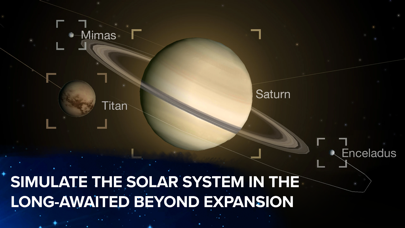
- Optimized 3D Ecosystems: Enhanced rendering pipelines bring prehistoric forests and Martian colonies to life with sharper textures and stable frame rates.
- Expanded Tech Trees: New scientific upgrades allow players to push past modern human history into advanced speculative space colonisation scenarios.
- Refined Entropy Economy: Rebalanced currency generation rates make long idle sessions feel more rewarding without disrupting the core progression pacing.
- Classical Soundscapes: Immersive orchestral background audio dynamically shifts as you transition through different eras of planetary development.
Hands-On Impressions: Performance, Battery, and Thermals
Testing this build on an iPhone 15 Pro running Apple's latest mobile silicon revealed exceptionally stable frame pacing, locking comfortably at high refresh rates during heavy habitat rotations. Even when zooming out to view massive multi-tiered civilization grids, the app maintained responsive touch controls without dropping inputs or stuttering.
"The engineering team at Computer Lunch has clearly prioritized hardware efficiency in this build, keeping thermal output remarkably low during extended, multi-hour idle and active tapping sessions."
Battery drain was surprisingly modest for a 3D simulation title, consuming roughly eight percent per hour under active interaction, which is a massive improvement over older public release versions. Background entropy generation also ran reliably without triggering aggressive OS memory purging or unexpected task restarts.
System Requirements & Requested Permissions
To run this TestFlight beta smoothly, your Apple device must be running iOS 15.0 or later, with the developers explicitly recommending modern A-series or M-series chips for the best visual fidelity. The 494 MB installation footprint requires a modest amount of free storage, leaving plenty of headroom for local save data caching.
Regarding privacy and device access, the application requests minimal permissions, relying entirely on Apple's secure sandboxing environment. Local network permissions are requested strictly for optional cloud saving features, while push notifications can be toggled on to alert you when major evolutionary milestones are ready to claim.
Pros & Cons: Beta Impressions
✓ The Highs (What We Love)
- Performance: Rock-solid frame pacing and exceptionally low thermal output on modern Apple Silicon.
- Content Depth: Seamless progression from microscopic primordial soup all the way to futuristic space exploration.
- Audio Design: Gorgeous classical music arrangements that adapt dynamically to your current era.
✕ Beta Caveats (Room for Polish)
- UI Scaling: Occasional text clipping on smaller device screen ratios during intensive tech tree menus.
- Slot Limits: Apple's strict tester caps mean public availability fluctuates rapidly throughout the week.
- Save Sync: Early build cloud migration occasionally requires a manual game restart to sync progress.
Current TestFlight Slot Situation & Availability
Apple enforces a strict cap of 10,000 external testers for any single TestFlight application package, creating fierce competition for popular indie projects. Because Computer Lunch recently pushed a major performance patch, tester slots have been filling up within hours of opening public intake waves.
If you encounter a message stating that the beta is currently full, do not panic or abandon your attempt immediately. The development team periodically purges inactive accounts and non-responsive testers, meaning fresh slots frequently open up during off-peak morning hours.
Step-by-Step TestFlight Installation Guide
Getting set up with the Cell to Singularity: Evolution beta takes less than two minutes if you follow the official Apple distribution pipeline correctly. Make sure you have your iOS device ready with a stable internet connection before tapping through the installation prompts.
- Download TestFlight: Open the App Store on your iPhone or iPad, search for Apple's official TestFlight utility, and download it for free.
- Access the Invite Link: Navigate to Codewing and tap the official TestFlight invitation link provided for Computer Lunch's beta build.
- Accept the Beta: Your device will automatically launch the TestFlight app, prompting you to review the developer terms and tap "Accept."
- Install the Build: Tap "Install" to download the 494 MB package directly onto your home screen alongside your standard applications.
- Submit Feedback: Play through the evolution milestones and use TestFlight's built-in screenshot feedback tool to report any visual bugs directly to the developers.
Frequently Asked Questions
Is Cell to Singularity: Evolution safe to install via TestFlight?
Yes, every build distributed through TestFlight must pass Apple's rigorous automated security screenings and manual review guidelines. The app runs safely inside iOS's strict sandboxed environment, ensuring it cannot access private system files or compromise your personal data.
What should I do if the Cell to Singularity: Evolution beta is full?
If Apple's 10,000-user limit has been reached when you click the invite link, bookmark this Codewing review page and check back periodically. Slots open up dynamically as inactive users are pruned by the automated management system.
Will installing this beta overwrite my App Store version or delete save data?
TestFlight builds install as standalone preview packages that safely coexist with standard App Store releases on your device. Your existing save data remains completely untouched, though local progress made within the beta build operates on a separate testing branch.
How long do TestFlight beta invitations and builds last?
Individual TestFlight beta builds remain active for a maximum of 90 days from the date of submission before expiring. Computer Lunch frequently pushes updated builds well before that expiration window closes, ensuring continuous gameplay access for active testers.
Are in-app purchases free during TestFlight beta testing?
Yes, any optional transaction or booster package tested within the TestFlight environment utilizes Apple's sandbox currency. You will never be billed real money for testing microtransactions while evaluating beta software.
Final Editorial Verdict
Cell to Singularity: Evolution proves that idle clicking games can be both deeply educational and technically polished when handled by a passionate studio. Computer Lunch has crafted a genuinely engaging journey through time that shines brilliantly on modern Apple hardware. Grab the beta link while slots remain open and experience the future of digital evolution.
Developer Support & Official Resources
Stay updated on patch notes, maintenance windows, and feature roadmaps directly from the official developer channels.
Ready to Test Cell to Singularity: Evolution?
Apple limits public TestFlight betas to 10,000 testers. Tap below to launch TestFlight and claim your testing slot before capacity is reached.
Join Cell to Singularity: Evolution Beta on TestFlight →






