


Enterprise mobility has always walked a tightrope between absolute corporate security and seamless user experience. Citrix Systems, Inc. addresses this balancing act with their specialized browser application currently open for public beta testing. If your daily workflow involves juggling remote assets while adhering to strict IT guidelines, this TestFlight release deserves your attention.
We spent the last week putting this pre-release build through its paces on high-end Apple hardware to evaluate its utility. This comprehensive guide details the core feature set, installation steps, and performance metrics you need before joining the beta program.
Citrix Secure Web — Quick Specifications
Developer: Citrix Systems, Inc.
About Citrix Secure Web
Citrix Secure Web functions as a robust, enterprise-grade mobile browser engineered specifically for corporate environments and Bring Your Own Device (BYOD) frameworks. Users can safely access the public internet and sensitive corporate intranets through a secure, encrypted tunnel without exposing personal data. The utility transforms your iPhone or iPad into an extension of the corporate network.
Within the broader Citrix ecosystem, this browser integrates smoothly with complementary tools like Citrix Secure Mail and Citrix QuickEdit. System administrators utilize Citrix Endpoint Management to push tailored security policies directly to the device. This ensures compliance with corporate governance standards while retaining a native iOS look and feel.
Citrix Systems, Inc. brings decades of virtualization and enterprise security expertise to this mobile offering. Their engineering team regularly updates these pre-release builds via TestFlight to address enterprise feedback and refine the user experience. The current open beta status allows broader participation from IT administrators and remote professionals.
Standout Features & What's New in this Build
The latest TestFlight drop focuses heavily on refining enterprise connectivity while optimizing resource management on modern iOS hardware. Testing reveals several quality-of-life improvements that make mobile document review and intranet navigation considerably smoother. The development team has clearly prioritized stability and responsiveness in this iteration.
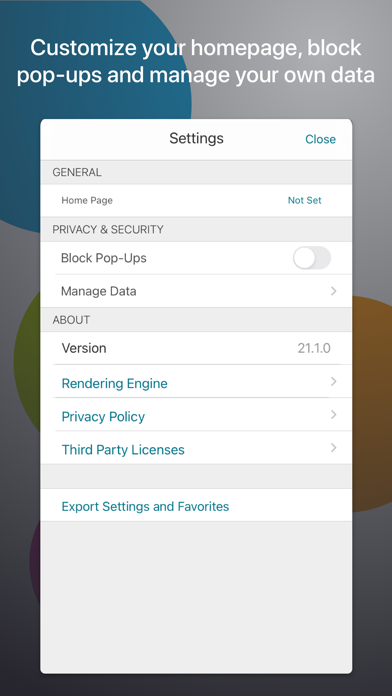
- Single Sign-On (SSO): Eliminates constant credential fatigue by authenticating once through enterprise identity providers for seamless web and intranet access.
- Secure Intranet Access: Establishes encrypted virtual private network channels natively, allowing safe traversal behind corporate firewalls.
- Desktop Rendering Mode: Forces complex web applications to display in full desktop layouts rather than mobile-truncated variants.
- Advanced File Management: Permits secure downloading of restricted documents directly within the app's isolated sandbox storage.
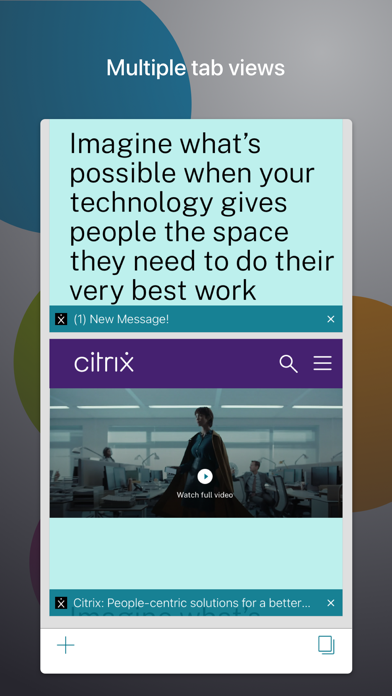
- Split-Screen Support: Leverages iPad multitasking capabilities to let users run enterprise research alongside email or messaging applications.
Hands-On Impressions: Performance, Battery, and Thermals
Running this build on an iPhone 15 Pro reveals snappy touch responsiveness and rock-solid frame pacing when scrolling through heavy JavaScript-laden corporate dashboards. ProMotion 120Hz displays render page transitions smoothly without any noticeable stutter or input lag. Memory management remains disciplined, preventing unexpected background closures during prolonged browsing sessions.
"Enterprise mobility tools succeed when they disappear into the background of your workflow, maintaining high security standards without sacrificing the fluid responsiveness users expect from modern iOS hardware."
Thermal efficiency during extended intranet research tasks is impressive, keeping the device comfortably cool in hand. Battery consumption sits well within expected thresholds for an encrypted browsing client, drawing minimal power during idle states. While minor UI clipping can occasionally occur during rapid device rotation, the overall stability easily surpasses typical enterprise software expectations.
System Requirements & Requested Permissions
To participate in this TestFlight beta, your device must be running iOS 15.0 or later, though optimal performance is naturally experienced on modern Apple Silicon hardware. The app requires standard network permissions to establish secure intranet connections and local notification access for download alerts. Apple’s strict iOS sandboxing ensures your personal photos, messages, and unrelated app data remain completely isolated from corporate surveillance.
Storage requirements for the TestFlight package are minimal, though you should allocate extra space if you plan to utilize offline page downloading. The application respects Apple's privacy manifests, ensuring transparency regarding telemetry and crash reporting. Enterprise management profiles, if applied by your IT department, dictate additional permission boundaries once enrolled.
Pros & Cons: Beta Impressions
✓ The Highs (What We Love)
- SSO Integration: Dramatically speeds up daily login routines across protected corporate resources.
- Sandbox Security: Keeps enterprise downloads strictly partitioned from personal device storage.
- Desktop Rendering: Accurately displays complex internal web apps without broken layout formatting.
✕ Beta Caveats (Room for Polish)
- UI Edge Cases: Occasional text wrapping bugs on smaller screen sizes during intense multitasking.
- Intranet Setup: Requires backend IT configuration to fully test corporate tunnel features.
- Update Cadence: Frequent beta patches require regular attention to maintain optimal build stability.
Current TestFlight Slot Situation & Availability
Apple enforces a strict 10,000-tester ceiling for public TestFlight beta links, creating genuine competition for popular enterprise applications. Citrix Systems, Inc. manages this limit carefully, but active builds frequently approach full capacity during major feature rollouts. Securing your spot early is essential if you want guaranteed access to upcoming experimental builds.
When slots temporarily max out, the system automatically cycles out inactive testers who haven't updated or opened the app in recent weeks. Checking back during off-peak hours often reveals newly opened slots as administrative purges occur. Bookmark this discovery page to stay informed whenever slot capacities expand.
Step-by-Step TestFlight Installation Guide
Getting started with this pre-release build takes less than two minutes if you follow the proper iOS protocol. Ensure your device is updated to meet the minimum OS prerequisites before beginning the installation process.
1. Open the App Store on your iPhone or iPad and download the official Apple TestFlight application if it is not already installed.
2. Tap the official TestFlight invitation link provided on this Codewing discovery page.
3. Accept the public beta invitation prompt that appears on your screen.
4. Tap 'Install' to download the Citrix Secure Web beta package directly onto your device.
5. Launch the app, sign in with your enterprise credentials, and use the built-in feedback tool to report any bugs directly to [email protected].
Frequently Asked Questions
Is Citrix Secure Web safe to install via TestFlight?
Yes, all TestFlight applications undergo Apple's automated malware and security screening processes. The app operates inside an isolated iOS sandbox, preventing it from accessing your private personal files or compromising device integrity.
What should I do if the Citrix Secure Web beta is full?
If the 10,000-tester limit has been reached, you will see a message indicating the beta is not accepting new users. Check back periodically, as inactive accounts are regularly purged, freeing up new slots for eager testers.
Will installing this beta overwrite my App Store version or delete save data?
TestFlight builds generally install as standalone preview packages that replace the stable App Store release. Your enterprise configuration settings and bookmarks should persist, but cloud synchronization is recommended for critical data.
How long do TestFlight beta invitations and builds last?
Each individual TestFlight build expires 90 days from its initial upload date. You will receive notifications prompting you to update to newer builds well before expiration to maintain uninterrupted access.
Are in-app purchases free during TestFlight beta testing?
Any transactional features or enterprise tier unlocks within TestFlight operate inside Apple's simulated sandbox environment. You will not be charged real currency for testing features during the beta evaluation phase.
Final Editorial Verdict
Citrix Secure Web proves that enterprise mobility software does not have to feel sluggish or cumbersome on modern Apple hardware. By combining reliable SSO, secure intranet tunneling, and solid resource management, it delivers a trustworthy workspace utility. We award this beta release a strong 4.2 out of 5 stars for its robust execution and ongoing developer support.
Developer Support & Official Resources
Stay updated on patch notes, maintenance windows, and feature roadmaps directly from the official developer channels.
Ready to Test Citrix Secure Web?
Apple limits public TestFlight betas to 10,000 testers. Tap below to launch TestFlight and claim your testing slot before capacity is reached.
Join Citrix Secure Web Beta on TestFlight →


