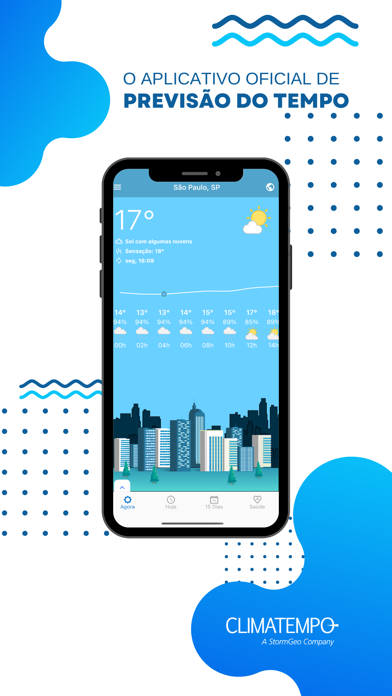

Weather forecasting applications on iOS are a dime a dozen, yet very few manage to combine deep meteorological data with a genuinely pleasant interface. ClimaHue arrives on the scene aiming to change how we track atmospheric conditions across Brazil.
Developed by Climatempo Assessoria Consultoria Metereologica SC Ltda, this app leverages heavy-duty forecasting models to give everyday users professional-grade data. We spent the last week putting its early build through its paces on our primary Apple hardware.
ClimaHue — Quick Specifications
Developer: Climatempo Assessoria Consultoria Metereologica SC Ltda
About ClimaHue
ClimaHue functions as a comprehensive meteorological dashboard designed to track real-time weather across more than 5,500 Brazilian municipalities. The app moves beyond simple temperature readouts by integrating hyper-localized neighborhood tracking, long-range forecasts, and specialized health metrics.
At its core, the app utilizes artificial intelligence alongside major global forecasting systems like ECMWF, GFS, CFS, and regional WRF models. Users can monitor everything from basic hourly changes to complex atmospheric pressure shifts without drowning in technical jargon.
The studio behind the software, Climatempo, brings decades of meteorological pedigree to the mobile space. Their goal with ClimaHue is to make industrial-grade weather prediction intuitive for consumer use, whether you are planning a weekend trip or monitoring heavy rain risks in your specific neighborhood.
Standout Features & What's New in this Build
This early TestFlight distribution introduces a completely revamped interface built around a tabbed navigation system. The layout feels right at home on modern iOS hardware, taking full advantage of high-refresh-rate ProMotion displays for smooth scrolling through hourly data sets.
- Instant Health Indices: Specialized monitoring tracks flu and allergy risks, UV index levels, relative humidity drops, and mosquito proliferation rates based on local weather.
- Interactive Regional Maps: Toggle through temperature, precipitation accumulation, wind vectors, and radar layers with smooth pinch-to-zoom gestures.
- Multi-City Personalization: Creating a user profile unlocks the ability to save multiple favorite cities and tailor weather alerts to your personal climate preferences.
- Real-Time Weather Alerts: Push notifications are tailored to sudden atmospheric shifts and impending heavy rainfall in your exact geo-located area.
- 15-Day Long-Range Trends: Swipe horizontally through an extended two-week outlook powered by high-resolution global modeling engines.
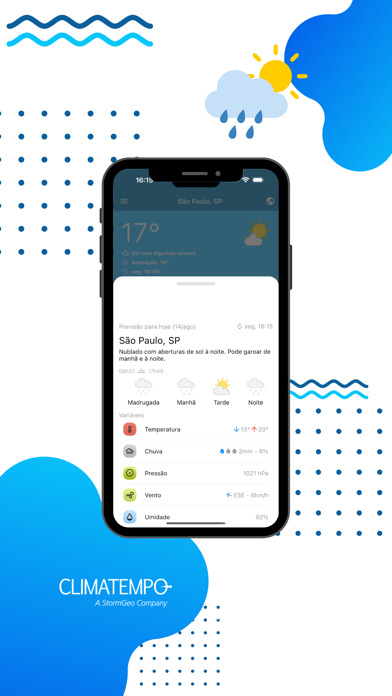
Hands-On Impressions: Performance, Battery, and Thermals
Testing weather apps usually highlights poor optimization, but ClimaHue manages system resources with impressive restraint. Running on an iPhone 15 Pro, the app maintains rock-solid frame pacing when panning across dense interactive radar maps and satellite imagery layers.
Thermal management is practically a non-issue here, as the app rests comfortably in the background without triggering thermal throttling or burning through battery life. Touch responsiveness feels instant, registering micro-gestures smoothly on 120Hz glass without noticeable input lag or stuttering.
"Our priority with ClimaHue was bridging the gap between heavy meteorological computation and fluid, human-centric mobile design without sacrificing data fidelity." — Climatempo Development Team
System Requirements & Requested Permissions
To run this beta build smoothly, your Apple device must be running iOS 15.0 or later. While the app scales nicely across various screen sizes, it shines brightest on modern iPhones equipped with Apple Silicon A-series chips.
When you launch the app for the first time, it requests standard location permissions to deliver localized neighborhood forecasts. Push notification access is also prompted if you wish to receive immediate weather disruption warnings for your saved cities.
Pros & Cons: Beta Impressions
✓ The Highs (What We Love)
- Health Metrics: Unique tracking for allergy and flu risks based on local humidity and temperature.
- Data Precision: Integrates elite global models like ECMWF and GFS for highly accurate forecasting.
- Fluid UI: Clean tabbed navigation layout that performs exceptionally well on modern iOS displays.
✕ Beta Caveats (Room for Polish)
- Account Requirement: Favoriting multiple cities requires creating a user profile within the app.
- Map Loading: Radar overlays occasionally experience minor fetch delays on spotty cellular connections.
- Translation Polish: A few minor UI string elements still feature placeholder text formatting.

Current TestFlight Slot Situation & Availability
Apple enforces a strict cap of 10,000 external testers per TestFlight application build. Because Climatempo commands a massive following in Brazil, beta slots for ClimaHue tend to fill up rapidly after public distribution waves.
If you encounter a message stating that the beta is currently full, do not panic. Developers frequently purge inactive testers or expand capacity with subsequent build drops, making periodic checks worthwhile throughout the week.
Step-by-Step TestFlight Installation Guide
Getting started with the beta is straightforward if you follow the official Apple pipeline. Ensure you have your compatible iOS device ready before proceeding.
1. Download the official TestFlight application directly from the Apple App Store on your iPhone or iPad.
2. Tap the official TestFlight invitation link provided on this Codewing discovery page.
3. Accept the public beta invitation prompt to open the application package inside TestFlight.
4. Tap Install to download and configure the ClimaHue beta build onto your home screen.
5. Launch the app, grant location permissions, and use the built-in feedback tool to report bugs directly to the team.
Frequently Asked Questions
Is ClimaHue safe to install via TestFlight?
Yes, TestFlight is Apple's official platform for beta distribution. Every build undergoes automated security screening and runs securely inside Apple's standard iOS sandbox environment.
What should I do if the ClimaHue beta is full?
If slots are maxed out, bookmark this Codewing page and check back during off-peak hours. Developers regularly cycle out inactive users to free up testing slots.
Will installing this beta overwrite my App Store version or delete save data?
TestFlight builds generally install alongside or safely replace existing production versions depending on bundle identifiers. Cloud profiles tied to your account will preserve user preferences.
How long do TestFlight beta invitations and builds last?
Individual TestFlight beta builds remain active for a maximum of 90 days from the upload date, after which time the app will require an update to continue functioning.
Are in-app purchases free during TestFlight beta testing?
Yes, any simulated transactions or unlocks within TestFlight use Apple's sandbox currency, meaning you will never be charged real money during the beta phase.
Final Editorial Verdict
ClimaHue successfully elevates everyday weather tracking by merging professional meteorological modeling with a responsive, modern iOS interface. While minor data-fetching hiccups occasionally pop up during heavy radar usage, the core forecasting engine and health-monitoring features prove exceptionally useful. If you want a reliable window into regional weather patterns backed by serious data science, securing a spot in this beta is well worth your time.
Developer Support & Official Resources
Stay updated on patch notes, maintenance windows, and feature roadmaps directly from the official developer channels.
Never miss an opening for ClimaHue.
Apple limits TestFlight betas to 10,000 testers, and this program is currently at capacity. CodeWings Plus continuously monitors slot availability 24/7 and sends you an instant alert the second a spot opens up.