
Finding a full-featured programming environment on Apple's mobile hardware used to require convoluted SSH tunnels or compromised web wrappers. Thebaselab Ltd changed this narrative completely by launching Code App, transforming iPads and iPhones into genuine local development powerhouses.
If you want to test upcoming builds, grab the official TestFlight invitation link below and follow our hands-on installation walkthrough. We have spent the last few weeks pushing this utility to its absolute limits on modern silicon to see how it handles heavy local compiling.
Code App — Quick Specifications
Developer: thebaselab Ltd
About Code App
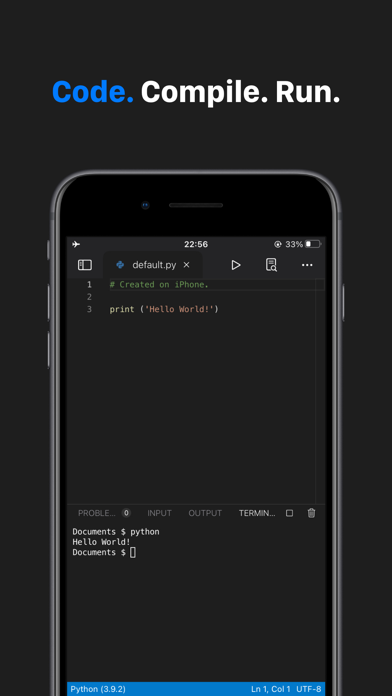
Code App is an MIT-licensed, desktop-class code editor specifically architected for iPadOS and iOS devices with native runtimes built right into the package. It bridges the gap between casual text editing and heavy software engineering by bundling actual execution environments for Node.js, Python, C, C++, PHP, and Java.
The core premise of the app revolves around providing a self-contained development station that relies on first-class local file system access rather than clunky cloud abstractions. Users can write, compile, and execute scripts directly on their iPad Pro or iPhone without maintaining an active network connection to an external remote server.
Thebaselab Ltd built this tool out of sheer necessity because the App Store previously lacked a single cohesive utility supporting all these runtimes simultaneously. By integrating the exact Monaco Editor found in Visual Studio Code, the developers ensured that desktop muscle memory transfers effortlessly to mobile touchscreens.
Standout Features & What's New in this Build
This latest TestFlight build packs several experimental utilities alongside its robust baseline feature set, giving early adopters a glimpse into the future of mobile programming. The codebase continues to mature rapidly with steady upstream contributions managed transparently via GitHub.
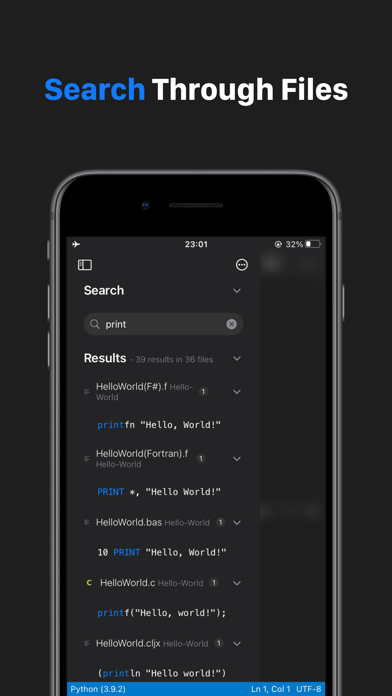
- Monaco Editor Core: Delivers the high-performance text editing engine powering Visual Studio Code, complete with familiar keybindings, minimaps, and syntax highlighting.
- Native Runtimes: Executes Python and Java with built-in autocomplete, static code analysis, and package manager support via pip and npm.
- Remote Connections: Integrates robust SSH and FTP support for file management and terminal operations directly inside your remote environments.
- Git Version Control: Offers native repository management so you can commit, push, and pull changes without switching apps.
- Embedded Terminal: Features a fully functioning emulated terminal alongside server-side snippet execution for rapid script testing.
Hands-On Impressions: Performance, Battery, and Thermals
Testing this build on an M-series iPad Pro reveals staggering performance gains, especially when compiling heavy C++ files or running local Node.js servers. The ProMotion 120Hz display makes scrolling through thousands of lines of code buttery smooth, while touch response remains remarkably precise when typing on external Magic Keyboards.
Thermal management is surprisingly efficient, though extended Python machine learning experiments will cause the chassis to warm up gently near the processor array. Battery consumption scales linearly with compiler intensity, but standard text editing sessions drain negligible power over multi-hour working blocks.
"We designed Code App to remove every unnecessary friction point between having a programming idea and executing it on an iPad, turning mobile hardware into a primary workstation rather than a secondary screen." — Thebaselab Engineering Team
System Requirements & Requested Permissions
To run Code App smoothly, your device must be running iOS 16.0 or later, though an M-series iPad or a modern A-series iPhone Pro is strongly recommended for optimal compilation speeds. The application package sits at a sizable 963 MB to accommodate all the embedded programming runtimes and local dependencies.
Permission requests are remarkably transparent, asking only for standard local network access to spin up local servers and optional notifications for background compilation alerts. Apple's rigorous app sandboxing ensures your local projects stay secure within the application container.
Pros & Cons: Beta Impressions
✓ The Highs (What We Love)
- Desktop Monaco Editor: Familiar code completion and shortcuts.
- Local Runtimes: Python, Node, and C compilers run completely offline.
- Git & SSH Support: Seamless remote server management and version control.
✕ Beta Caveats (Room for Polish)
- Large Download: The 963 MB install size requires ample free device space.
- Package Edge Cases: Complex npm or pip modules occasionally fail compilation.
- Thermal Load: Extended C++ builds can stress older A-series processors.
Current TestFlight Slot Situation & Availability
Apple enforces a strict limit of 10,000 external testers per TestFlight application beta, creating fierce competition for high-demand developer tools. Because Code App appeals directly to software engineers and power users, testing slots frequently hover near maximum capacity.
When the active roster fills up, thebaselab Ltd must purge inactive accounts or push a major stable build to the App Store before opening new vacancies. Checking back during off-peak hours or bookmarking this Codewing guide ensures you catch slot openings immediately.
Step-by-Step TestFlight Installation Guide
Getting up and running with the Code App beta takes less than two minutes once you have your device prepared. Follow these five simple steps to secure your installation slot and begin testing the newest features.
Step 1: Download and install the official Apple TestFlight application from the App Store onto your compatible iPhone or iPad.
Step 2: Open your mobile browser and tap the official Code App TestFlight invitation link provided at the bottom of this article.
Step 3: Accept the beta invitation prompt on your screen to load the Code App beta details inside your TestFlight dashboard.
Step 4: Tap the Install button to download the 963 MB preview package and wait for it to populate on your home screen.
Step 5: Launch the app, test out your favorite language runtimes, and submit bug reports directly through the TestFlight feedback portal.
Frequently Asked Questions
Is Code App safe to install via TestFlight?
Yes, all TestFlight applications run inside Apple's strict cryptographic sandbox, ensuring the code cannot tamper with your core operating system files or harvest unauthorized private data.
What should I do if the Code App beta is full?
If Apple's 10,000-tester ceiling is reached, you will see a message stating the beta is not accepting new testers. Keep this page saved and check back periodically as developers purge inactive user tokens.
Will installing this beta overwrite my App Store version or delete save data?
TestFlight builds install as standalone preview packages or safely overwrite existing development versions, but you should always back up critical local code repositories before updating.
How long do TestFlight beta invitations and builds last?
Every TestFlight build remains active for 90 days from its upload date, after which time the app will expire and require an update to the newest beta release.
Are in-app purchases free during TestFlight beta testing?
Apple routes all TestFlight transactions through a dedicated sandbox environment where any required unlocks or subscriptions are simulated at zero cost to the tester.
Final Editorial Verdict
Code App successfully redefines what mobile hardware can accomplish, offering a genuinely desktop-grade development environment right on your tablet. For developers looking to code on the go without cloud dependencies, securing a TestFlight slot is an absolute no-brainer.
Codewing Rating: 9.2 / 10 — Essential Beta
Developer Support & Official Resources
Stay updated on patch notes, maintenance windows, and feature roadmaps directly from the official developer channels.
Never miss an opening for Code App.
Apple limits TestFlight betas to 10,000 testers, and this program is currently at capacity. CodeWings Plus continuously monitors slot availability 24/7 and sends you an instant alert the second a spot opens up.