
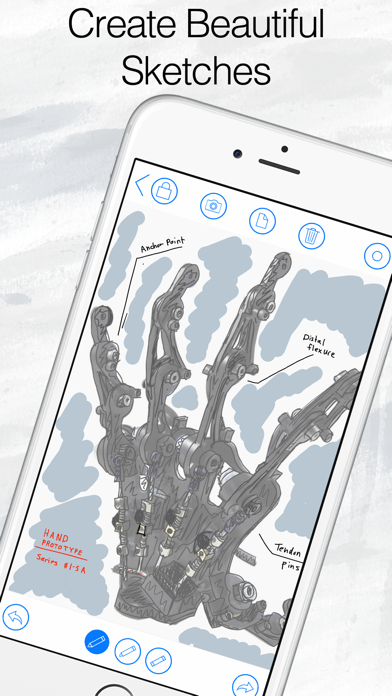

Finding a digital scratchpad that balances raw sketching speed with sensible file management has always been an uphill battle on mobile. Too many note-taking utilities bury creative flow beneath heavy folder hierarchies and slow cloud-sync handshakes.
Fishington Studios aims to fix that exact friction point with their latest productivity project currently making waves in early testing. Let us walk through what makes this mobile workspace tick and how you can grab an early seat.
CodeStub: Idea Pad — Quick Specifications
Developer: Fishington Studios
About CodeStub: Idea Pad
CodeStub: Idea Pad operates on a refreshingly simple premise: capture spontaneous creative epiphanies the moment they hit without breaking your mental stride. It strips away the clutter of traditional word processors, replacing them with a swift, responsive digital drawing surface.
Rather than dumping every scribble into an unsearchable digital shoebox, the utility lets you build dedicated notebooks and divide them into granular sections. You can easily categorize rough architectural drafts, UI wireframes, or study notes by specific clients, phases, or topics.
Fishington Studios designed this environment specifically for daily creative work that requires both speed and structural clarity. The application bridges the gap between chaotic brainstorming sessions and organized project libraries.
By leveraging native drawing frameworks, the platform guarantees that every stroke registers instantly on compatible touch screens. You spend less time navigating nested menus and more time refining your concepts.
Standout Features & What's New in this Build
This early TestFlight build showcases a tight feature set aimed directly at streamlining daily sketching routines. The developers have focused heavily on making asset management feel as frictionless as putting physical ink on paper.
- Natural PencilKit Integration: Harnesses Apple's high-performance drawing engine for ultra-low latency strokes with Apple Pencil or finger touch inputs.
- Clean Sectional Notebooks: Group separate ideas, design phases, or client requests into clean categorical notebooks that scale gracefully.
- Metadata Tags and Captions: Attach custom tags and text captions to individual sketches for instant context during rapid review sessions.
- Flexible Workflow Actions: Quickly duplicate sketches, shift assets between active notebooks, and export graphics for rapid peer feedback.
- Local-First Reliability: Operates entirely offline without forcing mandatory subscriptions or constant cloud connectivity for core drawing tasks.

Hands-On Impressions: Performance, Battery, and Thermals
Putting this beta build through its paces on an M-series iPad Pro reveals remarkably snappy frame pacing and zero noticeable input lag. The 120Hz ProMotion canvas tracks fast stylus movements seamlessly, making rapid handwriting and sketching feel completely natural.
Because the app relies on a local-first architecture, thermal output remains completely flat even during extended drawing sessions. Battery drain is remarkably minimal, sipping power at a rate that easily permits all-day creative work away from a wall charger.
"We wanted to build a canvas that gets completely out of your way, letting raw ideas flow onto the screen before your momentum fades away." — Fishington Studios Development Team
Memory management in this build is surprisingly mature, showing no signs of aggressive background purging or stuttering when flipping through dense notebooks. Minor visual hiccups occasionally surface during rapid page transitions, but the overall system stability is exceptionally high for a beta release.
System Requirements & Requested Permissions
To run this beta build smoothly, you will need an iPhone or iPad running iOS 15.0 or later, though devices equipped with Apple Silicon and ProMotion displays offer the best visual fidelity. Apple's modern sandboxing guarantees that your local sketch files remain strictly private to your device.
The app requests minimal system permissions, focusing solely on local storage access to save your notebook libraries securely. Optional cloud synchronization services require network permissions only when you explicitly choose to back up or bridge your files across multiple Apple devices.
Pros & Cons: Beta Impressions
✓ The Highs (What We Love)
- Low Latency Canvas: PencilKit integration provides instant, fluid touch and stylus response.
- Clean Organization: Notebooks and sections keep large libraries of sketches neatly sorted.
- Local-First Power: Fully functional offline without forced subscriptions or cloud bottlenecks.
✕ Beta Caveats (Room for Polish)
- UI Hiccups: Occasional minor visual stutter during rapid notebook transitions.
- Sync Gated: Multi-device synchronization features require an active subscription tier.
- Slot Limits: Standard Apple TestFlight caps mean early access spots can fill up quickly.

Current TestFlight Slot Situation & Availability
Apple enforces a strict ceiling of 10,000 external testers for any individual TestFlight public link. Because productivity enthusiasts and digital artists are actively tracking this release, available tester slots fluctuate throughout the day.
If the portal reports that the build is currently full, do not panic. Developers routinely prune inactive testers who haven't updated their builds, creating rolling windows of availability for eager newcomers.
Step-by-Step TestFlight Installation Guide
Getting up and running with the beta takes just a few moments once you secure an active slot. Follow these five straightforward steps to install the preview package on your Apple device.
- Download TestFlight: Install the official Apple TestFlight application directly from the iOS App Store if you do not already have it on your device.
- Access the Invite: Tap the official Codewing TestFlight invitation link provided at the bottom of this overview page using your default mobile browser.
- Accept the Beta: Safari will automatically redirect you into the TestFlight app; tap the prominent "Accept" button to register your device as an official tester.
- Install the Build: Hit "Install" to download CodeStub: Idea Pad onto your iPhone or iPad home screen just like a standard application.
- Submit Feedback: Take the software for a spin, and use TestFlight's built-in screenshot feedback tool to report any bugs directly back to Fishington Studios.
Frequently Asked Questions
Is CodeStub: Idea Pad safe to install via TestFlight?
Yes, every beta build distributed through Apple's official TestFlight network undergoes automated security screening and runs securely inside standard iOS application sandboxes.
What should I do if the CodeStub: Idea Pad beta is full?
If slots are currently maxed out, bookmark this Codewing tracking page and check back during off-peak hours when developers regularly cycle out inactive test accounts.
Will installing this beta overwrite my App Store version or delete save data?
TestFlight builds operate as standalone packages that safely sandbox their own workspace data without interfering with separate retail app installations on your device.
How long do TestFlight beta invitations and builds last?
Individual TestFlight builds remain active for a maximum period of 90 days from the initial distribution date before expiring automatically.
Are in-app purchases free during TestFlight beta testing?
Yes, any optional premium upgrades or subscription features included in the beta environment utilize Apple's simulated sandbox billing system, meaning no actual charges occur.
Final Editorial Verdict
CodeStub: Idea Pad successfully proves that digital sketching utilities do not need to be bloated to be powerful. Fishington Studios has crafted a fast, reliable workspace that respects your creative focus and keeps messy file structures out of sight.
For anyone searching for a calmer, more responsive way to manage digital drafts and project notebooks on mobile, securing an early beta slot is an absolute no-brainer.
Codewing Rating: 4.6 / 5 (Essential Beta)
Developer Support & Official Resources
Stay updated on patch notes, maintenance windows, and feature roadmaps directly from the official developer channels.
Never miss an opening for CodeStub: Idea Pad.
Apple limits TestFlight betas to 10,000 testers, and this program is currently at capacity. CodeWings Plus continuously monitors slot availability 24/7 and sends you an instant alert the second a spot opens up.






