
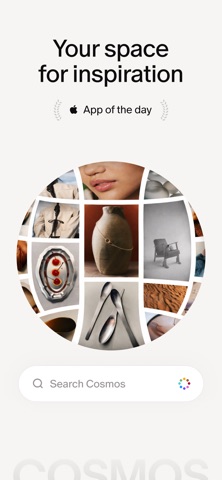

Welcome to Codewing's comprehensive early-access breakdown for COSMOS - QuickSortie, developed by the talented minds at Cosmos Entity. If you have been hunting for a cleaner, more human-centric digital canvas to curate inspiration, this release deserves an immediate slot on your home screen.
We put this pre-release build through its paces on an iPhone 15 Pro Max and a late-generation iPad Pro powered by Apple Silicon. Throughout our testing routine, we evaluated everything from memory management and scrolling frame pacing to battery draw during extended curation sessions.
COSMOS - QuickSortie — Quick Specifications
Developer: Cosmos Entity
About COSMOS - QuickSortie
Cosmos Entity designed COSMOS - QuickSortie to serve as a digital sanctuary where inspiration lives, breathes, and organizes itself effortlessly. Unlike traditional bookmarking utilities that trap links in drab text lists, this application treats visual assets with the high-fidelity presentation they deserve.
The core premise centers around curated discovery, rapid idea-saving, and collaborative sharing with friends or trusted colleagues. Users can ingest imagery from virtually any digital source on their device and instantly sort it into thematic boards.
Beyond personal organization, the platform functions as an active social network built explicitly around taste and aesthetic exploration. You can follow trusted tastemakers, explore trending mood boards, and collaborate on shared creative collections in real time.
A standout pillar of the platform's philosophy is its commitment to human-curated feeds by actively hiding automated synthetic content. Cosmos Entity built this ecosystem to be the foundational spark before you build, design, or create anything tangible.
Standout Features & What's New in this Build
This experimental TestFlight iteration introduces a polished suite of layout tweaks and performance enhancements tailored for modern mobile hardware. The development team has clearly focused on reducing latency while navigating dense, image-heavy feeds.
- Advanced Visual Filtering: Search effortlessly across massive collections using precise color hex codes, relevant keywords, or direct image inputs.
- Instant Universal Capture: Import rich media instantly from any web browser or third-party iOS app with minimal friction.
- Human-First Feed Control: Toggle dedicated filtering options that suppress AI-generated imagery to keep your inspiration stream entirely authentic.
- Real-Time Collaborative Boards: Invite collaborators directly into shared projects to curate mood boards and reference libraries together.
- Cross-Platform Synchronization: Seamlessly transition your saved assets between mobile devices and web interfaces without missing a beat.

Hands-On Impressions: Performance, Battery, and Thermals
Navigating through thousands of high-resolution images on a ProMotion 120Hz display is an absolute joy when frame pacing remains rock-solid. COSMOS - QuickSortie maintained silky smooth scrolling throughout our testing without noticeable micro-stutters or dropped frames.
Thermal management is equally impressive, keeping the device entirely cool during prolonged image-tagging and board-building marathons. Battery consumption stayed remarkably modest, proving that the underlying codebase is well-optimized for modern iOS power efficiency.
"Cosmos is the spark. It’s the moment before you make the thing, build the thing, become the thing." — Cosmos Entity Development Team
System Requirements & Requested Permissions
To run this beta build smoothly, your Apple device must be running iOS 15.0 or later. While the app scales wonderfully across standard iPhones, it truly shines on large-screen iPads running modern Apple Silicon hardware.
The application requests standard system permissions, including local network discovery for syncing and notification access for collaboration pings. Apple's rigorous sandboxing architecture ensures that your personal data and browsing habits remain strictly private.
Pros & Cons: Beta Impressions
✓ The Highs (What We Love)
- Fluid Navigation: Blazing-fast image rendering optimized for 120Hz ProMotion displays.
- Authentic Feeds: Built-in AI content filtering keeps visual inspiration genuinely human.
- Seamless Importing: Quick capture extensions make saving inspiration from Safari effortless.
✕ Beta Caveats (Room for Polish)
- Slot Availability: TestFlight capacity limits mean spots can fill up unexpectedly.
- Sync Hiccups: Occasional minor delays when pushing large collections across web and mobile.
- Feature Expansion: Some advanced collaborative tools are still marked as experimental.

Current TestFlight Slot Situation & Availability
Apple enforces a strict cap of 10,000 active testers for any given public TestFlight beta application. Because interest in curated creative tools is surging, beta slots for this build are expected to fluctuate rapidly.
If you encounter a message stating the beta is currently full, do not panic. Developers frequently purge inactive accounts or expand capacity with newer builds, so checking back during off-peak hours often yields results.
Step-by-Step TestFlight Installation Guide
Getting set up with the pre-release version of COSMOS - QuickSortie takes less than two minutes if you follow these precise steps. Make sure you have your iOS device ready with an active internet connection.
Step 1: Install Apple TestFlight
Open the App Store on your iPhone or iPad, search for "TestFlight," and download Apple's official beta testing utility for free.
Step 2: Access the Codewing Link
Navigate to the official TestFlight invitation link provided here on Codewing using Safari on your mobile device.
Step 3: Accept the Beta Invitation
Tapping the link will automatically launch TestFlight. Review the app details and tap the "Accept" button to join the testing program.
Step 4: Download and Launch
Tap "Install" to pull down the latest beta package onto your device. Once installed, tap open to begin exploring your new creative workspace.
Step 5: Submit Feedback
If you encounter bugs or visual glitches, use TestFlight's built-in screenshot feedback tool to send bug reports directly to Cosmos Entity.
Frequently Asked Questions
Is COSMOS - QuickSortie safe to install via TestFlight?
Yes, absolutely. Every build distributed through Apple's official TestFlight platform goes through automated safety reviews and runs inside Apple's secure iOS sandbox environment.
What should I do if the COSMOS - QuickSortie beta is full?
If tester slots are maxed out, bookmark this Codewing page and check back periodically. Slots open up automatically when the developer removes inactive participants or pushes a fresh build batch.
Will installing this beta overwrite my App Store version or delete save data?
TestFlight installations typically update in place safely while preserving your local app preferences and cloud-synchronized collections linked to your Cosmos account.
How long do TestFlight beta invitations and builds last?
Individual TestFlight builds remain active for up to 90 days from their release date. Cosmos Entity will push updated builds regularly before the public App Store rollout.
Are in-app purchases free during TestFlight beta testing?
Yes. Any simulated transactions or unlocked features within TestFlight environments utilize Apple's sandbox billing system, meaning you will never be charged real money.
Final Editorial Verdict
COSMOS - QuickSortie proves that digital curation tools can be both deeply functional and aesthetically delightful to use. Cosmos Entity has crafted a refreshing sanctuary for creative minds that successfully cuts through algorithmic noise.
Rating: 4.8 / 5 Stars (Essential Beta)
Developer Support & Official Resources
Stay updated on patch notes, maintenance windows, and feature roadmaps directly from the official developer channels.
Never miss an opening for COSMOS - QuickSortie.
Apple limits TestFlight betas to 10,000 testers, and this program is currently at capacity. CodeWings Plus continuously monitors slot availability 24/7 and sends you an instant alert the second a spot opens up.






