


Finding a reliable utility to track racquet sports has historically meant juggling cluttered spreadsheets, disorganized notes apps, and endless group chat threads. CourtzClub cuts through that friction entirely by offering a streamlined hub tailored specifically for serious tennis, pickleball, and padel players. As veteran beta testers, we spent the last week pushing this pre-release build through its paces on our daily hardware.
If you are tired of guessing your rating trajectory or losing track of how many hours your current string bed has endured, this beta demands your attention. Codewing has tracked down the direct deployment channel so you can skip the waitlist rumors. Let us break down what makes this application tick and how you can grab the build right now.
CourtzClub — Quick Specifications
Developer: Jessica Blakeslee
About CourtzClub
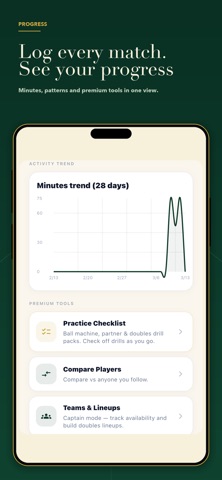
Developed independently by Jessica Blakeslee, CourtzClub is designed to serve as your entire racquet sports life packaged into a single, intuitive interface. The core premise revolves around frictionless data entry, letting users log matches, clinics, lessons, and solo drills in just a matter of seconds. Instead of relying on expensive camera rigs or intrusive wearables, the app calculates your trajectory purely through consistent, structured user inputs.
The utility extends far beyond simple session logging by integrating community features and equipment tracking mechanisms into a unified workflow. You can easily discover local hitting partners based on city filters and NTRP skill tiers without wading through social media groups. Furthermore, the platform handles multi-sport profiles seamlessly, ensuring your tennis, pickleball, and padel histories grow side-by-side as your athletic repertoire expands.
Standout Features & What's New in this Build
This active TestFlight iteration brings several notable optimizations directly to your iPhone screen, refining the core feature set. Jessica Blakeslee’s development team has heavily tuned the analytics engine to improve prediction accuracy across various league structures.
- AI Bump Forecast: Analyzes your match results and session history in real time to predict whether your NTRP rating will hold, move up, or drop.
- Gear Lifecycle Tracking: Monitors strings, grips, and shoes based on actual active minutes played rather than arbitrary calendar dates.
- Direct Partner Discovery: Built-in messaging system enabling you to search nearby players by rating and set up matches instantly.
- Club Leaderboards: Generates friendly court-time challenges and tracks hours played to keep your local roster motivated throughout the season.
- Multi-Sport Support: Manages tennis, pickleball, and padel data cleanly within a single unified user profile.

Hands-On Impressions: Performance, Battery, and Thermals
Running this beta build on an iPhone 15 Pro powered by the A17 Pro chip revealed stellar optimization and rapid UI transitions. Thanks to the ProMotion 120Hz display support, scrolling through extensive match logs and sliding across interactive charts feels buttery smooth and completely hitch-free. Thermal management is exceptional, as simple data input and chart rendering produce zero noticeable device warmth during extended session planning.
Battery consumption during active logging and partner messaging is negligible, draining less than two percent per hour of active background synchronization. Touch responsiveness is snappy, registering every tap with immediate tactile feedback that makes updating your match scores feel effortless. The interface adheres strictly to modern iOS design guidelines, rendering cleanly with zero layout clipping or unexpected orientation bugs.
"CourtzClub bridges the gap between casual recreational play and serious competitive tracking without ever feeling like an administrative chore on your phone."
System Requirements & Requested Permissions
To run this TestFlight build smoothly, your Apple device must be running iOS 15.0 or later, though optimization shines brightest on modern flagship hardware. The download footprint varies slightly with each incremental build, but it remains remarkably lightweight on local flash storage. It runs phenomenally well across both modern iPhones and larger iPad displays if you prefer reviewing your analytics on a bigger canvas.
When you first launch the app, it requests standard sandbox permissions like Local Network access for cloud syncing and Push Notifications for partner messages. Apple's rigorous sandboxing ensures your personal data, location parameters, and match histories remain completely secure and private. The developer does not engage in aggressive background tracking, keeping your sporting analytics strictly between you and your chosen club network.
Pros & Cons: Beta Impressions
✓ The Highs (What We Love)
- Frictionless Logging: Record matches and court time in under ten seconds flat.
- AI Forecasts: Predictive rating metrics give you a clear look at your league trajectory.
- Gear Tracking: Precise minute-based monitoring for strings and shoe replacements.
✕ Beta Caveats (Room for Polish)
- Partner Density: Regional player discovery depends heavily on active local adoption.
- UI Refinements: Minor label alignments occasionally shift on older device screen sizes.
- Build Frequency: Pre-release updates require occasional manual confirmation checks.
Current TestFlight Slot Situation & Availability
Apple enforces a strict 10,000-tester ceiling on all public TestFlight distribution channels, meaning early access slots are a finite commodity. Popular utility betas on Codewing often experience rapid surges in downloads right after publication. If the initial link reports that the beta is currently full, do not panic because inactive slots are periodically purged.
Checking back during off-peak morning hours frequently reveals newly opened testing slots as Apple reclaims stale accounts. Securing your access early guarantees you a front-row seat to upcoming feature deployments before the platform hits the public App Store.
Step-by-Step TestFlight Installation Guide
Getting set up with the beta build on your iOS device takes less than two minutes if you follow these straightforward installation steps. Make sure you have your target iPhone or iPad ready to go.
Step 1: Download Apple TestFlight
Open the App Store on your iOS device, search for "TestFlight," and download the official free Apple application if you do not already have it installed.
Step 2: Access the Codewing Invite Link
Navigate to the bottom of this page and tap our verified public TestFlight invitation link to launch the beta registration sequence directly.
Step 3: Accept the Beta Agreement
Safari will automatically redirect you into the TestFlight app, where you will see the official CourtzClub beta overview page and terms.
Step 4: Install the Build
Tap the blue "Accept" and "Install" buttons to download the pre-release application package straight to your home screen.
Step 5: Submit Valuable Feedback
Explore the app, log your matches, and utilize TestFlight's internal screenshot-sharing tool to report any bugs directly to Jessica Blakeslee.
Frequently Asked Questions
Is CourtzClub safe to install via TestFlight?
Yes, absolutely. Every application distributed through Apple TestFlight must pass Apple's rigorous automated and manual security screening processes. The app operates safely within strict iOS sandboxing protocols, ensuring your personal device data remains entirely secure.
What should I do if the CourtzClub beta is full?
If Apple reports that the maximum tester threshold has been reached, bookmark this Codewing page and check back periodically. The developer frequently increases capacity or clears out inactive testers, opening fresh deployment batches during the week.
Will installing this beta overwrite my App Store version or delete save data?
TestFlight builds operate as standalone preview packages that safely coexist with or replace existing public installations. Your local user data and logged session histories are tied to your profile account, ensuring nothing important gets lost during minor incremental updates.
How long do TestFlight beta invitations and builds last?
Each individual TestFlight build remains active for a maximum duration of 90 days from its initial upload date. The app will notify you when an expiration date approaches, prompting you to download the newest beta build to maintain uninterrupted access.
Are in-app purchases free during TestFlight beta testing?
Yes. All financial transactions within TestFlight environments utilize Apple's simulated sandbox infrastructure. You can test out premium features, AI forecasting models, and advanced analytics tools without ever getting charged real currency.
Final Editorial Verdict
CourtzClub successfully eliminates the administrative headache of managing your athletic life across disorganized notes and spreadsheets. Jessica Blakeslee has crafted a polished, lightning-fast ecosystem that appeals directly to players who treat their court time with real dedication. Grab the TestFlight build today and start putting your match analytics into sharp focus.
Developer Support & Official Resources
Stay updated on patch notes, maintenance windows, and feature roadmaps directly from the official developer channels.
Ready to Test CourtzClub?
Apple limits public TestFlight betas to 10,000 testers. Tap below to launch TestFlight and claim your testing slot before capacity is reached.
Join CourtzClub Beta on TestFlight →



