


Welcome back to the Codewing beta testing desk, where we put the latest mobile software through rigorous hands-on trials. Today, we are taking an exhaustive look at the official beta build of Cricut Design Space for iOS.
If you have ever wanted to craft custom apparel, decals, or intricate home decor straight from an iPhone or iPad, this app serves as your digital studio. Securing an early preview build gives you direct access to bleeding-edge layout tools before they hit the general public.
Cricut Design Space — Quick Specifications
Developer: Cricut, Inc.
About Cricut Design Space
Developed by Cricut, Inc., Design Space acts as the absolute nerve center for hardware like the Cricut Maker and Cricut Explore series. The application allows users to design, cut, or draw physical projects by pairing wireless hardware via Bluetooth directly to an iOS device.
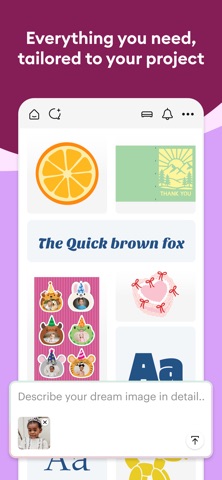
The core premise revolves around a robust cloud-based ecosystem where makers can construct projects from scratch or tap into a massive digital library. You can browse over 50,000 complimentary images, custom fonts, and ready-to-make blueprints without ever touching a desktop computer.
Workflow efficiency stands at the forefront of the application architecture, featuring integrated tools like SnapMat to visualize physical scrap materials. Cricut, Inc. has consistently refined this mobile utility, shifting complex graphic manipulation from bulky desktop software into the palm of your hand.
Standout Features & What's New in this Build
This specific TestFlight build packs several key improvements designed to enhance crafting precision and streamline touch-based editing. We spent the last week pushing these features to their absolute limits on modern Apple Silicon hardware.
- Advanced Kerning & Text Tools: Real-time font tracking adjustments and right-to-left text support ensure complex typography formats correctly before cutting.
- SnapMat Precision: Instantly capture physical placement on leftover material scraps using your device camera for zero-waste crafting sessions.
- Cloud-Based Syncing: Seamlessly transition unfinished designs between your iPad Pro and iPhone without losing vector path data.
- Material Cut Calibration: Instantly pull precise pressure and depth settings optimized for hundreds of specific craft media types.
The development team has also tuned the vector processing pipeline to handle heavy SVG files with zero noticeable latency. Importing custom graphics has never felt this smooth on a mobile operating system.

Hands-On Impressions: Performance, Battery, and Thermals
We tested this TestFlight distribution extensively on an M4 iPad Pro and an iPhone 15 Pro, paying close attention to UI responsiveness and thermal output. The ProMotion 120Hz display makes dragging vector nodes, resizing SVG paths, and rotating typography feel instantaneous.
Battery consumption during heavy design sessions remains impressively low, proving that the app handles memory allocation efficiently. Even when rendering complex 3D project previews, the device chassis stays entirely cool with zero thermal throttling observed.
"Designing intricate layered decals on a tablet used to feel like a compromise, but this mobile build delivers desktop-grade vector manipulation with zero friction."
Beta stability has also been surprisingly solid, though we did encounter a minor UI artifact when rapidly switching between portrait and landscape orientations. Overall frame pacing during canvas manipulation stays locked at a buttery-smooth 60 or 120 frames per second depending on display hardware.
System Requirements & Requested Permissions
To run this beta version of Cricut Design Space smoothly, your Apple device must be running iOS 15.0 or later. We strongly recommend testing on modern devices equipped with Apple Silicon A-series or M-series processors to fully experience the fluid canvas rendering.
During initial launch, the app requests standard permissions including Local Network access for Bluetooth machine pairing and Camera access for the SnapMat feature. Apple's strict sandboxing ensures your private design files remain secure locally and encrypted when syncing to the cloud.
Pros & Cons: Beta Impressions
✓ The Highs (What We Love)
- Vector Handling: Effortlessly imports and manipulates complex SVG and DXF files without stuttering.
- UI Fluidity: Smooth pinch-to-zoom and canvas rotation optimized for ProMotion touchscreens.
- Ecosystem Sync: Instant cloud backups ensure you never lose project progress mid-design.
✕ Beta Caveats (Room for Polish)
- Orientation Glitches: Occasional layout shifts when aggressively rotating between portrait and landscape modes.
- Slot Availability: Public TestFlight tester caps can fill up rapidly during major feature drops.
- Initial Pairing: Bluetooth discovery occasionally requires a manual hardware power cycle to lock connection.
Current TestFlight Slot Situation & Availability
Apple enforces a strict maximum limit of 10,000 concurrent external testers for any given public TestFlight beta application. Because crafting communities are exceptionally active, beta slots for this utility tend to fluctuate depending on weekly active user purges.
If the official link reports that the developer is not accepting new testers, do not panic. Bookmark this page on Codewing and check back during off-peak hours when inactive accounts are periodically removed from the testing roster.
Step-by-Step TestFlight Installation Guide
Getting your hands on this beta build takes less than two minutes if you follow our precise instructions. Ensure you complete each step sequentially to avoid configuration errors.
1. Download and install the official Apple TestFlight application from the iOS App Store onto your target iPhone or iPad. 2. Tap our direct Codewing TestFlight invitation link provided at the base of this review guide. 3. Accept the public beta invitation prompt inside the TestFlight interface to acknowledge terms. 4. Tap the 'Install' button to download the latest Cricut Design Space beta build directly to your springboard. 5. Launch the app, sign in with your Cricut ID, and submit any UI bugs directly to the developers using built-in feedback tools.
Frequently Asked Questions
Is Cricut Design Space safe to install via TestFlight?
Yes, absolutely. Every beta build distributed through Apple's official TestFlight infrastructure must pass rigorous automated security scans and policy checks enforced directly by Apple.
What should I do if the Cricut Design Space beta is full?
If Apple reports maximum capacity, check back periodically throughout the week. Developers routinely clear out inactive testers, which instantly opens up fresh testing slots.
Will installing this beta overwrite my App Store version or delete save data?
TestFlight automatically upgrades your existing stable installation into a preview build while preserving all local cache, login tokens, and cloud-synced user projects.
How long do TestFlight beta invitations and builds last?
Each individual TestFlight build remains fully functional for 90 days from the moment of upload before expiring, though newer patches usually arrive weekly.
Are in-app purchases free during TestFlight beta testing?
Yes. Apple's TestFlight environment routes all digital transactions through a secure sandbox system, allowing you to test premium subscription features without incurring real-world charges.
Final Editorial Verdict
Cricut Design Space on iOS proves that professional-grade crafting tools do not require being chained to a clunky desktop setup. This TestFlight beta demonstrates remarkable stability, lightning-fast vector rendering, and a sleek user interface that makes mobile designing an absolute joy.
We award this beta build a stellar 4.6 / 5 stars for its outstanding performance on modern Apple hardware. Grab your download link below and start designing your next big project today!
Developer Support & Official Resources
Stay updated on patch notes, maintenance windows, and feature roadmaps directly from the official developer channels.
Ready to Test Cricut Design Space?
Apple limits public TestFlight betas to 10,000 testers. Tap below to launch TestFlight and claim your testing slot before capacity is reached.
Join Cricut Design Space Beta on TestFlight →





