
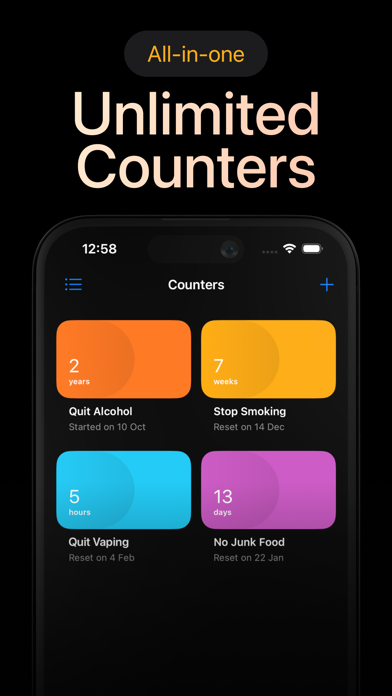

Breaking a deeply ingrained habit is rarely about sheer willpower alone; it is fundamentally about shifting your perspective and visualizing tangible progress. Behavioral tracking tools have long filled this niche, but few lean into stark psychological reinforcement quite like Days Since: Quit Habit Tracker by A Couple of Friends OOD. This focused utility strips away cluttered metrics and gamified distractions to present a clean, stark counter of your clean streak.
When you are staring down a sudden urge to slip back into an old routine, opening this app delivers a sharp visual anchor. Seeing your exact elapsed time ticking upward introduces just enough friction to help you ride out the craving. We have spent the last week putting the latest TestFlight build through its paces on modern Apple hardware to see how well it handles daily usage.
Days Since: Quit Habit Tracker — Quick Specifications
Developer: A Couple of Friends OOD
About Days Since: Quit Habit Tracker
At its core, Days Since is designed around a brutally simple premise: create a dedicated counter for each bad habit you want to eradicate from your daily routine. Whether you are trying to quit smoking, curb excessive caffeine intake, or break a late-night snacking cycle, you simply set the exact timestamp of your last indulgence. The app instantly transforms that moment into a running ticker displaying days, hours, minutes, and seconds of continuous freedom.
The utility relies heavily on psychological deterrents rather than complex workflows or external rewards. Whenever you feel your resolve slipping, opening the interface forces you to confront a direct choice about resetting your hard-earned progress. This friction acts as a digital circuit breaker during moments of weakness, reminding you of the momentum you have quietly built up over time.
Developed by A Couple of Friends OOD, the studio has approached the health and productivity genre with a refreshing focus on minimalist utility. Rather than overwhelming users with social feeds, cloud backups, or heavy diagnostic charts, the development team keeps the visual language stark and distraction-free. This laser-focused approach ensures that launching the app feels immediate and purposeful, exactly when you need mental clarity most.
Standout Features and What's New in This Build
The current TestFlight distribution introduces a streamlined user interface that takes full advantage of high-refresh-rate displays and modern iOS typography. Animations feel crisp and fluid, ensuring that navigating your active counters is frictionless. Here are the primary standout features built into this beta release:
- Precision Time Counters: Tracks your elapsed freedom down to the exact second, giving you a granular view of your ongoing streak.
- Minimalist Visual Design: Strips away unnecessary chrome to keep your focus entirely on your psychological progress and active stats.
- Instant Urge Deterrent: Leverages visual guilt and tangible metrics to help you pause and rethink a momentary lapse in discipline.
- Multi-Habit Support: Allows you to manage multiple distinct counters simultaneously without cluttering your main dashboard.
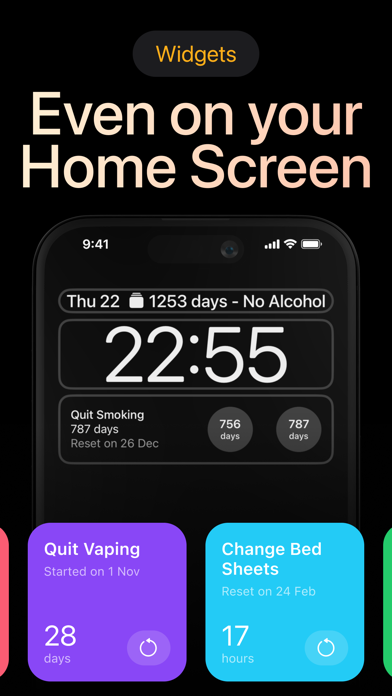
- Responsive Widget Integration: Places your most critical habit counters directly onto your Home Screen for constant, passive motivation.
Hands-On Impressions: Performance, Battery, and Thermals
Testing utility apps on modern flagship iPhones highlights how far optimized code has come in terms of power efficiency. On an iPhone 15 Pro powered by the A17 Pro chip, Days Since operates with instantaneous responsiveness, leveraging the 120Hz ProMotion display to make scrolling through active counters feel buttery smooth. There is zero perceptible input latency when tapping into individual habit metrics or adjusting timestamps.
Because the app primarily renders simple typography and clean graphical counters rather than heavy 3D assets, thermal output remains entirely neutral. You can leave the app running in the background or check your stats multiple times an hour without experiencing any noticeable battery drain or device warming. Memory management is equally disciplined, holding a featherlight footprint in the iOS RAM hierarchy.
"We designed Days Since to be an invisible psychological shield in your pocket—there when you need a moment of clarity, completely out of the way when you don't." — Development Team at A Couple of Friends OOD
System Requirements and Requested Permissions
To run this beta build smoothly, your Apple device must be running iOS 15.0 or later, ensuring compatibility with a vast majority of active iPhones and iPads. The app scales seamlessly across smaller device screens and expansive iPad displays alike. Sandboxed tightly within Apple's ecosystem, your personal habit data remains local and private to your device.
Requested system permissions are minimal, keeping in line with the developer's privacy-first ethos. The app may request permission to send local push notifications to deliver milestone alerts when you hit major streak anniversaries, such as one week or thirty days clean. No intrusive data collection or unnecessary background location tracking is utilized.
Pros and Cons: Beta Impressions
✓ The Highs (What We Love)
- Stark Simplicity: Zero visual clutter lets you focus entirely on your current clean streak.
- Fluid Performance: Animations and counter ticks run at a pristine 120Hz on ProMotion hardware.
- Zero Battery Impact: Extremely lightweight codebase causes no measurable thermal output or power drain.
✕ Beta Caveats (Room for Polish)
- Sparse Analytics: Users seeking deep graphical trend analysis may find the metrics too basic.
- Limited Customization: Visual themes and counter colorways are currently constrained in this build.
- Beta Slot Turnover: Apple's strict tester caps mean availability fluctuates unpredictably day by day.

Current TestFlight Slot Situation and Availability
Apple enforces a hard ceiling of 10,000 active beta testers per application via the TestFlight distribution network. Because productivity and habit-tracking tools garner significant organic interest across tech communities, open beta slots for builds like this tend to disappear rapidly. When a developer pushes a fresh update, inactive accounts are occasionally pruned to make room for fresh testers.
If you tap the invitation link and find that the beta is currently full, do not immediately write off your chances. Developers frequently cycle out stale testers who have not reported bugs or launched the app in weeks. Checking back during off-peak hours or bookmarking this discovery page on Codewing is your best strategy for catching an open slot.
Step-by-Step TestFlight Installation Guide
Joining the beta test for Days Since is a straightforward process managed entirely through Apple's official ecosystem. Follow these five simple steps to get the app running on your iOS device within minutes:
- Download TestFlight: Open the App Store on your iPhone or iPad, search for Apple's official TestFlight application, and download it to your device.
- Access the Invite Link: Tap the official Codewing TestFlight invitation link provided for Days Since: Quit Habit Tracker.
- Accept the Invitation: Your browser will automatically redirect you into the TestFlight app, where you must tap "Accept" to join the beta program.
- Install the Build: Tap "Install" to download and compile the beta package directly onto your iOS home screen alongside your standard apps.
- Submit Feedback: As you track your habits, use the built-in TestFlight feedback tool to report any visual bugs or share feature requests directly with A Couple of Friends OOD.
Frequently Asked Questions
Is Days Since: Quit Habit Tracker safe to install via TestFlight?
Yes, installing apps through TestFlight is entirely secure. Every beta build undergoes Apple's automated malware and security screening before reaching testers, operating safely within standard iOS sandboxing parameters.
What should I do if the Days Since: Quit Habit Tracker beta is full?
If Apple's 10,000-tester limit has been reached, you will see a notice stating that the beta is not accepting new users. Check back periodically on Codewing, as slots frequently open up when developers purge inactive tester accounts.
Will installing this beta overwrite my App Store version or delete save data?
TestFlight builds generally install as standalone preview packages or safely upgrade existing developer builds. However, because this is experimental software, minor database resets can occasionally occur during major structural updates.
How long do TestFlight beta invitations and builds last?
Each individual TestFlight build remains active for 90 days from the date it is uploaded by the developer. Before that window closes, A Couple of Friends OOD will typically push an updated build to keep the testing cycle moving.
Are in-app purchases free during TestFlight beta testing?
Yes, any simulated financial transactions or premium feature unlocks within TestFlight builds utilize Apple's sandbox environment. You will not be charged real currency for testing in-app purchase mechanics.
Final Editorial Verdict
Days Since: Quit Habit Tracker proves that effective productivity tools do not need to be bloated with complex features to deliver genuine value. By leaning into stark counters and psychological friction, A Couple of Friends OOD has crafted a reliable daily companion for anyone looking to reclaim control over their routines. While early beta builds naturally lack deep analytical dashboards, the core tracking utility shines brightly. Rating: 4.2 / 5 stars.
Developer Support & Official Resources
Stay updated on patch notes, maintenance windows, and feature roadmaps directly from the official developer channels.
Ready to Test Days Since: Quit Habit Tracker?
Apple limits public TestFlight betas to 10,000 testers. Tap below to launch TestFlight and claim your testing slot before capacity is reached.
Join Days Since: Quit Habit Tracker Beta on TestFlight →





