

Finding high-end sports simulators that run fluidly on mobile hardware is a constant challenge for competitive iOS gamers. ElitePing arrives on the scene promising deep athletic management alongside high-intensity track and field events. Testing this fresh beta build gives enthusiasts an early window into how POWERPLAY MANAGER is optimizing their engine for Apple devices.
Getting your hands on pre-release software requires a reliable invitation link and a quick setup process through Apple's official testing utility. This comprehensive review breaks down the performance, standout mechanics, and system requirements for the current beta build. Read on to discover how you can secure your spot and start training your digital athletes today.
ElitePing — Quick Specifications
Developer: POWERPLAY MANAGER, s.r.o.
About ElitePing
ElitePing functions as an action sports game packed with sophisticated RPG mechanics, meticulous simulation systems, and robust manager tools. Players take total control of their athletes, steering every facet of their professional careers from training regimens to equipment upgrades. You decide when to push for new personal bests, how to allocate skill points, and when to enter high-stakes global tournaments.
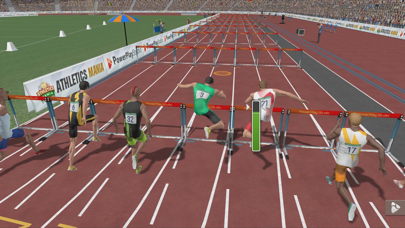
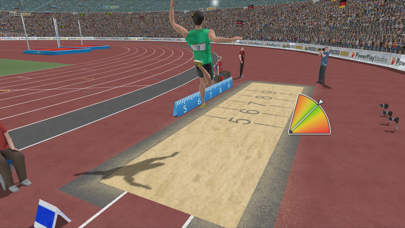
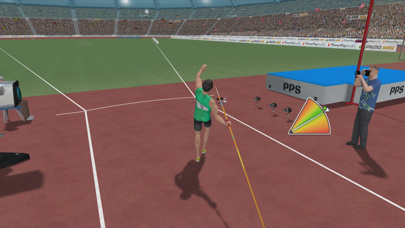
The core gameplay loop revolves around a massive roster of track and field disciplines that test different physical and tactical attributes. You can compete in sprinting events like the 100m, 110m hurdles, and 400m dash, or test your endurance in the grueling 1500m race. Field events are fully represented too, featuring long jump, high jump, triple jump, pole vault, shot put, discus, javelin, and hammer throw.
Beyond individual events, players can tackle multi-discipline competitions like the pentathlon, heptathlon, and decathlon to prove their overall dominance. POWERPLAY MANAGER, s.r.o. has also integrated club mechanics that let users team up with friends to build powerhouse organizations. Whether you prefer a solitary career mode driven by a rich story or multiplayer showdowns against international opponents, the gameplay offers tremendous depth.
Standout Features & What's New in this Build
This active TestFlight build brings several compelling additions straight to your iPhone display, blending classic sports management with twitch-based minigames. The developers have fine-tuned the balancing for global leaderboards, ensuring that dedicated players always have a clear path to the top. Here are the core features included in the current beta release:
- Real Famous Athletes: Compete alongside and against legendary sports stars integrated directly into the simulation's career tracks.
- Deep RPG Progression: Upgrade specific attributes, purchase superior equipment, and unlock advanced skills tailored to your preferred events.
- Club Competitions: Form cooperative teams with other real-world players to conquer club rankings and dominate regional tournaments.
- Diverse Minigames: Experience action-oriented segments during events that directly test your timing and reflexes on the track or field.
- Global Multiplayer: Test your customized athletes in competitive matchmaking against human opponents hailing from all over the world.
Hands-On Impressions: Performance, Battery, and Thermals
Firing up ElitePing on modern Apple hardware immediately highlights the benefits of robust optimization for Apple Silicon processors. Frame pacing remains rock-solid, and UI transitions render instantly without any noticeable stutters or input lag. Devices equipped with ProMotion 120Hz displays benefit from exceptionally smooth animations during the sprinting and jumping minigames.
Thermal management is remarkably efficient, even during extended play sessions involving multiple decathlon events and club management screens. The game causes minimal battery drain compared to heavier 3D open-world titles, allowing for prolonged training sessions on the go. Touch responsiveness is pinpoint accurate, which is critical for nailing the precise timing windows required in pole vault and javelin events.
"Our goal with ElitePing was to marry the tactical depth of sports management with immediate, responsive athletic controls that feel completely natural on a touchscreen." – POWERPLAY MANAGER Development Team
System Requirements & Requested Permissions
To run this beta build smoothly, your Apple device must be running iOS 15.0 or later. The game scales exceptionally well across a wide variety of hardware configurations, performing admirably on older A-series processors while shining brightest on modern devices. Installation requires a modest amount of free storage space, which varies slightly depending on incoming TestFlight incremental updates.
Permission requests remain minimal and entirely transparent, respecting user privacy through Apple's strict sandboxing framework. The app may request local network access for seamless multiplayer matchmaking and push notifications to alert you when training cycles or club tournaments conclude. No invasive tracking permissions are required, ensuring your personal data stays strictly on your device.
Pros & Cons: Beta Impressions
✓ The Highs (What We Love)
- Incredible Variety: Twelve distinct track and field disciplines keep the gameplay loop fresh and engaging.
- Fluid Performance: Excellent frame rate stability and low thermal footprint on modern Apple Silicon hardware.
- Engaging Progression: Deep RPG and club management mechanics provide long-term strategic motivation.
✕ Beta Caveats (Room for Polish)
- UI Complexity: The sheer number of management menus can present a steep learning curve for newcomers.
- Occasional Softlocks: Rare loading hitches can occur when switching rapidly between global club screens.
- Slot Limitations: Apple's standard TestFlight capacity caps mean beta access fills up extremely quickly.
Current TestFlight Slot Situation & Availability
Apple enforces a strict cap of 10,000 concurrent external testers for any public TestFlight beta program. Because sports simulation fans and community members are actively hunting for new competitive titles, these slots fill up fast. Securing access requires prompt action as soon as an open invitation link becomes available.
If you tap the invite link and encounter a message stating the build is currently full, do not panic. Developers routinely purge inactive accounts and dormant testers to make room for fresh feedback providers. Keeping this Codewing guide bookmarked and checking back during off-peak hours gives you the best statistical chance of grabbing an opening.
Step-by-Step TestFlight Installation Guide
Installing ElitePing on your iPhone or iPad takes only a couple of minutes once you have the correct link ready. Follow these five simple steps to get the beta up and running on your device:
- Download and install the official Apple TestFlight app directly from the App Store if you haven't already.
- Open your iOS device browser and tap the official Codewing TestFlight invitation link provided on this page.
- Accept the prompt to open the link inside the TestFlight application, which will display the ElitePing beta details.
- Tap the "Install" or "Update" button to download the latest preview build directly to your home screen.
- Launch the game, create your athlete profile, and use the built-in feedback tool in TestFlight to report any bugs you encounter.
Frequently Asked Questions
Is ElitePing safe to install via TestFlight?
Yes, the app is completely safe. Every build distributed through TestFlight undergoes Apple's rigorous automated security review and operates inside a secure iOS sandbox environment.
What should I do if the ElitePing beta is full?
If slots are currently maxed out, bookmark this page on Codewing and check back periodically. Developers frequently increase tester limits or purge inactive users, opening up new spots unexpectedly.
Will installing this beta overwrite my App Store version or delete save data?
TestFlight builds generally install as a standalone preview package or safely update existing beta data. However, because this is pre-release software, minor progress wipes can occasionally happen between major test builds.
How long do TestFlight beta invitations and builds last?
Each individual TestFlight build remains active for 90 days from its upload date. POWERPLAY MANAGER will push regular updates through the app to ensure testers always have access to the newest fixes.
Are in-app purchases free during TestFlight beta testing?
Yes, any simulated microtransactions or in-game purchases within a TestFlight build use Apple's sandbox currency, meaning you will not be charged real money while evaluating the store mechanics.
Final Editorial Verdict
ElitePing successfully bridges the gap between active sports minigames and strategic career management on iOS. The current TestFlight build demonstrates tremendous promise, boasting smooth performance and impressive tactical depth across a wide variety of events. Sports fans looking for a fresh competitive challenge should grab the beta link immediately.
Developer Support & Official Resources
Stay updated on patch notes, maintenance windows, and feature roadmaps directly from the official developer channels.
Ready to Test ElitePing?
Apple limits public TestFlight betas to 10,000 testers. Tap below to launch TestFlight and claim your testing slot before capacity is reached.
Join ElitePing Beta on TestFlight →






