Finding a dedicated audiobook player that respects your local file library can sometimes feel like an uphill battle. The stock Apple Books app handles purchased audiobooks reasonably well, but importing standalone M4B or MP3 files often turns into a frustrating metadata nightmare.
Enter Every Word, a fresh utility built from the ground up to solve these exact headaches. As a veteran TestFlight tester tracking the indie iOS space, I've spent the past week putting this pre-release build through its paces on an iPhone 16 Pro.
Every Word: Audiobook Player — Quick Specifications
Developer: Mike Apurin
About Every Word: Audiobook Player
Developed entirely by solo creator Mike Apurin, Every Word is designed to act as a robust, frictionless hub for your personal audiobook collection. Users can bring their own M4B and MP3 files, storing them either locally on their iOS hardware or syncing them seamlessly across devices via iCloud Drive.
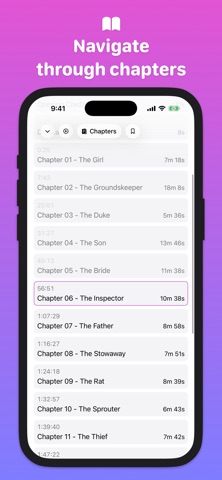
The core utility of the app revolves around organization, playback management, and a clean, clutter-free user interface. Rather than overwhelming you with bloated podcast feeds or store tabs, Every Word focuses purely on your library, offering custom filters, sorting tools, and editable book metadata.
Apurin built the project to address the specific friction points found in mainstream media players. Whether you are managing massive multi-part fantasy epics or dense non-fiction audio files, the app handles chapters, customizable bookmarks with notes, and precise playback controls with remarkable elegance.
Standout Features & What's New in this Build
This latest TestFlight build introduces several refinement passes alongside core features that make long listening sessions a breeze. The app's standout capabilities cater heavily to power users who consume dozens of hours of spoken-word audio every month.
- Shorten Silences: Intelligently cuts out awkward pauses between words and sentences without introducing artifacts, letting you speed through books up to 20 percent faster while keeping natural voice cadences.
- Granular Speed Control: Fine-tune playback anywhere from 0.5x up to 3x speed, giving you precise control over narration pacing.
- Audio Enhancement: Toggle an explicit volume boost and clarity filter to make older or poorly mastered audio files sound crisp on built-in stereo speakers.
- CarPlay Integration: Full native browsing and playback support for your vehicle's dashboard display during commutes or long road trips.
- Listening Stats: Track your literary habits with detailed analytical breakdowns spanning daily, weekly, monthly, and yearly intervals.

Hands-On Impressions: Performance, Battery, and Thermals
Testing audio players on modern Apple Silicon usually highlights efficiency over heavy raw compute, and Every Word shines in this department. Running on an A18 Pro chip paired with a 120Hz ProMotion display, scrolling through dense library lists feels buttery smooth with zero dropped frames or stutter.
Thermal headroom during extended listening sessions remains pristine, with the device staying completely cool even when background tasks process iCloud sync updates. Battery consumption is remarkably light, registering negligible drain over a four-hour background playback session with the screen locked.
"Every Word is built to get out of your way and let the narration take center stage. This TestFlight build proves that indie audio utilities can outclass bloated mainstream apps through sheer focus on performance and thoughtful utility features."
System Requirements & Requested Permissions
To run this beta build of Every Word, your iOS device must be running iOS 15.0 or later. While the app performs swimmingly on older legacy hardware, the animations and layout feel tailored for modern OLED displays and high-refresh-rate panels.
The app requests standard sandboxed permissions, primarily utilizing Local Network access for potential sync features and iCloud integration for cross-device progress tracking. Apple's rigorous app sandboxing ensures your local files and listening data remain strictly private to your device and personal cloud container.
Pros & Cons: Beta Impressions
✓ The Highs (What We Love)
- Local File Management: Seamless import and sync for M4B and MP3 files via iCloud Drive.
- Shorten Silences Engine: Cleanly accelerates pacing without distorting narrator voices.
- CarPlay Readiness: Reliable vehicle dashboard browsing and playback controls out of the box.
✕ Beta Caveats (Room for Polish)
- Library Limits: The free tier caps library capacity at two books until you unlock Plus.
- Metadata Editing: Occasional edge cases where custom cover art fails to update instantly.
- Build Stability: Minor UI layout shifts when rapidly toggling between dark mode accents.
Current TestFlight Slot Situation & Availability
Apple enforces a strict cap of 10,000 external testers for any given TestFlight public link. Because indie utilities with genuine utility draw massive crowds from enthusiast communities, open beta slots for polished apps tend to fluctuate rapidly.
If you encounter a message stating that the developer is not accepting additional testers, it simply means the current 10,000-user threshold has been temporarily maxed out. Developers routinely prune inactive accounts or push new build allocations, so checking back during off-peak hours often yields an open slot.
Step-by-Step TestFlight Installation Guide
Getting set up with the pre-release build takes less than two minutes if you follow these straightforward instructions. Make sure you have your iOS device ready with an active internet connection.
- Download and install the official Apple TestFlight application from the App Store if you do not already have it installed on your device.
- Tap the official Codewing TestFlight invitation link provided on this page to launch the beta portal directly within iOS.
- Accept the beta participation agreement prompt to register your device as an authorized tester for the application.
- Tap the Install button to download the Every Word beta package onto your iOS home screen alongside your existing apps.
- Open the app, import your first audiobook file, and use the built-in feedback tool in TestFlight to report any bugs directly to Mike Apurin.
Frequently Asked Questions
Is Every Word: Audiobook Player safe to install via TestFlight?
Yes, installation is entirely secure. Every TestFlight build undergoes Apple's automated malware and security screening before distribution, and apps operate strictly inside iOS security sandboxes.
What should I do if the Every Word: Audiobook Player beta is full?
If slots are currently exhausted, bookmark this page on Codewing and check back periodically. Developer slot cleanups and new build expansions frequently open up new availability windows.
Will installing this beta overwrite my App Store version or delete save data?
TestFlight builds operate as standalone pre-release packages. If an App Store version exists, the beta will update it, but your local files and iCloud sync data remain safely preserved.
How long do TestFlight beta invitations and builds last?
Every individual TestFlight build remains active for 90 days from its initial upload date. The developer will push updated builds through TestFlight well before expiration to keep the software current.
Are in-app purchases free during TestFlight beta testing?
Yes. The Apple TestFlight environment utilizes a simulated sandbox billing system, allowing testers to evaluate premium membership features without incurring actual charges.
Final Editorial Verdict
Every Word proves that a focused, single-developer utility can easily rival bloated enterprise media apps. Its snappy performance, clever silence-trimming algorithms, and clean design make it an essential download for avid audiobook listeners.
Rating: 4.5 / 5 Stars
Developer Support & Official Resources
Stay updated on patch notes, maintenance windows, and feature roadmaps directly from the official developer channels.
Ready to Test Every Word: Audiobook Player?
Apple limits public TestFlight betas to 10,000 testers. Tap below to launch TestFlight and claim your testing slot before capacity is reached.
Join Every Word: Audiobook Player Beta on TestFlight →