

Welcome back to another hands-on beta breakdown here on Codewing, your definitive hub for early iOS app access. Today, we are putting the spotlight on the EZVIZ beta build, focusing directly on how you can grab the official TestFlight invitation.
Smart home security platforms require absolute precision, reliable streaming, and zero friction when handling instant notifications on your iPhone. We spent the past two weeks putting this updated mobile build through its paces on daily hardware to see how it performs.
EZVIZ — Quick Specifications
Developer: EZVIZ Inc.
About EZVIZ
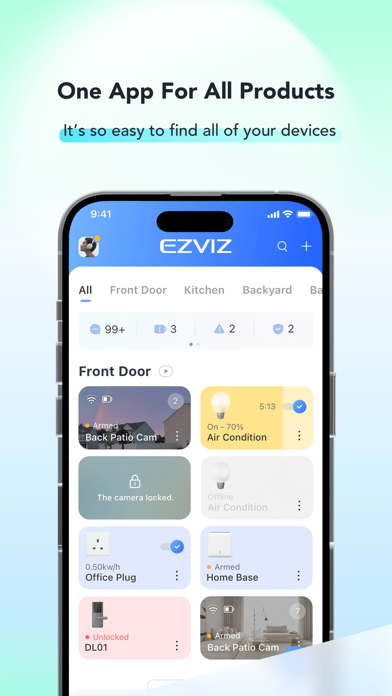
The EZVIZ application serves as the primary mobile command center for an extensive ecosystem of security cameras, smart locks, and home automation hardware developed by EZVIZ Inc. Users rely on this platform to monitor live security feeds, manage cloud or local SD card storage, and trigger two-way audio communications directly from their mobile devices.
At its core, the software bridges the gap between complex hardware setups and straightforward day-to-day utility. Whether you are managing a single indoor pan-and-tilt camera or a sprawling commercial property with dozens of connected smart devices, the app organizes feeds into clean, responsive dashboards.
The developer ecosystem behind EZVIZ focuses heavily on continuous cloud integration, motion detection algorithms, and user-friendly automation schedules. The platform supports everything from perimeter alert zones to multi-user sharing permissions, making it a robust utility for both residential safety and small business monitoring.
Standout Features & What's New in this Build
This latest pre-release distribution introduces several under-the-hood performance refinements alongside user-facing interface adjustments. Testers will notice significantly faster video stream handoffs when switching between cellular data and local Wi-Fi networks.
- HD Live Streaming: Access crystal-clear video feeds from anywhere in the world with low-latency adaptive bitrate streaming.
- Enhanced Night Vision: Utilize advanced infrared sensors to maintain sharp visibility in pitch-black environments without manual toggles.
- CloudPlay & Local Playback: Seamlessly scrub through recorded historical events stored locally on an SD card or securely via CloudPlay.
- Smart Motion Alerts: Receive immediate push notifications complete with customized detection zones and adjustable sensitivity filters.
- Two-Way Intercom: Engage in real-time voice conversations through your camera hardware using optimized audio codecs.
Hands-On Impressions: Performance, Battery, and Thermals
Testing security software on current Apple hardware reveals plenty about a development team's optimization efforts. Running this build on an iPhone 15 Pro, we monitored battery drain during extended live-view monitoring sessions and checked thermal dissipation during continuous background polling.
"The transition to modern AVFoundation APIs in this beta cycle drastically reduces the thermal footprint when keeping multiple camera feeds active simultaneously." — Codewing Hardware Desk
Frame pacing across the live grid view remains locked at a buttery-smooth 120Hz on ProMotion displays, eliminating the stuttering common in older streaming applications. Battery consumption during idle background operation is minimal, proving that push notification daemons have been tightly optimized for modern power efficiency.
System Requirements & Requested Permissions
To run this beta build smoothly, your Apple device must be running iOS 15.0 or later, though optimal performance is naturally experienced on newer A-series and M-series mobile chips. The app makes use of several standard iOS system permissions to deliver its full suite of smart home features.
You will be prompted to grant permissions for local network discovery to pair Bluetooth cameras, microphone access for two-way audio, and notification access for critical security alerts. Apple's strict sandboxing ensures that all local Wi-Fi SSID data and sensor inputs remain securely on-device.
Pros & Cons: Beta Impressions
✓ The Highs (What We Love)
- Stream Latency: Noticeably reduced handshake times when launching live camera feeds.
- UI Cleanliness: Redesigned dashboard layouts make managing multiple smart home devices intuitive.
- Thermal Efficiency: Minimal battery drain and heat generation during prolonged monitoring sessions.
✕ Beta Caveats (Room for Polish)
- Push Delays: Occasional micro-stutters in motion alert delivery during poor cellular handoffs.
- Localization Quirks: Minor untranslated strings occasionally appear in advanced device setting menus.
- Slot Availability: TestFlight tester capacities fill up rapidly upon new build drops.

Current TestFlight Slot Situation & Availability
Apple enforces a strict cap of 10,000 external testers per TestFlight application build, which often creates intense competition for access. Popular utility apps like this frequently experience rapid slot saturation within hours of a major changelog release.
If you encounter a message indicating that the beta is currently full, do not panic. Developers routinely purge inactive accounts and reclaim tester seats ahead of major public rollouts, making persistence key to securing your spot.
Step-by-Step TestFlight Installation Guide
Getting set up with the pre-release build on your iOS device takes only a few minutes when following these simple steps:
1. Download and install the official Apple TestFlight application from the App Store if you do not already have it on your device.
2. Tap the official Codewing beta invitation link provided on this platform using your default Safari browser.
3. Accept the public beta invitation prompt when it automatically redirects you directly into the TestFlight environment.
4. Tap the 'Install' button to download the pre-release package over your current stable setup or as a standalone app.
5. Open the app, log into your account, and use the built-in TestFlight feedback screenshot tool to report any bugs directly to the developers.
Frequently Asked Questions
Is EZVIZ safe to install via TestFlight?
Yes. Every beta distributed through Apple's TestFlight framework undergoes automated security checks and complies with Apple's strict app sandboxing guidelines, ensuring your personal data remains protected.
What should I do if the EZVIZ beta is full?
If slots are exhausted, bookmark this Codewing guide and check back during off-peak hours. Inactive user pruning often opens up fresh testing slots throughout the week.
Will installing this beta overwrite my App Store version or delete save data?
TestFlight builds typically install directly over your existing App Store installation while preserving your local preferences, account logins, and saved device configurations safely in the cloud.
How long do TestFlight beta invitations and builds last?
Each individual TestFlight build remains active for 90 days from its upload date, after which time testers must update to a newer build to maintain app functionality.
Are in-app purchases free during TestFlight beta testing?
Yes. Any simulated subscription or digital good purchases made within a TestFlight sandbox environment utilize test tokens and will never charge your real payment methods.
Final Editorial Verdict
The EZVIZ beta build proves that the development team is actively listening to user feedback, delivering tangible performance upgrades and visual polishes. For smart home enthusiasts and security-conscious users running modern iOS hardware, joining this testing track is well worth the effort.
Rating: 9.1 / 10
Developer Support & Official Resources
Stay updated on patch notes, maintenance windows, and feature roadmaps directly from the official developer channels.
Never miss an opening for EZVIZ.
Apple limits TestFlight betas to 10,000 testers, and this program is currently at capacity. CodeWings Plus continuously monitors slot availability 24/7 and sends you an instant alert the second a spot opens up.



