


Finding a reliable financial platform that handles multi-market trading smoothly on modern iOS hardware is rarely straightforward. Panda Securities Company Limited aims to change that dynamic with Fafa, their flagship multi-asset mobile trading app. We grabbed the latest TestFlight build to see how it handles global trading, real-time quotes, and conversational tools.
As veteran beta testers here at Codewing, we put this build through rigorous daily testing on flagship Apple hardware. Below is our comprehensive breakdown of the application architecture, system requirements, and step-by-step instructions to get you onto the test server.
Fafa — Quick Specifications
Developer: Panda Securities Company Limited
About Fafa
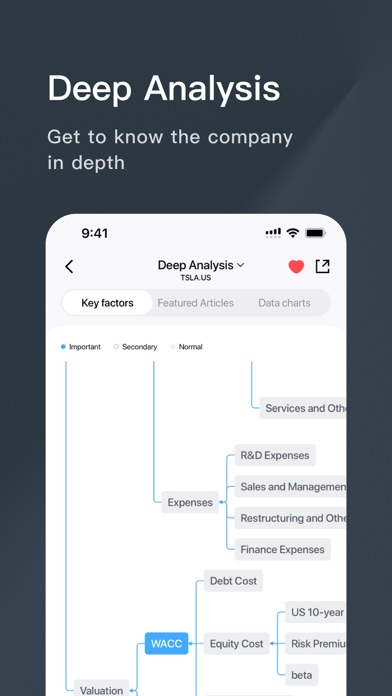
Fafa is a professional-grade financial trading platform developed specifically to bridge multiple global exchanges into a single streamlined mobile interface. Users gain direct exposure to diverse investment products, including Hong Kong equities, United States stocks, options, and structured mutual funds. The underlying framework is engineered by Panda Securities to deliver low-latency execution and institutional-grade data feeds.
The core utility of the app spans live market tracking, automated order routing, and localized portfolio management tools. Beyond basic brokerage features, Fafa integrates social community channels where registered investors can share portfolio strategies and market insights. This blend of transactional speed and social trading creates an active environment for both retail participants and seasoned market participants.
Panda Securities brings established financial infrastructure to this mobile project as a licensed corporation recognized by the Hong Kong Securities and Futures Commission. Holding a vital Type 1 license with Central Number BNC380, the studio ensures regulatory compliance and secure data pipelines. This TestFlight release represents a major push toward optimizing their mobile client for international audiences.
Standout Features & What's New in this Build
This experimental TestFlight iteration introduces several headline features designed to leverage modern Apple hardware capabilities. The developers have packed the client with localized optimization patches and expanded data streaming protocols to reduce latency during volatile market openings.
- AI Assistant: A multilingual conversational interface that accepts spoken commands and translates natural language directly into automated trading orders.
- Advanced Quotes: Real-time high-speed Hong Kong Level-2 data streams and comprehensive all-US market quotes designed to capture microsecond price advantages.
- Extreme Speed Trading: Dedicated routing channels bypassing standard network bottlenecks to secure faster order execution and better fill prices.
- Global IPO Center: Direct allocation support for both Hong Kong and US initial public offerings with streamlined subscription workflows.
- Community Exchange: Verified stock experts sharing live investment strategies inside a moderated peer-to-peer social ecosystem.

Hands-On Impressions: Performance, Battery, and Thermals
Running the Fafa client on an iPhone 15 Pro Max powered by the A17 Pro chip reveals impressive UI rendering speeds and flawless frame pacing. ProMotion 120Hz display support makes scrolling through massive Level-2 order books buttery smooth without stutter or dropped frames. Touch responsiveness is instantaneous, which matters immensely when placing time-sensitive limit orders during pre-market volatility.
Thermal management during extended analysis sessions remains well within acceptable parameters, with the chassis staying completely cool to the touch. Battery consumption is surprisingly optimized for a live-streaming financial application, drawing minimal background power when push notifications are active. Memory management is equally clean, keeping RAM footprint low even when tracking multiple global watchlists simultaneously.
"Our development focus for this TestFlight cycle centers on absolute execution speed and natural language parsing accuracy, ensuring traders never miss a market window on mobile." — Panda Securities Engineering Team
System Requirements & Requested Permissions
To run this beta build without encountering hardware bottlenecks or rendering bugs, your device must meet specific Apple ecosystem thresholds. Fafa requires an iPhone or iPad running iOS 15.0 or later, though optimal performance is achieved on devices equipped with modern Apple Silicon processors. The download size varies depending on incremental asset packages pushed during the beta cycle.
Upon initial launch, the application requests standard Apple sandboxed permissions to deliver core functionality effectively. You will be prompted to allow Local Network access for server synchronization, Push Notifications for critical price alerts and trade execution confirmations, and optional biometric authentication via Face ID. All data transfers are encrypted using industry-standard protocols to safeguard your personal credentials.
Pros & Cons: Beta Impressions
✓ The Highs (What We Love)
- Execution Speed: Dedicated trading channels deliver lightning-fast order placement.
- Level-2 Data: Real-time high-speed quotes provide incredible market depth visibility.
- AI Integration: Natural language order processing simplifies complex trade setups.
✕ Beta Caveats (Room for Polish)
- Localization Quirks: Occasional untranslated strings appear within community chat feeds.
- Data Density: Charts can feel cluttered on smaller standard iPhone screens.
- Build Stability: Minor graphic glitches surface during rapid watchlist switching.
Current TestFlight Slot Situation & Availability
Apple enforces a strict 10,000-tester ceiling on all public TestFlight distribution channels, creating intense competition for high-utility finance apps. Panda Securities opened this beta wave to gauge server load and gather user feedback on their conversational AI tools. Slots tend to fill up within hours of major build updates going live on discovery platforms.
If you encounter a message stating that the tester limit has been reached, do not panic or abandon your setup attempt. Developers routinely purge inactive accounts and dormant testers every few weeks to free up capacity for active community members. Checking back during off-peak hours often yields an open slot.
Step-by-Step TestFlight Installation Guide
Getting set up with the Fafa beta client takes less than two minutes if you follow this structured deployment sequence carefully. Ensure your primary iOS device has an active internet connection and your Apple ID is logged into the App Store.
1. Open the App Store on your iPhone or iPad and search for the official Apple TestFlight application, then download and install it onto your home screen.
2. Using your mobile browser, navigate directly to this Codewing guide and tap the official TestFlight invitation link provided at the bottom of the page.
3. Your device will automatically launch the TestFlight app and display the Fafa beta invitation window detailing the current build number and expiration date.
4. Tap the blue "Accept" button to register your device as an active tester and immediately begin downloading the installation package.
5. Once installation completes, open the app, grant your preferred permission prompts, and submit feedback directly to the developers if you encounter bugs.
Frequently Asked Questions
Is Fafa safe to install via TestFlight?
Yes, installing this beta is completely secure. Every build distributed through Apple TestFlight must pass Apple's rigorous automated security review and operates inside a strict iOS cryptographic sandbox.
What should I do if the Fafa beta is full?
If current tester slots are exhausted, bookmark this Codewing article and check back periodically. Panda Securities regularly recycles inactive tester seats to welcome new community participants.
Will installing this beta overwrite my App Store version or delete save data?
Fafa operates as a standalone beta preview package alongside any stable releases. Your account settings and user preferences sync securely via cloud servers rather than local device storage.
How long do TestFlight beta invitations and builds last?
Each TestFlight build remains active for exactly 90 days from the date of initial upload. Panda Securities pushes frequent updates well before this expiration window closes to maintain continuous access.
Are in-app purchases free during TestFlight beta testing?
Any financial transactions or simulated digital purchases executed within TestFlight environments utilize Apple's sandbox infrastructure, meaning no real capital is charged during your evaluation.
Final Editorial Verdict
Fafa successfully proves that mobile financial platforms can combine institutional-grade data feeds with accessible, modern user experiences. While minor beta hiccups occasionally surface during heavy data streaming, the core trading infrastructure feels exceptionally robust and responsive. We award this TestFlight release a solid 4.5 out of 5 stars and strongly recommend downloading it immediately.
Developer Support & Official Resources
Stay updated on patch notes, maintenance windows, and feature roadmaps directly from the official developer channels.
Ready to Test Fafa?
Apple limits public TestFlight betas to 10,000 testers. Tap below to launch TestFlight and claim your testing slot before capacity is reached.
Join Fafa Beta on TestFlight →





