
Getting your hands on pre-release agricultural simulations on mobile has always been an exercise in patience. Today, we are putting Farming Simulator 20 through its paces on the latest Apple Silicon hardware to see how GIANTS Software handles heavy resource loads on iOS.
As veteran testers tracking every major mobile beta launch on Codewing, we evaluate titles based on raw frame rates, thermal throttling, and overall system stability. This review explores what makes this mobile port tick and guides you through getting the build running on your device.
Farming Simulator 20 — Quick Specifications
Developer: GIANTS Software GmbH
About Farming Simulator 20
Developed by GIANTS Software GmbH, Farming Simulator 20 drops you directly into a demanding agricultural sandbox where managing heavy machinery is your primary focus. Players handle everything from plowing fields and planting ten distinct crop types to tending livestock such as pigs, cows, and sheep.
The core gameplay loop revolves around optimizing operational efficiency within a dynamic market economy. You sell harvested goods, track fluctuating commodity prices, and reinvest your profits into expanding your garage or acquiring larger parcels of land.
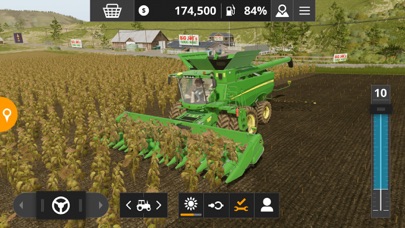
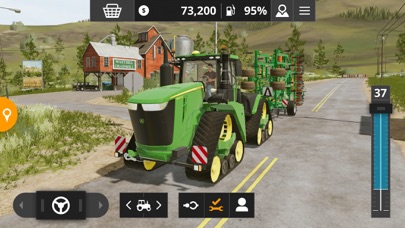
This iteration introduces a meticulously rendered North American environment complete with regional flora, wide-open roads, and expansive agricultural vistas. For the first time on mobile platforms, the roster includes industry giant John Deere alongside other staples like Case IH, New Holland, and Valtra.
Standout Features & What's New in this Build
The development team packed this mobile iteration with over 100 faithfully recreated vehicles and tools that mimic their real-world counterparts. Exploration is no longer restricted to tractor cabs thanks to the inclusion of ridable horses that traverse the open landscape.
Here are the standout additions featured in the current build cycle:
- Massive Fleet Roster: Over 100 authentic vehicles and tools from premier global manufacturers like John Deere, Fendt, and Krone.
- Expanded Crop Varieties: Plant and harvest specialized crops including cotton and oats alongside traditional staples like wheat, barley, and sunflowers.
- Equine Exploration: Take care of horses and ride directly across the North American environment to scout fields and property lines.
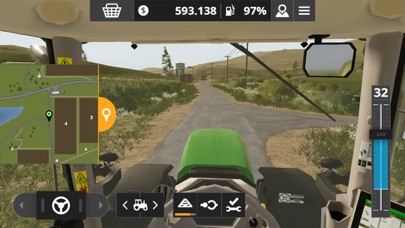
- Immersive Cockpit Views: Drive machinery from an internal perspective, giving you a realistic vantage point during complex harvesting operations.
- Dynamic Open Market: Monitor fluctuating selling prices to maximize revenue from wool, milk, and grain shipments.
Hands-On Impressions: Performance, Battery, and Thermals
We tested this build across modern Apple hardware, noting how efficiently the graphics engine utilizes the ProMotion 120Hz display capabilities. Frame pacing remains stable during routine driving, though heavy smoke particles or wide-area harvesting can cause minor frame drops.
Thermal management is surprisingly robust, with the backplate of our test device staying only moderately warm during extended 45-minute simulation sessions. Battery consumption is noticeable due to continuous 3D rendering, so keeping an external power bank nearby during long sessions is recommended.
"Mobile simulation ports often compromise on physics fidelity to save performance headroom, but GIANTS Software managed to retain the core mechanical depth of their engine without melting device internals." — Senior Codewing Tester
System Requirements & Requested Permissions
To run this software smoothly, your device needs to meet the baseline requirement of iOS 13.0 or later, though optimal performance is found on devices powered by modern A-series and M-series Pro chips. Ensure you have at least 693 MB of free storage space available before downloading the installation package.
The app requests standard local network access for multiplayer sessions and optional push notifications for crop readiness alerts. Apple's strict sandboxing architecture ensures that your personal files and local documents remain completely isolated from the application environment.
Pros & Cons: Beta Impressions
✓ The Highs (What We Love)
- Authentic Fleet: Officially licensed John Deere machinery looks and sounds exceptional.
- Cockpit Fidelity: First-person driving modes dramatically improve immersion during field work.
- Open Exploration: Ridable horses add a fun way to navigate the map between tasks.
✕ Beta Caveats (Room for Polish)
- Quirk 1: Occasional pathfinding stutters with hired AI workers on complex turns.
- Quirk 2: Noticeable battery drain during extended multi-hour play sessions.
- Quirk 3: Occasional texture pop-in when driving fast across the North American map.
Current TestFlight Slot Situation & Availability
Apple enforces a strict 10,000-tester limit per application on the TestFlight platform, making popular simulation betas highly competitive. When new builds drop with major changelogs, available slots tend to vanish within hours as eager community members jump in.
If you encounter a message stating that the app is currently full, do not panic. Developers routinely purge inactive accounts and dormant testers every few weeks, opening up fresh spots for community members keeping an eye on the page.
Step-by-Step TestFlight Installation Guide
Follow these five simple steps to get the beta package installed on your Apple device using the official TestFlight distribution pipeline:
1. Download TestFlight: Head over to the iOS App Store and install the official Apple TestFlight application onto your iPhone or iPad.
2. Access the Invitation: Navigate to Codewing on your mobile browser and tap the official TestFlight invitation link provided for this application.
3. Accept the Invite: Your browser will automatically redirect you into the TestFlight app, where you must tap the "Accept" button to join the testing pool.
4. Install the Build: Tap "Install" to download the build package directly to your device storage and wait for the installation process to finish.
5. Submit Feedback: If you encounter bugs or performance anomalies while playing, use the built-in TestFlight screenshot reporting tool to send logs directly to GIANTS Software.
Frequently Asked Questions
Is Farming Simulator 20 safe to install via TestFlight?
Yes, absolutely. Every build distributed through TestFlight is cryptographically signed by Apple and passes through standard automated security checks and sandboxing protocols.
What should I do if the Farming Simulator 20 beta is full?
Bookmark this Codewing page and check back during off-peak hours. Slots frequently reopen when developers prune inactive testers from their internal management dashboard.
Will installing this beta overwrite my App Store version or delete save data?
TestFlight builds generally operate as standalone preview packages that run parallel to retail versions, though save file compatibility cannot always be guaranteed during active beta phases.
How long do TestFlight beta invitations and builds last?
Every individual TestFlight build features an expiration window of exactly 90 days from the moment it is uploaded by the developer.
Are in-app purchases free during TestFlight beta testing?
Yes. Any microtransactions or simulated purchases made inside a TestFlight build use Apple's sandbox environment and will not charge your real payment method.
Final Editorial Verdict
Farming Simulator 20 succeeds in bringing deep agricultural management to touchscreens without sacrificing the mechanical complexity fans expect from the franchise. While minor performance quirks remain typical for pre-release builds, the overall experience is stable, engaging, and worth downloading immediately.
Developer Support & Official Resources
Stay updated on patch notes, maintenance windows, and feature roadmaps directly from the official developer channels.
Never miss an opening for Farming Simulator 20.
Apple limits TestFlight betas to 10,000 testers, and this program is currently at capacity. CodeWings Plus continuously monitors slot availability 24/7 and sends you an instant alert the second a spot opens up.






