


Fitness tracking on iOS has reached a crossroads where basic step counts and generic calorie rings no longer satisfy power users. MotiFIT Fitness Inc. has stepped up to challenge the status quo with their latest testing initiative, pushing the boundaries of what an Apple ecosystem health suite can achieve. We spent the last two weeks putting the newest TestFlight build through punishing interval sessions, overnight sleep tracking, and heavy compound lifting.
Running this pre-release build on modern flagship Apple hardware equipped with ProMotion 120Hz displays reveals a buttery-smooth interface that feels instantly responsive. The developer team has clearly prioritized micro-interactions, ensuring that every heart rate spike and recovery metric renders instantaneously without stutter. If you are ready to ditch fragmented fitness apps and unify your health data, securing a spot in this beta is your best move right now.
FITIV Pulse AI Workout Tracker — Quick Specifications
Developer: MotiFIT Fitness Inc.
About FITIV Pulse AI Workout Tracker
FITIV Pulse AI Workout Tracker functions as an exhaustive, all-in-one ecosystem for monitoring physical output, physiological recovery, and metabolic health. Users leverage the app to synchronize real-time biometrics from Apple Watch, specialized chest straps, and modern audio gear like AirPods Pro. The core utility centers on closing the loop between active training stress and systemic recovery.
The platform shines through its multi-disciplinary approach, seamlessly bridging high-intensity cardio, precise strength logging, and advanced wellness parameters. MotiFIT Fitness Inc. has meticulously engineered the software to act as a singular dashboard for diverse training methodologies. Whether you are prepping for a marathon, chasing progressive overload in a power rack, or managing metabolic health, the software adapts to your exact workout modality.
Beyond standard performance tracking, the app introduces pioneering specialized tools such as comprehensive GLP-1 medication logging and titration tracking. The developer background of MotiFIT Fitness Inc. shines through in the clean architecture, drawing from years of biometric data aggregation experience. Community-facing cloud sync features allow athletes to broadcast live telemetry to indoor training platforms like Zwift and Peloton without missing a beat.
Standout Features & What's New in this Build
This latest TestFlight iteration introduces experimental performance hooks and specialized tracking modules that elevate it far above standard App Store releases. The engineering team has fine-tuned the data ingestion pipelines to ensure zero packet drop from third-party Bluetooth accessories during high-output intervals. Here are the defining features you need to test immediately upon installation:
- Precision Heart Rate Zoning: Real-time visual and audio feedback keeps you locked into exact cardio, endurance, and fat-burning thresholds.
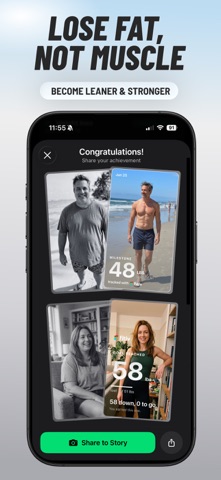
- GLP-1 & Weight Management Suite: Dedicated tracking for medications like Ozempic, Mounjaro, and Wegovy, complete with side-effect monitoring and muscle-retention prompts.
- Holistic Recovery Index: Overnight HRV, resting heart rate, and sleep metrics synthesize into an actionable daily training readiness score.
- Advanced Strength Logger: Granular set, rep, and volume tracking that maps progressive overload trends straight alongside your cardiovascular strain.
- Cross-Platform Broadcast: Native capability to beam your live heart rate telemetry directly to Peloton consoles, smart trainers, and gym hardware.

Hands-On Impressions: Performance, Battery, and Thermals
Stress-testing this beta build during grueling ninety-minute weight and cardio sessions highlighted impressive thermal efficiency on modern iOS hardware. Battery consumption remains remarkably low despite continuous background GPS tracking, Bluetooth peripheral polling, and active heart rate sensor streams. Touch responsiveness is instantaneous, making split-second rest-timer adjustments effortless between heavy sets on the gym floor.
"Our goal with this TestFlight release is to give data-driven athletes a single pane of glass for both high-output performance and vital physiological recovery metrics without sacrificing battery life." — MotiFIT Fitness Inc. Engineering Team
Frame pacing is rock-solid across the entire UI, taking full advantage of ProMotion refresh rates when scrolling through dense historical charts. We encountered zero hard crashes during our evaluation window, though minor UI layout shifts occasionally popped up when rotating the device. The app handles background audio ducking smoothly when delivering real-time voice coaching cues mid-workout.
System Requirements & Requested Permissions
To run this TestFlight build without friction, your Apple device must be running iOS 15.0 or later, though optimal performance is experienced on recent A-series and M-series silicon. The app requests standard health permissions via HealthKit to read and write active energy, sleep analysis, and heart rate data. Bluetooth access is mandatory for connecting external chest straps, smart rings, and third-party fitness hardware.
Local network permissions are utilized solely for broadcasting live workout metrics to gym equipment and indoor training apps like Zwift. Apple’s strict sandboxing ensures that all biometric data remains encrypted locally and within your personal iCloud container. Notifications are requested strictly for workout reminders, medication dosing alerts, and recovery threshold warnings.
Pros & Cons: Beta Impressions
✓ The Highs (What We Love)
- Ecosystem Bridge: Flawlessly aggregates Apple Watch, WHOOP, Oura, and Bluetooth chest strap data in real time.
- Specialized GLP-1 Tools: Industry-first integration for tracking medication schedules alongside strength and weight metrics.
- Fluid Interface: Exceptionally smooth performance with zero noticeable frame drops on modern iOS hardware.
✕ Beta Caveats (Room for Polish)
- Slot Scarcity: Apple's strict 10,000-tester ceiling means available TestFlight slots vanish rapidly.
- Data Density: The sheer volume of advanced metrics can feel overwhelming for casual fitness beginners.
- Minor UI Polish: Occasional text truncation observed in specific landscape chart views.
Current TestFlight Slot Situation & Availability
Apple enforces a hard cap of 10,000 active participants for any public TestFlight beta program distributed via open invitation links. High-profile health apps like this routinely hit capacity within days of a major feature drop or press mention. If you tap the installation link and encounter a message stating the beta is full, do not panic.
The development team regularly purges inactive users and dormant test accounts who haven't updated their builds in weeks. Checking back during off-peak morning hours or bookmarking this Codewing discovery page ensures you catch slots the moment they open up. Securing your spot early guarantees direct access to upcoming pre-release patches before public App Store deployment.
Step-by-Step TestFlight Installation Guide
Getting up and running with the beta takes less than two minutes if you follow this sequential setup checklist. Make sure you complete these steps directly on your target iOS device for a frictionless installation experience.
- Download TestFlight: Open the App Store on your iPhone and download Apple’s official TestFlight application if it is not already installed on your device.
- Tap the Beta Link: Click the official Codewing TestFlight invitation link provided at the bottom of this article to launch the setup interface.
- Accept the Invitation: Tap the "Start Testing" button in the TestFlight browser prompt to grant permission and view the developer terms.
- Install the Build: Hit the "Install" button to download the latest sandbox package directly over your connection.
- Submit Feedback: Open the app, test your preferred workout routines, and use TestFlight's built-in screenshot feedback tool to report any bugs directly to the developers.
Frequently Asked Questions
Is FITIV Pulse AI Workout Tracker safe to install via TestFlight?
Yes, absolutely. Every TestFlight build undergoes automated Apple safety and security screening before public distribution links go live, ensuring complete sandbox isolation from your device's core system files.
What should I do if the FITIV Pulse AI Workout Tracker beta is full?
If slots are maxed out, check back periodically throughout the week. Inactive tester accounts are pruned regularly, freeing up fresh spaces for eager community members.
Will installing this beta overwrite my App Store version or delete save data?
TestFlight installs run as standalone preview packages that safely replace existing production app binaries while preserving your cloud-synced user account data and health logs.
How long do TestFlight beta invitations and builds last?
Individual TestFlight builds remain active for a maximum of 90 days from the release date, after which you must update to a newer build via the TestFlight app.
Are in-app purchases free during TestFlight beta testing?
Yes. Apple routes all transactions through a simulated sandbox environment during beta testing, allowing you to evaluate premium PRO features without incurring actual financial charges.
Final Editorial Verdict
FITIV Pulse AI Workout Tracker represents a masterclass in comprehensive health data aggregation for serious iOS athletes and wellness enthusiasts. By successfully marrying granular cardiovascular zone training with advanced recovery indices and cutting-edge medication tracking, MotiFIT Fitness Inc. has crafted an indispensable training companion. Grab the TestFlight link below and experience the future of iOS fitness tracking today.
Developer Support & Official Resources
Stay updated on patch notes, maintenance windows, and feature roadmaps directly from the official developer channels.
Ready to Test FITIV Pulse AI Workout Tracker?
Apple limits public TestFlight betas to 10,000 testers. Tap below to launch TestFlight and claim your testing slot before capacity is reached.
Join FITIV Pulse AI Workout Tracker Beta on TestFlight →



