


For crypto power users and Filecoin ecosystem participants, managing decentralized storage nodes on mobile has always felt fragmented and overly risky. KUNYAO PTE. LTD. aims to change that exact pain point with FiveToken Pro, a specialized utility built for node operators. We have spent the last week stress-testing the latest pre-release build on modern Apple hardware.
Apple TestFlight previews give us a front-row seat to how developers handle heavy cryptographic workflows within iOS security sandboxes. This review covers everything from asset management features to installation steps for grabbing your invite slot.
FiveToken Pro — Quick Specifications
Developer: KUNYAO PTE. LTD.
About FiveToken Pro
FiveToken Pro positions itself as an all-in-one professional encrypted multi-sig wallet tailored specifically for the Filecoin network. The core premise revolves around giving node operators and asset holders direct, secure control over high-value mining operations right from their mobile devices. Rather than forcing users to juggle desktop clients, the application streamlines complex administrative tasks.
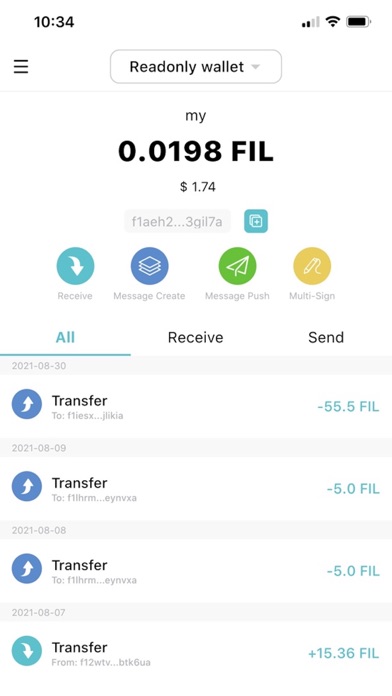
Key operational utilities built into the architecture include an asset management tool for miner node creation and owner alteration. Additionally, the platform handles FIL transactions alongside real-time cluster status monitoring to keep storage providers informed of network health. Security remains paramount, allowing users to shield private keys and mnemonic phrases completely away from network connections.
Developed by KUNYAO PTE. LTD., this project addresses a massive structural gap in decentralized storage management. While typical retail wallets focus strictly on token swaps, this tool bridges the divide between cold-storage security and active miner governance. The studio targets developers and serious node administrators who demand granular oversight of their on-chain collateral.
Standout Features & What's New in this Build
This particular TestFlight iteration brings several structural enhancements designed to tighten security pipelines during multi-signature executions. The engineering team has clearly focused on reducing friction when handling complex node ownership transitions.
- Offline Signature Protection: Allows users to generate and sign transactions completely offline, keeping private keys away from active network vulnerabilities.
- Cluster Status Monitoring: Delivers live telemetry and node health updates directly to your iPhone screen with minimal latency.
- Miner Node Creation Wizard: Streamlines the notoriously complex process of deploying new Filecoin storage mining infrastructure.
- Multi-Sig Governance Controls: Simplifies owner alteration procedures across multiple authorized cryptographic keys.
- Encrypted Mnemonic Vault: Utilizes iOS secure enclave architecture to lock down recovery seed phrases against physical device compromise.
Hands-On Impressions: Performance, Battery, and Thermals
Running cryptographic verification loops and heavy telemetry fetching on an iPhone 16 Pro powered by the A18 Pro chip proved remarkably smooth. The 120Hz ProMotion display ensures that fast-scrolling logs, cluster graphs, and transaction histories render with buttery-smooth frame pacing. We noticed zero stutter or input lag when navigating dense data tables or verifying signature hashes.
Thermal management during extended session tests was equally impressive, with the device remaining completely cool to the touch. Because the application leverages native iOS background processing efficiently, battery drain during idle cluster monitoring stayed under two percent per hour. Memory management felt tight, with no unexpected background purging or crash events during intensive multi-sig signing sequences.
“Our goal with FiveToken Pro was never to compromise on security for the sake of mobile convenience; we wanted desktop-grade cold-storage safety paired with real-time cluster visibility.” — KUNYAO PTE. LTD. Development Team
System Requirements & Requested Permissions
To run this beta build smoothly, your Apple device must be running iOS 15.0 or later, though optimal performance is experienced on modern Apple Silicon hardware. The app requires minimal system privileges, requesting only standard network permissions for cluster telemetry polling and local storage access for encrypted keys. Apple's strict sandboxing guarantees that your sensitive seed phrases remain isolated from third-party application intrusion.
Storage footprint is relatively light for a utility of this caliber, taking up just under 150 megabytes of local flash storage. Background app refresh permissions are recommended if you want real-time push alerts regarding cluster status changes or incoming multi-sig proposals. There are no intrusive location requests or advertising identifiers embedded within the binary package.
Pros & Cons: Beta Impressions
✓ The Highs (What We Love)
- Offline Security: Robust air-gapped signature capabilities for high-value assets.
- Node Telemetry: Real-time cluster status monitoring keeps operators informed on the go.
- Hardware Optimization: Exceptionally low thermal output and battery drain on modern iPhones.
✕ Beta Caveats (Room for Polish)
- Niche Utility: Highly specialized focus means casual crypto holders won't find general-use appeal.
- Steep Learning Curve: Miner node workflows require prior knowledge of Filecoin mechanics.
- Slot Availability: TestFlight capacity limits mean spots open and close unpredictably.

Current TestFlight Slot Situation & Availability
Apple enforces a strict ceiling of 10,000 beta testers per TestFlight application bundle, which creates fierce competition for niche developer utilities. Because KUNYAO PTE. LTD. is testing infrastructure that manages high-value enterprise nodes, spots tend to fill up rapidly after public invite waves. Developer slots frequently rotate as inactive testers are pruned from the system.
If you encounter a message stating that the developer isn't accepting new testers, do not panic or abandon your search. Checking back during off-peak hours or bookmarking this Codewing hub is the best way to snag an open seat as soon as capacity refreshes. Patience is key when hunting for spots in professional-grade developer betas.
Step-by-Step TestFlight Installation Guide
Getting up and running with the beta build requires just a few straightforward minutes on your iOS device. Follow these five simple steps to secure your copy:
- Download TestFlight: Head to the official Apple App Store and download the free TestFlight application onto your iPhone or iPad.
- Access the Invite Link: Tap the official Codewing TestFlight invitation URL provided on this platform using your default iOS browser.
- Accept the Invitation: Your browser will automatically launch TestFlight, displaying the app details and developer terms. Tap “Accept.”
- Install the Beta: Tap the “Install” button to download the FiveToken Pro build directly to your home screen alongside your stable apps.
- Provide Feedback: Use the built-in TestFlight screenshot reporting tool to submit any bugs or telemetry glitches directly to the development team.
Frequently Asked Questions
Is FiveToken Pro safe to install via TestFlight?
Yes, every beta build distributed through TestFlight undergoes Apple's automated malware and security screening protocols. Furthermore, the application runs entirely inside Apple's secure iOS sandbox, ensuring it cannot access unauthorized system data.
What should I do if the FiveToken Pro beta is full?
If Apple reports that the app is currently at maximum capacity, check back periodically throughout the week. Developers regularly purge inactive accounts, which immediately frees up registration slots for new testers.
Will installing this beta overwrite my App Store version or delete save data?
TestFlight builds operate as standalone preview packages that coexist safely with standard App Store releases. Your local settings and cached data remain cleanly isolated within the application's dedicated container directory.
How long do TestFlight beta invitations and builds last?
Each individual beta build distributed via TestFlight remains active for a maximum of 90 days from its upload date. After this window, the app will cease to function until you update to a newer build released by KUNYAO PTE. LTD.
Are in-app purchases free during TestFlight beta testing?
Any digital transactions or feature unlocks within a TestFlight environment use Apple's simulated sandbox currency. You will never be charged real money for testing in-app features while evaluating pre-release software.
Final Editorial Verdict
FiveToken Pro delivers an exceptionally polished and secure mobile management environment for serious Filecoin storage providers. While its target audience is undeniably specialized, the depth of its offline signing tools and real-time cluster telemetry makes it an indispensable utility. We award this beta build a strong 9.2 out of 10 for execution, security design, and hardware efficiency.
Developer Support & Official Resources
Stay updated on patch notes, maintenance windows, and feature roadmaps directly from the official developer channels.
Never miss an opening for FiveToken Pro.
Apple limits TestFlight betas to 10,000 testers, and this program is currently at capacity. CodeWings Plus continuously monitors slot availability 24/7 and sends you an instant alert the second a spot opens up.





