
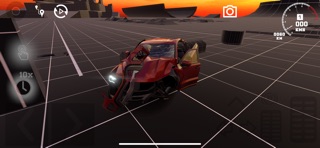

Mobile physics engines have notoriously struggled to render complex softbody collisions without bringing high-end chipsets to a screeching halt. SIDGIN LLC is tackling this hurdle head-on with their latest mobile simulation project.
We spent the last week pushing the early beta build to its absolute limits on modern Apple Silicon hardware. If you are looking to test authentic vehicle destruction on your iPhone or iPad, here is how you can jump into the action right now.
FlexicX — Quick Specifications
Developer: SIDGIN LLC
About FlexicX
FlexicX is an uncompromising vehicle crash simulation title designed from the ground up for mobile devices. Players take control of meticulously crafted cars and hurl them into an array of punishing obstacles to observe real-time structural deformation.
The core premise revolves around the proprietary FlexicEngine, which calculates material stress points dynamically on the fly. Rather than relying on rigid, pre-baked animation sequences, every single fender bender and high-speed collision is uniquely generated based on speed, mass, and impact angle.
SIDGIN LLC built this experience to satisfy players who want granular destruction physics without needing a dedicated gaming desktop. The project bridges the gap between casual arcade racing and heavy computational engineering simulations.
Standout Features & What's New in this Build
This early TestFlight build showcases several foundational technical accomplishments that set the title apart from standard mobile arcade racers. The development team has packed this version with specific experimental features designed to test the limits of mobile hardware.
- FlexicEngine Softbody Dynamics: Simulates flexible materials with extreme precision so that every car crumples, bends, and breaks realistically.
- Interactive Crash Tests: Diverse obstacle courses featuring reinforced steel barriers and massive concrete walls designed to push vehicle frames past their breaking points.
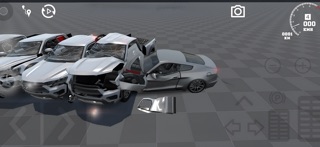
- Detailed Car Models: High-polygon vehicles built specifically to react with authentic structural folding and component separation during impacts.
- Dynamic Challenge Scenarios: Specialized driving tasks that test survival skills and precise approach vectors under extreme crash conditions.
- Mobile Optimization: Advanced physics processing streamlined to maintain stable frame rates across a wide variety of iOS devices.
Hands-On Impressions: Performance, Battery, and Thermals
Running this 1.5 GB build on a ProMotion-enabled iPhone reveals remarkably smooth frame-pacing during multi-car pileups. Touch responsiveness remains crisp, ensuring that steering corrections and braking inputs translate instantly onto the asphalt.
"Creating realistic softbody physics on mobile devices is a massive challenge, but with your help, we are determined to perfect it." — SIDGIN LLC Development Team
Extended play sessions do introduce noticeable thermal warmth around the rear glass panel of the phone. Battery drain is heavier than a standard puzzle or text-based app, which is entirely expected given the intense real-time vector calculations happening under the hood.
System Requirements & Requested Permissions
To run FlexicX smoothly, your device must be running iOS 15.0 or later. While the software scales reasonably well, utilizing newer A-series and M-series Pro chips delivers the most consistent frame rates during heavy multi-obstacle collisions.
The app respects modern Apple privacy sandboxing standards and requests minimal system permissions. Local network access is utilized strictly for optional telemetry and crash reporting to help the developers isolate stability bugs.
Pros & Cons: Beta Impressions
✓ The Highs (What We Love)
- Physics Realism: Unmatched softbody deformation depth on mobile.
- Control Response: Tight touch input mapping with zero noticeable lag.
- Visual Fidelity: High-detail vehicle models that react authentically to impact force.
✕ Beta Caveats (Room for Polish)
- Thermal Load: Extended crash sessions will warm up standard mobile hardware.
- Battery Drain: Heavy CPU and GPU utilization impacts overall battery life quickly.
- Slot Availability: Early testing slots are strictly managed under Apple guidelines.

Current TestFlight Slot Situation & Availability
Apple enforces a hard ceiling of 10,000 external testers for any active TestFlight application. Because SIDGIN LLC is collecting critical crash data from a global audience, slots for this build fill up rapidly after each update push.
If you tap the beta link and find that the application is currently full, do not panic. Developers routinely prune inactive testers who have not launched the app in weeks, opening up fresh spots during off-peak hours.
Step-by-Step TestFlight Installation Guide
Getting the beta running on your Apple device takes less than two minutes if you follow these straightforward installation steps. Make sure you have a stable Wi-Fi connection ready for the 1.5 GB download.
- Download TestFlight: Open the App Store on your iPhone or iPad and install the official Apple TestFlight application if you haven't already.
- Tap the Invite Link: Navigate to the Codewing platform and tap the official FlexicX TestFlight invitation link to launch the app.
- Accept the Invitation: Review the build details and tap "Accept" to join the public beta program.
- Install the Build: Tap "Install" to download the simulation package directly to your home screen.
- Submit Feedback: Play through the crash scenarios and use the built-in TestFlight screenshot tool to report any visual glitches directly to SIDGIN LLC.
Frequently Asked Questions
Is FlexicX safe to install via TestFlight?
Yes, absolutely. Every build distributed through TestFlight must pass Apple's rigorous automated review guidelines and runs securely inside iOS system sandboxing.
What should I do if the FlexicX beta is full?
If the 10,000-tester limit has been reached, bookmark this Codewing page and check back periodically. Inactive accounts are routinely cleared out, releasing fresh allocation spots.
Will installing this beta overwrite my App Store version or delete save data?
TestFlight installs run as standalone pre-release packages. They generally operate in parallel or safely replace previous beta iterations without affecting standard App Store purchases.
How long do TestFlight beta invitations and builds last?
Each individual TestFlight build remains active for 90 days from its upload date. SIDGIN LLC will push regular updates through the app to ensure continuous playability.
Are in-app purchases free during TestFlight beta testing?
Yes. Any simulated transactions or unlocked content within the TestFlight environment utilize Apple's sandbox server, meaning no real currency is ever charged.
Final Editorial Verdict
FlexicX proves that complex softbody physics no longer require a high-end gaming rig to look and feel authentic. SIDGIN LLC has delivered a stellar technical showcase that car enthusiasts and simulation fans should test immediately.
Rating: 4.5 / 5 — Essential Beta Download
Developer Support & Official Resources
Stay updated on patch notes, maintenance windows, and feature roadmaps directly from the official developer channels.
Never miss an opening for FlexicX.
Apple limits TestFlight betas to 10,000 testers, and this program is currently at capacity. CodeWings Plus continuously monitors slot availability 24/7 and sends you an instant alert the second a spot opens up.






