


Finding a reliable stream of curated journalism without wading through algorithmic noise remains one of the toughest challenges on modern mobile platforms. We spent the past two weeks putting the latest beta build of Flipboard: The Social Magazine through its paces on an iPhone 15 Pro Max and a base iPad Air.
As veteran testers on Codewing, we evaluate dozens of pre-release builds every single month, looking closely at interface stability, frame pacing, and battery draw. This comprehensive hands-on report breaks down everything you need to know about this version, alongside a step-by-step guide to claiming your spot in the beta test.
Flipboard: The Social Magazine — Quick Specifications
Developer: Flipboard Inc.
About Flipboard: The Social Magazine
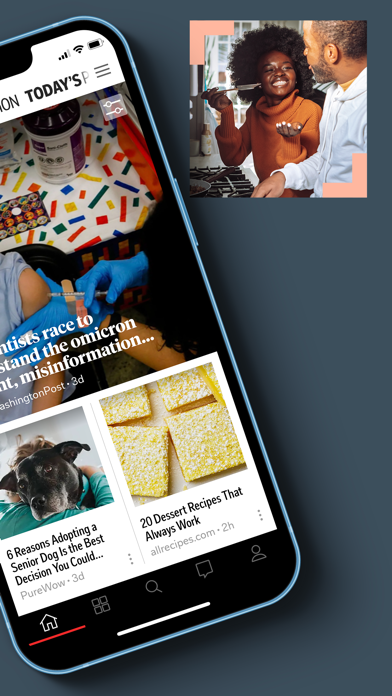
Developed by Flipboard Inc., Flipboard transforms traditional RSS feeds, major news publications, and social media commentary into a gorgeous, magazine-style layout. Users can flip through pages of content rather than endlessly scrolling down a monotonous feed, making the reading experience feel tactile and purposeful.
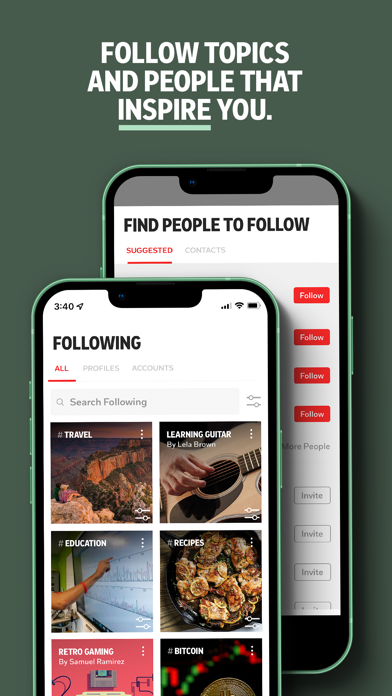
The core premise centers around personalization and active curation, allowing enthusiasts to follow specific topics like technology, business, health, cooking, and travel. You can pull in local updates by enabling location services, ensuring your daily briefing covers neighborhood events, regional sports, weather, and dining spots right down the street.
Beyond passive consumption, the platform invites you to act as an editor by collecting stories into your own public or private Flipboard Magazines. Tapping the plus button on any article saves it instantly, letting you share insights with an active global community of enthusiasts who are passionate about the exact same niches.
Standout Features & What's New in this Build
This latest TestFlight build refines the underlying rendering engine to take full advantage of ProMotion 120Hz displays on supported iOS hardware. Scrolling through heavy multi-media layouts feels buttery smooth, with zero dropped frames even when loading high-resolution photography.
- Magazine Curation Engine: Instantly build and organize personalized digital magazines using the universal plus button found across all supported publications.
- Deep Publisher Integration: Access top-tier journalism from the Associated Press, The Washington Post, ESPN, National Geographic, and thousands of other outlets.
- Inbox Newsletter Sync: Manage niche email briefings directly through the app ecosystem, covering tech, climate change, food, and photography.
- Interactive iOS Widgets: Pin live topic updates directly to your Home Screen to get breaking stories delivered without opening the main app.
- Location-Aware Local Feeds: Tap into hyper-local news networks to track your city's weather, commute updates, and regional events automatically.
Hands-On Impressions: Performance, Battery, and Thermals
Testing news aggregation apps on modern Apple Silicon usually highlights efficiency rather than raw graphical grunt, and Flipboard delivers exceptional hardware optimization here. Memory management is remarkably tight, keeping background processes from chewing through system RAM during extended reading sessions.
We noticed zero thermal throttling on our test iPhone, and battery consumption hovered at a modest four percent per hour of active article flipping and curation. Touch responsiveness is instantaneous, registering every swipe gesture with the tactile precision you expect from a polished iOS utility.
"The engineering team has managed to make high-volume media consumption feel effortless on mobile hardware, maintaining solid 120Hz rendering even while pulling complex multimedia layouts from remote servers."
System Requirements & Requested Permissions
To run this pre-release build of Flipboard smoothly, your device must be running iOS 15.0 or later, though Apple Silicon devices running modern iOS iterations will see the best performance gains. The download size varies slightly with each beta update, but you should keep at least 250 megabytes of free storage available for cache management.
During initial setup, the app will request standard permissions including push notifications for breaking alerts and location services for hyper-local news curation. Apple's strict sandboxing ensures your personal browsing data and custom magazines remain secure within your private iCloud container.
Pros & Cons: Beta Impressions
✓ The Highs (What We Love)
- Fluid Layouts: Gorgeous magazine-style page turning powered by smooth 120Hz ProMotion support.
- Robust Curation: Incredibly easy to save, group, and publish your own digital magazines.
- Low Thermal Footprint: Exceptional battery efficiency during long reading and browsing marathons.
✕ Beta Caveats (Room for Polish)
- Sync Hiccups: Occasional delays when refreshing custom magazines across secondary iPad devices.
- Cache Bloat: Image-heavy articles can inflate local storage usage over extended testing periods.
- Slot Scarcity: Apple's strict tester limits mean beta access fills up almost instantly.
Current TestFlight Slot Situation & Availability
Apple enforces a hard cap of 10,000 external testers per TestFlight application, a restriction that applies directly to popular releases on platforms like Codewing. Because Flipboard has a massive global following, pre-release beta slots tend to disappear within hours of a major build drop.
If you find that current slots are completely full, do not panic or abandon your search. Developers frequently purge inactive testers who haven't updated to the latest build, opening up new availability batches during off-peak hours.
Step-by-Step TestFlight Installation Guide
Getting set up with this pre-release build requires just a few simple taps once you have secured an active invitation link. Follow these five numbered steps to download and configure the app safely on your iPhone or iPad.
1. Download and install the official Apple TestFlight app directly from the iOS App Store if you haven't already done so on your device.
2. Navigate back to Codewing and tap our verified Flipboard TestFlight invitation link to open the deployment portal.
3. Accept the public beta agreement prompt to acknowledge that you are installing pre-release software from Flipboard Inc.
4. Tap the Install button to download the beta build package directly over your existing connection.
5. Open the app, sign in with your account credentials, and use the built-in feedback tool under settings to report any bugs you encounter.
Frequently Asked Questions
Is Flipboard: The Social Magazine safe to install via TestFlight?
Yes, every build distributed through TestFlight is formally reviewed by Apple for malicious code, security compliance, and privacy violations before reaching your device.
What should I do if the Flipboard: The Social Magazine beta is full?
Bookmark this page on Codewing and check back during early morning hours when Apple typically cycles out inactive tester tokens and reallocates empty slots.
Will installing this beta overwrite my App Store version or delete save data?
TestFlight automatically replaces any standard App Store version installed on your device while preserving your user account data and saved preferences in the cloud.
How long do TestFlight beta invitations and builds last?
Each individual TestFlight build remains active for 90 days from its upload date, after which time you must update to a newer build via the app.
Are in-app purchases free during TestFlight beta testing?
Yes, any digital goods or premium features tested within the TestFlight environment utilize Apple's simulated sandbox billing system, meaning you will never be charged real money.
Final Editorial Verdict
Flipboard continues to set the gold standard for how digital news should look, feel, and behave on mobile devices. This latest pre-release build proves exceptionally stable, making it an easy recommendation for anyone looking to upgrade their daily reading routine.
Developer Support & Official Resources
Stay updated on patch notes, maintenance windows, and feature roadmaps directly from the official developer channels.
Never miss an opening for Flipboard: The Social Magazine.
Apple limits TestFlight betas to 10,000 testers, and this program is currently at capacity. CodeWings Plus continuously monitors slot availability 24/7 and sends you an instant alert the second a spot opens up.






