
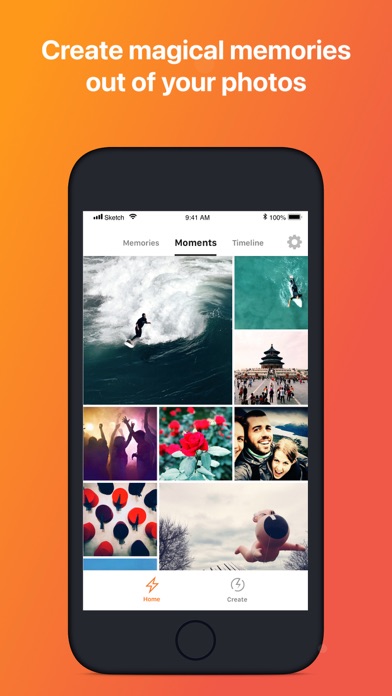

Finding a reliable and feature-rich media utility on iOS usually means dealing with bloated interfaces and aggressive subscription paywalls. YOOSHR LTD changes that narrative with their latest photographic creation, aiming squarely at users who want speed and professional depth.
As veteran beta testers at Codewing, we spent the last week pushing this pre-release build through its paces on high-end Apple hardware. Here is everything you need to know about what makes this software tick and how to secure your spot in the testing pool.
Giftr - GIF Maker — Quick Specifications
Developer: YOOSHR LTD
About Giftr - GIF Maker
Giftr - GIF Maker is an advanced photography and video utility built from the ground up for iOS devices. Users utilize the platform to transform static photos and video clips into dynamic, animated memories, stop-motion loops, and customized GIFs with minimal friction.
The core utility centers around a blazing-fast rendering engine that handles complex frame sequences entirely on-device. Casual users can rely on automated AI algorithms to stitch together highlights, while power users can tweak everything from shutter speeds to color grading channels.
Developed by YOOSHR LTD, the application builds upon the studio's reputation for fluid, media-centric iOS utilities. The team designed this specific project to bridge the gap between heavy desktop editing suites and mobile convenience.
Standout Features & What's New in this Build
This experimental TestFlight iteration introduces several under-the-hood optimizations alongside a massive suite of creative controls. Here are the standout features worth testing in the current build:
- Real-Time Stop Motion Engine: Experience hardware-accelerated rendering that lets you add, remove, and re-order frames on the fly without waiting for export bars.
- Massive Sticker Library: Access over 200 custom stickers, Bitmoji integrations, and live GIPHY animated stickers to layer onto your moving memories.
- Advanced HSL and Color Grading: Make precise adjustments using professional tools like selective hue, saturation, lightness, vignettes, and dual exposure overlays.
- Immersive 3D AR Mapping: Plot your chronological photo memories directly onto an interactive map or view them in spatial augmented reality environments.
- Total Local Privacy: Benefit from an artificial intelligence algorithm that processes all visual data directly on your device without uploading files to remote servers.

Hands-On Impressions: Performance, Battery, and Thermals
Running this beta build on modern Apple Silicon devices reveals impressive frame pacing and fluid touch responsiveness. Scrolling through massive photo libraries and scrubbing through multi-layered frame timelines remains buttery smooth, taking full advantage of ProMotion 120Hz display refresh rates.
Thermal management is equally robust, as the local rendering engine maintains low chassis temperatures even during prolonged editing sessions. Battery consumption spikes slightly when exporting heavy 4K video loops, but routine image processing causes minimal drain on your daily charge.
“We built Giftr to prove that advanced stop-motion editing and complex color grading don't require a desktop workstation. Seeing how smoothly the real-time renderer handles complex frame stacks on mobile silicon validates our entire engineering roadmap.”
System Requirements & Requested Permissions
To run this TestFlight build successfully, your iPhone or iPad must be running iOS 14.0 or later. The app weighs in at 257 MB, so ensure you have sufficient local storage available before downloading the package from Apple's servers.
Privacy-conscious users will appreciate the strict sandboxing implementation enforced by YOOSHR LTD. The app requests standard photo library access to browse your memories, but strictly avoids tracking data or uploading personal media to cloud servers.
Pros & Cons: Beta Impressions
✓ The Highs (What We Love)
- Real-Time Rendering: Zero export lag when adjusting frame orders and playback speeds.
- Local Privacy: All AI processing stays on-device for total peace of mind.
- Granular Control: Over 7 million filter combinations and deep HSL tuning tools.
✕ Beta Caveats (Room for Polish)
- Battery Draw: Heavy 4K video exports will warm up older devices during long sessions.
- UI Density: The sheer number of creative tools can overwhelm casual photo editors initially.
- Slot Limits: Apple's strict tester caps mean availability fluctuates daily.

Current TestFlight Slot Situation & Availability
Apple enforces a strict ceiling of 10,000 active testers for any public TestFlight beta program. Because YOOSHR LTD has opened this link to the broader community, slots tend to fill up rapidly after every major update.
If the beta currently appears full, do not panic. Developers frequently prune inactive accounts or push fresh builds that clear out stale testing tokens, making off-peak hours the ideal time to refresh your link.
Step-by-Step TestFlight Installation Guide
Getting set up with the pre-release build takes less than two minutes if you follow these precise steps. Make sure you have your iOS device handy and ready to go.
First, open the App Store and download the official Apple TestFlight application if you do not already have it installed. Second, tap our exclusive Codewing TestFlight invitation link from your mobile browser.
Third, accept the prompt to join the public beta testing group for the application. Fourth, tap the Install button to download the 257 MB package directly over your current connection.
Fifth, open the app, test out the creative tools, and use the built-in feedback mechanism to report any visual bugs directly to the development team. Your crash logs help refine the software for its public launch.
Frequently Asked Questions
Is Giftr - GIF Maker safe to install via TestFlight?
Yes, absolutely. Every beta build distributed through Apple's TestFlight must pass Apple's automated security reviews and code-signing protocols, running inside a secure iOS sandbox environment.
What should I do if the Giftr - GIF Maker beta is full?
If Apple reports the maximum tester capacity has been reached, bookmark this Codewing guide and check back during off-peak hours when developers routinely cycle out inactive beta testers.
Will installing this beta overwrite my App Store version or delete save data?
TestFlight installs run as standalone preview packages that safely coexist with or replace standard App Store binaries while preserving your local app preferences and exported library folders.
How long do TestFlight beta invitations and builds last?
Each individual TestFlight build remains active for 90 days from its upload date, after which time the app will expire until you install an updated build from the developer.
Are in-app purchases free during TestFlight beta testing?
Yes, any premium filters, features, or content packs unlocked during the testing phase utilize Apple's TestFlight sandbox billing system, meaning you will never be charged real money.
Final Editorial Verdict
Giftr - GIF Maker stands out as a genuinely impressive multimedia utility that balances high-end editing depth with snappy on-device performance. YOOSHR LTD has crafted a must-have tool for photography enthusiasts, and joining the beta offers a great early look at what modern iOS development can achieve.
Developer Support & Official Resources
Stay updated on patch notes, maintenance windows, and feature roadmaps directly from the official developer channels.
Never miss an opening for Giftr - GIF Maker.
Apple limits TestFlight betas to 10,000 testers, and this program is currently at capacity. CodeWings Plus continuously monitors slot availability 24/7 and sends you an instant alert the second a spot opens up.



