
Managing software repositories used to chain developers to their office desks and heavy workstations. GitHub changed that dynamic by bringing version control tracking right into our pockets on mobile devices.
Testing the latest beta builds through Apple TestFlight gives early adopters an inside track on incoming developer workflows. We spent significant time evaluating the stability, performance, and feature depth of this build on modern iOS hardware.
GitHub — Quick Specifications
Developer: GitHub
About GitHub
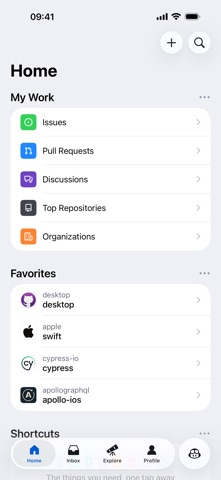
GitHub stands as the premier cloud-based hosting service for software development using Git version control. The GitHub iOS application distills essential repository oversight functions into a streamlined, touch-optimized user experience.
Users can easily triage issues, review lines of code, and collaborate on design discussions without opening a complex development environment. The platform connects developers, maintainers, and contributors across a unified global network.
Developed by GitHub, the mobile application has evolved from a simple notification reader into a robust project management utility. It allows teams to merge pull requests, organize issues with custom labels, and explore trending repositories on the go.
Standout Features & What's New in this Build
This TestFlight iteration introduces several workflow enhancements designed to streamline mobile code review sessions. The engineering team focuses heavily on native UI performance and reducing friction during asynchronous team communication.
Here are the primary feature highlights included in the current beta distribution:
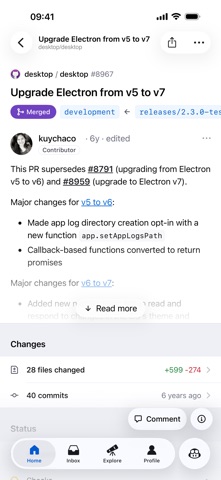
- Native Code Review: Seamlessly inspect changed lines, leave inline comments, and approve pull requests with fluid touch gestures.
- Interactive Triage: Quickly filter, label, and assign issues directly from your mobile device while away from your desk.
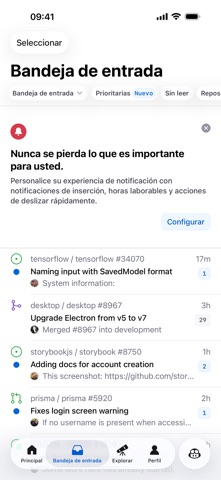
- Notification Center: Stay on top of repository mentions, team reviews, and build failures with a modernized alert interface.
- Repository Explorer: Browse source code files, directory structures, and commit histories with syntax highlighting intact.
- Trending Discovery: Uncover emerging open-source projects and popular repositories curated by the global developer community.
Hands-On Impressions: Performance, Battery, and Thermals
Evaluating this build on a ProMotion 120Hz display reveals exceptionally smooth scrolling through lengthy commit logs and code diffs. Touch response is immediate, making rapid inline commenting feel natural and precise on recent Apple Silicon devices.
Thermal efficiency remains pristine throughout extended review sessions, with negligible battery drain compared to resource-heavy mobile games. Memory management is well-optimized, avoiding unexpected background termination when switching between Safari and the app.
"Our goal with the iOS app is to remove friction from everyday code maintenance so developers can keep projects moving forward from anywhere." — GitHub Mobile Engineering Team
System Requirements & Requested Permissions
Running this TestFlight build requires an iPhone, iPad, or iPod touch running iOS 17.0 or later. The app weighs in at 174 MB, demanding minimal local storage space for installation cache.
System permissions are kept strictly to essential necessities, primarily requesting push notifications for repository alerts. Apple’s robust sandboxing architecture ensures your local device files remain completely secure and isolated.
Pros & Cons: Beta Impressions
✓ The Highs (What We Love)
- Fluid UI: Native rendering engine delivers buttery smooth 120Hz scrolling on Pro models.
- Quick Approvals: Merging pull requests and addressing urgent issues takes seconds.
- Low Overhead: Minimal battery consumption and zero thermal throttling during extended use.
✕ Beta Caveats (Room for Polish)
- Complex Diffs: Extremely large code files can occasionally cause momentary rendering hitches.
- Offline Limits: Limited caching functionality when cellular connectivity drops completely.
- Slot Caps: TestFlight capacity limits restrict immediate access for new testers.
Current TestFlight Slot Situation & Availability
Apple enforces a strict 10,000-tester ceiling for public TestFlight beta programs across the iOS ecosystem. Popular developer utilities like GitHub often see slots vanish within hours of opening new build waves.
If you encounter a capacity warning message, check back during off-peak hours when inactive users are periodically pruned. Securing your spot early guarantees direct access to incoming feature experiments before public App Store rollouts.
Step-by-Step TestFlight Installation Guide
Getting set up with the beta build takes only a couple of minutes using Apple's official testing framework. Follow these five straightforward steps to install the application on your device today.
First, download and install the official Apple TestFlight application from the App Store if you haven't already. Second, tap our official Codewing TestFlight invitation link directly from your iOS device browser.
Third, accept the invitation prompt inside the TestFlight application interface to join the beta program. Fourth, tap the Install button to download the 174 MB package onto your iPhone or iPad.
Fifth, launch the app, log into your account, and use the built-in feedback tool to report any bugs. Your diagnostic reports directly assist developers in refining stability prior to official production releases.
Frequently Asked Questions
Is GitHub safe to install via TestFlight?
Yes, every beta build distributed through TestFlight undergoes Apple's rigorous automated security and malware screening. The application operates securely within iOS sandboxing guidelines, protecting your personal data.
What should I do if the GitHub beta is full?
If tester slots are currently capped, bookmark this page on Codewing and check back periodically. Slots open up automatically when developers remove inactive testers or increase build capacities.
Will installing this beta overwrite my App Store version or delete save data?
TestFlight builds install directly over existing retail app versions as an update while preserving your login credentials. Your cloud repository data and account settings remain completely untouched throughout the installation process.
How long do TestFlight beta invitations and builds last?
Individual TestFlight builds remain active for a maximum duration of 90 days from their initial upload date. Regular updates pushed through the platform will keep your application running smoothly past expiration limits.
Are in-app purchases free during TestFlight beta testing?
Because this app is entirely free to use, there are no simulated payment gates or transaction hurdles. All features, repository tools, and notification utilities are fully unlocked for all active beta testers.
Final Editorial Verdict
GitHub continues to prove that complex developer workflows can translate seamlessly onto mobile touchscreens without losing functionality. This TestFlight build delivers rock-solid reliability, making it an essential download for active developers and project maintainers.
Rating Score: 4.8 / 5.0 (Essential Beta Utility)
Developer Support & Official Resources
Stay updated on patch notes, maintenance windows, and feature roadmaps directly from the official developer channels.
Ready to Test GitHub?
Apple limits public TestFlight betas to 10,000 testers. Tap below to launch TestFlight and claim your testing slot before capacity is reached.
Join GitHub Beta on TestFlight →