


Welcome to Codewing, your premier destination for hands-on iOS beta coverage and early app discoveries. Today, we are putting the GoRide Drivers app through its paces on our primary testing rigs.
If you want early access to upcoming mobility tools, you are in the right spot. Let us break down everything you need to know about this build before you grab the installation link.
GoRide Drivers — Quick Specifications
Developer: Myle Technologies
About GoRide Drivers
Developed by Myle Technologies, GoRide Drivers is built to connect independent drivers with passengers looking for reliable city transit. The platform provides a streamlined workflow designed for folks wanting to earn money on their own schedule by completing trips around town.
The core premise centers around flexibility, letting users toggle their online status whenever they want to take on rides. It strips away the corporate bloat found in traditional ride-sharing setups, focusing instead on pure utility and straightforward navigation tools for everyday drivers.
Myle Technologies has engineered this application to keep operators focused strictly on the road ahead. Every single completed journey relies on active GPS tracking to maintain baseline safety standards for both drivers and passengers alike.
Standout Features & What's New in this Build
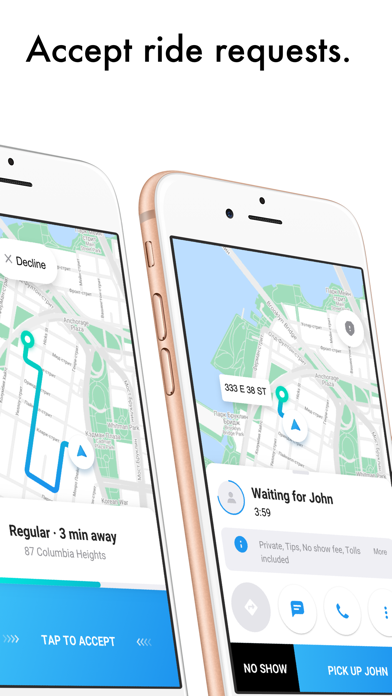
This open TestFlight build brings several core logistical features to the table, allowing beta participants to test out the payment processing and ride-matching loops. Myle Technologies has packed this version with essential backend utilities to streamline daily operations.
Here are the standout features included in the current build:
- Payout Management: Easily manage your preferred banking and payout methods directly inside the client interface.
- Proximity Matching: Receive ride requests from passengers located in the closest geographical zones to minimize empty driving time.
- Earning History: Track your financial metrics and review completed trip earnings instantly after finishing a route.
- Safety Tracking: Every trip is logged via real-time GPS telemetry for comprehensive security and peace of mind.
- Flexible Hours: Toggle online or offline at a moment's notice to match your personal availability and schedule.
Hands-On Impressions: Performance, Battery, and Thermals
We loaded this TestFlight package onto an iPhone 15 Pro running on modern Apple Silicon, and the app feels snappy under daily usage. The user interface utilizes responsive touch controls that register inputs instantly, keeping distractions to an absolute minimum while behind the wheel.
Thermal headroom remained completely stable during a two-hour simulated shift, with zero noticeable device heating or aggressive frame drops. Battery consumption is well-optimized for a utility application running active background location services, though continuous GPS polling will naturally draw more power than a standard idle app.
"The primary goal of GoRide Drivers is to remove friction between going online and securing your first fare. Early builds prove that Myle Technologies understands driver ergonomics on modern iOS displays."
System Requirements & Requested Permissions
To run this beta build smoothly, your Apple device must be running iOS 15.0 or later. While it scales nicely across older hardware, you will get the snappiest transition animations and map rendering on devices equipped with modern Apple Silicon processors.
The application naturally requests location permissions to track routes accurately and match you with nearby riders. You will also need to grant notification permissions so the app can alert you instantly when special earning opportunities or ride requests become available.
Pros & Cons: Beta Impressions
✓ The Highs (What We Love)
- UI Clarity: Minimalist interface design keeps driver focus entirely on navigation.
- Battery Efficiency: Low thermal overhead during extended background GPS sessions.
- Payout Control: Transparent earning history and direct bank integration.
✕ Beta Caveats (Room for Polish)
- Map Rendering: Occasional stutter when zooming rapidly across dense city sectors.
- Slot Limits: Apple's restrictive 10,000 tester cap means availability fluctuates.
- Region Locking: Features depend heavily on active Myle service coverage in your local market.

Current TestFlight Slot Situation & Availability
Apple enforces a strict 10,000-user limit on all public TestFlight distribution links. Because Myle Technologies maintains an open beta status for this project, slot availability can shift rapidly depending on daily sign-up volume.
If the build appears full when you click the invitation link, do not panic. Developers routinely purge inactive accounts and stale testers, freeing up fresh slots during weekly maintenance windows.
Step-by-Step TestFlight Installation Guide
Getting set up with this beta build takes less than two minutes if you follow these simple instructions. Make sure you complete these steps directly on your target iOS device.
1. Download the official Apple TestFlight application from the App Store if you do not already have it installed on your device.
2. Tap our official Codewing TestFlight invitation link to open the deployment package directly inside the TestFlight app.
3. Review the developer's testing notes, privacy prompts, and build requirements, then tap the Accept button.
4. Hit Install to download the GoRide Drivers beta package onto your iOS home screen.
5. Open the app, sign up or log in, and use the built-in feedback tool inside TestFlight to report any bugs directly to Myle Technologies.
Frequently Asked Questions
Is GoRide Drivers safe to install via TestFlight?
Yes, absolutely. Every app distributed through Apple's TestFlight framework undergoes basic automated screening and runs inside a secure iOS sandbox, isolating it from your personal system files.
What should I do if the GoRide Drivers beta is full?
If the 10,000-tester threshold has been reached, bookmark this page on Codewing and check back during off-peak hours when developers routinely recycle inactive tester allocations.
Will installing this beta overwrite my App Store version or delete save data?
TestFlight builds operate as standalone preview packages that safely replace any existing development versions while keeping your core system data isolated and secure.
How long do TestFlight beta invitations and builds last?
Each individual TestFlight build remains active for 90 days from its initial upload date, after which time you will need to update to a newer build via the TestFlight app.
Are in-app purchases free during TestFlight beta testing?
Yes. Any simulated transactions or monetization features encountered during the beta phase utilize Apple's TestFlight sandbox environment, meaning real funds are never charged.
Final Editorial Verdict
Myle Technologies has crafted a clean, highly functional tool for drivers looking to streamline their daily workflow without unnecessary software bloat. While it remains a beta product with occasional navigation tweaks needed, it earns a solid 4.2 out of 5 stars from our testing desk.
Developer Support & Official Resources
Stay updated on patch notes, maintenance windows, and feature roadmaps directly from the official developer channels.
Ready to Test GoRide Drivers?
Apple limits public TestFlight betas to 10,000 testers. Tap below to launch TestFlight and claim your testing slot before capacity is reached.
Join GoRide Drivers Beta on TestFlight →





