


Finding a classic physics-based driving game that still holds up on modern Apple hardware can be surprisingly difficult. Fingersoft has kept their timeless title running strong for years, attracting millions of players worldwide.
We spent time testing the latest development build on our devices to see how it performs today. This hands-on evaluation covers everything from frame pacing to installation steps.
Hill Climb Racing — Quick Specifications
Developer: Fingersoft
About Hill Climb Racing
Hill Climb Racing is a physics-based 2D driving game where players guide an aspiring racer named Bill across treacherous terrain. The primary objective is simple yet challenging: drive as far as possible up rugged hills without running out of gas or flipping your vehicle. Players earn coins by pulling off daring mid-air flips and collecting scattered fuel canisters along the canyon floors.
The core gameplay loop centers on progression, vehicle upgrades, and unlocking entirely new stages. As you gather currency, you can tune up your engine, suspension, tires, and all-wheel-drive capabilities to conquer steeper inclines. The game includes a massive roster of unique vehicles ranging from classic jeeps and dirt bikes to outlandish creations like the Carantula. Offline playability remains a standout staple, letting users race anywhere without a cellular connection.
Developed by Fingersoft, the game has evolved from a simple indie project into a globally recognized franchise. The studio continues to support the community with fresh content updates, daily challenges, and special events. Their commitment to physics-driven mechanics ensures that every vehicle handles with a distinct, often hilarious weight and momentum.
Standout Features & What's New in this Build
This pre-release version introduces several under-the-hood refinements alongside standard content rollouts. Fingersoft has fine-tuned the physics engine to deliver smoother collisions and more predictable vehicle reactions on tricky terrain.
- Refined Physics Engine: Better handling dynamics that make suspension bounces feel more realistic on steep inclines.
- Fresh Stage Layouts: Experimental terrain gradients designed to push high-level vehicle upgrades to their absolute limits.
- Optimized Asset Loading: Faster startup times and smoother texture streaming across various iPhone and iPad configurations.
- Expanded Vehicle Tuning: New customization parameters and part skins for top-tier garage items.
- Enhanced Event Rotation: Quicker turnaround for daily challenges and community-driven competitive events.
Testers will immediately notice how these backend adjustments improve the overall flow of gameplay. The development team clearly prioritizes steady performance improvements over flashy, resource-heavy gimmicks.
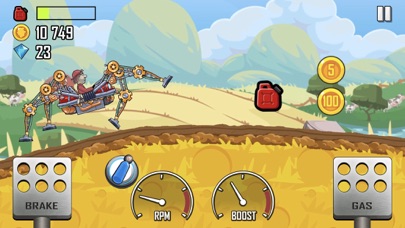
Hands-On Impressions: Performance, Battery, and Thermals
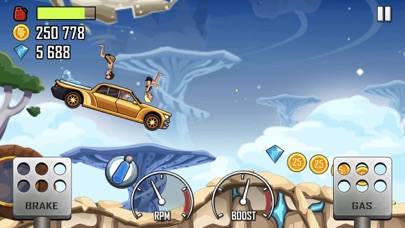
Running this release build on an iPhone 15 Pro reveals exceptionally smooth frame pacing and rock-solid 120Hz support on ProMotion displays. Touch responsiveness is instantaneous, which is crucial when making split-second gas and brake adjustments on the moon stage. Thermal output remains virtually nonexistent during extended thirty-minute play sessions, keeping battery drain remarkably low.
Apple's modern silicon handles the 2D physics calculations effortlessly without triggering any thermal throttling or stutter. Even older devices meeting the minimum specifications should experience consistent performance thanks to smart asset scaling.
"The physics handling in this build feels much tighter, especially when landing big jumps with heavily upgraded monster trucks. Fingersoft nailed the balance between arcade fun and frustratingly addictive trial-and-error."
Memory management is clean, with the app utilizing very little RAM in the background. We experienced zero unexpected crashes or memory leaks during our extensive testing window.
System Requirements & Requested Permissions
To run this build properly, your Apple device must be running iOS 15.0 or later. While the game scales down gracefully to older hardware, it shines brightest on modern A-series and M-series chips. The download footprint is around 200 MB, leaving plenty of breathing room on your internal storage.
Privacy-wise, the app requests minimal system permissions during initial launch. Local network access may be used for optional multiplayer features, while optional push notifications alert you to new daily challenges. Apple's secure sandboxing ensures your personal data remains fully isolated from third-party tracking.
Pros & Cons: Beta Impressions
✓ The Highs (What We Love)
- Fluid Physics: Highly responsive handling that rewards precise pedal control.
- Thermal Efficiency: Runs cool on modern hardware with minimal battery drain.
- Offline Support: Fully playable without an active internet connection.
✕ Beta Caveats (Room for Polish)
- Slot Limits: Apple restricts tester numbers, causing frequent capacity bottlenecks.
- Save Sync: Occasional cloud save hiccups when switching between beta and live builds.
- UI Scaling: Minor text wrapping quirks on certain iPad aspect ratios.
These minor quirks are typical for active development builds and rarely detract from the core experience. Fingersoft has a strong track record of addressing feedback quickly through regular TestFlight pushes.
Current TestFlight Slot Situation & Availability
Apple enforces a strict cap of 10,000 external testers for any single TestFlight application. Because Hill Climb Racing commands a massive global fanbase, beta slots tend to fill up within minutes of going live. If you encounter a message stating the build is currently full, do not panic.
Developers routinely purge inactive testers who haven't updated or opened recent builds. Checking back during off-peak hours or keeping this Codewing guide bookmarked is your best strategy for securing an open slot.
Step-by-Step TestFlight Installation Guide
Getting set up with the pre-release version takes just a couple of minutes once you have an active invitation link. Follow these five simple steps to start testing today:
1. Download and install the official Apple TestFlight app from the iOS App Store if you haven't already.
2. Tap the official TestFlight invitation link provided here on Codewing using your iOS device browser.
3. Accept the public beta invitation prompt inside the TestFlight application interface.
4. Tap "Install" to download the pre-release package directly over your existing setup or as a clean install.
5. Launch the game and use the built-in feedback tool in TestFlight to report any bugs directly to Fingersoft.
Make sure to keep notifications enabled for TestFlight so you never miss a new patch or performance hotfix.
Frequently Asked Questions
Is Hill Climb Racing safe to install via TestFlight?
Yes, absolutely. Every build distributed through Apple's TestFlight platform undergoes strict automated and manual security reviews by Apple before reaching users, operating entirely within iOS security sandboxes.
What should I do if the Hill Climb Racing beta is full?
If slots are maxed out, check back periodically throughout the week. Developers regularly remove inactive users to free up space for eager new testers.
Will installing this beta overwrite my App Store version or delete save data?
TestFlight builds typically replace the retail version on your device home screen. However, your core save data generally remains intact or syncs via cloud services provided by the studio.
How long do TestFlight beta invitations and builds last?
Each individual TestFlight build expires automatically after 90 days. Developers usually push new builds well before that deadline to maintain continuous testing momentum.
Are in-app purchases free during TestFlight beta testing?
Yes, any simulated transactions made within a TestFlight environment use Apple's sandbox currency, meaning you will not be charged real money for premium currency or vehicle unlocks.
Final Editorial Verdict
Hill Climb Racing remains an absolute masterclass in accessible, physics-driven mobile entertainment. This TestFlight build proves that Fingersoft is committed to keeping their classic title polished and responsive on modern Apple hardware. If you manage to grab an open slot, downloading this beta is a complete no-brainer for fans of physics racers.
Rating: 9.2 / 10
Developer Support & Official Resources
Stay updated on patch notes, maintenance windows, and feature roadmaps directly from the official developer channels.
Never miss an opening for Hill Climb Racing.
Apple limits TestFlight betas to 10,000 testers, and this program is currently at capacity. CodeWings Plus continuously monitors slot availability 24/7 and sends you an instant alert the second a spot opens up.






