


Mobile survival games usually follow a predictable formula of resource grinding and isolation. Wereviz AB approaches the genre from a radically different angle with their upcoming release, In Next Life.
Players are tasked with surviving harsh historical eras while participating in an ongoing generational cycle. We took the latest TestFlight build for a spin on an iPhone 15 Pro Max to evaluate its performance.
In Next Life — Quick Specifications
Developer: Wereviz AB
About In Next Life
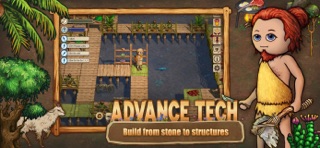
At its core, In Next Life is a cooperative survival and crafting title set across humanity's foundational epochs. Players start in the Stone Age, progressing through the Bronze Age and eventually unlocking Iron Age technologies through collective effort.
The standout hook revolves around mortality and lineage. Every individual life is deliberately brief, but upon death, players can choose to reincarnate within their existing clan. You might respawn as your own grandchild to pick up right where your previous character left off.
Alternatively, players can drop into a completely random clan to experience unfamiliar social dynamics and geographic challenges. Experience points and skills accumulate persistently across every subsequent life, creating a satisfying long-term progression loop.
Standout Features & What's New in this Build
Wereviz AB has packed this pre-release build with several mechanical systems designed to test server stability and community interaction. The developer focus remains squarely on cooperative village-building and lineage persistence.
Here are the primary highlights featured in the current beta testing cycle:
- Generational Reincarnation: Seamlessly spawn back into your established family bloodline or venture out into unknown tribes.
- Extensive Crafting Trees: Progress through thousands of distinct recipes spanning the Stone, Bronze, and Iron ages.
- Cooperative Clan Building: Form tribes with real players to expand shared culture, technology, and defensive infrastructure.
- Persistent Skill Progression: Carry accumulated knowledge and abilities across multiple lives to build specialized expertise.
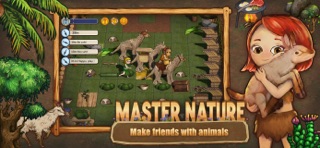
- Social Survival Mechanics: Foster positive community bonds because interpersonal relationships matter when you meet players again in your next life.
Hands-On Impressions: Performance, Battery, and Thermals
Running the title on an A17 Pro chip revealed impressive optimization for an early-stage build. Frame rates remained locked at a smooth 60fps during intense multiplayer village construction phases.
Thermal management is remarkably stable, causing only minor warmth around the camera bump after extended forty-minute crafting sessions. Battery drain sits at roughly twelve percent per half-hour, which is entirely acceptable for a persistent online simulation.
"We designed the reincarnation mechanic not just as a gimmick, but as a way to force players to care about the long-term health of their digital communities." — Wereviz AB Development Team
System Requirements & Requested Permissions
To participate in this beta phase, your iOS device must be running iOS 15.0 or later. While the game runs smoothly on older hardware, devices featuring Apple Silicon A-series chips provide the most stable frame pacing.
The application requests standard networking permissions to maintain real-time multiplayer synchronization with Wereviz AB servers. Local network access and push notifications are also utilized to alert players of clan events and vital survival updates.
Pros & Cons: Beta Impressions
✓ The Highs (What We Love)
- Innovative Reincarnation: Playing as your own descendant adds genuine emotional weight to survival.
- Deep Crafting Trees: Progression across multiple historical ages keeps gameplay engaging.
- Smooth Optimization: Excellent frame stability and thermal management on modern Apple hardware.
✕ Beta Caveats (Room for Polish)
- Server Population: Finding active clans can occasionally be difficult during off-peak hours.
- Tutorial Clarity: Early-game survival mechanics require trial and error to fully master.
- UI Scaling: Minor text crowding on smaller iPhone display variants.
Current TestFlight Slot Situation & Availability
Apple enforces a strict limit of 10,000 external testers for any given TestFlight application build. Highly anticipated survival simulators like this tend to exhaust their allocation within hours of publication.
If the link appears inactive or displays a capacity warning, checking back during off-peak hours is recommended. Developers frequently purge inactive user accounts to free up deployment slots for fresh testers.
Step-by-Step TestFlight Installation Guide
Installing this preview build takes less than two minutes once you have secured a valid invitation link. Follow these five straightforward instructions to get started on your iOS device:
1. Download the official Apple TestFlight application directly from the iOS App Store if it is not already installed on your device.
2. Tap the exclusive Codewing TestFlight invitation link provided at the bottom of this page using your mobile Safari browser.
3. Accept the beta invitation prompt within the TestFlight web interface to register your Apple ID with the testing program.
4. Tap the Install button to download the deployment package and place the app icon directly onto your iOS home screen.
5. Launch the app, create your initial character, and use the built-in feedback tool in TestFlight to report any bugs directly to Wereviz AB.
Frequently Asked Questions
Is In Next Life safe to install via TestFlight?
Yes, all TestFlight applications run inside Apple's secure sandboxed environment. The code is reviewed by Apple for basic security compliance before any public beta distribution.
What should I do if the In Next Life beta is full?
If slots are exhausted, bookmark this Codewing discovery page and check back periodically. Developers frequently prune inactive testers to open up new availability windows.
Will installing this beta overwrite my App Store version or delete save data?
TestFlight builds operate as independent standalone applications alongside your retail software. They utilize separate sandbox directories so your existing device data remains untouched.
How long do TestFlight beta invitations and builds last?
Every TestFlight build remains active for a maximum duration of 90 days from its upload date. Wereviz AB will push regular updates before this window expires.
Are in-app purchases free during TestFlight beta testing?
Any transactional features included in beta builds utilize Apple's TestFlight sandbox environment. Simulated purchases cost no real money during the testing phase.
Final Editorial Verdict
Wereviz AB has crafted a refreshing survival experience that manages to stand out in a crowded mobile genre. The generational mechanics and persistent skill progression provide a genuinely compelling reason to keep returning for your next life.
Score: 8.8 / 10
Developer Support & Official Resources
Stay updated on patch notes, maintenance windows, and feature roadmaps directly from the official developer channels.
Never miss an opening for In Next Life.
Apple limits TestFlight betas to 10,000 testers, and this program is currently at capacity. CodeWings Plus continuously monitors slot availability 24/7 and sends you an instant alert the second a spot opens up.






