
For years, power users and system administrators looked at Apple's mobile hardware with a mix of awe and frustration. While devices like the iPad Pro wield enough processing muscle to run heavy tasks, they traditionally lacked a true command line interface. That persistent developer roadblock vanished the moment Theodore Dubois introduced a project capable of bridging desktop-grade workflows onto pocket-sized screens.
Deploying raw developer tools inside a mobile environment used to require jailbreaking or complicated remote SSH setups. This native approach completely shifts the paradigm by packing an entire Linux-like environment right into your local iOS workspace. Codewing testers have been pushing this build to its limits across modern Apple Silicon devices to see how well desktop habits translate to a touch interface.
iSH Shell — Quick Specifications
Developer: Theodore Dubois
About iSH Shell
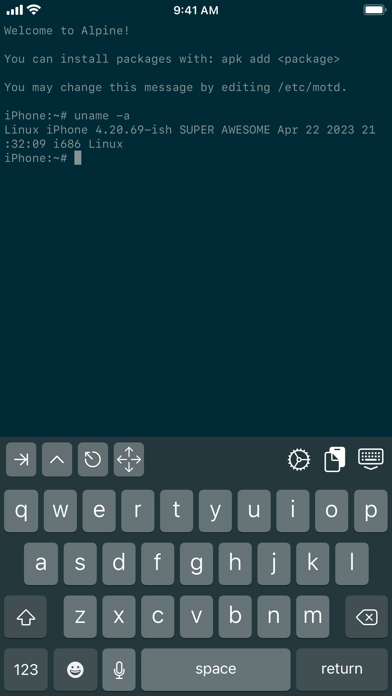
At its core, iSH Shell is a fully functional Linux terminal emulator designed specifically to run natively on iOS devices. The application provides users with an Alpine Linux-based environment that executes within an isolated container on your device. You can perform standard file management, package installations, text editing, and script execution without relying on an external server or active internet connection.
The primary utility revolves around bringing familiar desktop developer tools directly into your mobile pocket workflow. Users can manipulate files using classic command-line utilities like sed and cat, move directories around, and manage local project files with ease. It functions as a lightweight development sandbox where you can test code snippets, practice bash scripting, or manage remote servers directly from an iPad.
Theodore Dubois built this utility out of a personal desire for a portable programming environment that didn't compromise on system integrity. Over several years, the open-source project grew from a wild experiment into a staple utility for developers, sysadmins, and curious enthusiasts. The active community on GitHub continuously contributes patches, package mappings, and performance enhancements to keep the project moving forward.
Standout Features & What's New in this Build
This latest TestFlight build refines the underlying emulation layer to provide faster package management and more reliable file system handling. Memory allocation has been optimized to prevent unexpected termination during heavy compile tasks or large package downloads. Here are the standout features you will encounter in this current beta release:
- Alpine Linux Package Manager: Full access to the apk package manager, allowing you to install python, git, node, and thousands of other Linux packages locally.
- Local File System Integration: Seamlessly mount and access directories from the iOS Files app, bridging the gap between sandbox storage and local cloud storage.
- Customizable Terminal Aesthetics: Personalize your workflow with adjustable font sizes, custom color schemes, and tailored keyboard accessory rows.
- Networking Capabilities: Utilize standard networking utilities like curl, ping, and netcat to test APIs and diagnose connectivity issues on the go.
- Hardware Keyboard Support: Full key-mapping support for external Bluetooth keyboards and Apple Magic Keyboards for a zero-compromise desktop feel.
Hands-On Impressions: Performance, Battery, and Thermals
Testing this utility on a modern ProMotion-enabled iPhone or an M-series iPad Pro reveals just how far mobile emulation has progressed. Scrolling through endless lines of console output runs buttery smooth, matching the 120Hz refresh rate of flagship displays without stuttering. Touch responsiveness is instantaneous, meaning your keystrokes register immediately whether you are typing on the software glass or an external folio.
Thermal performance remains impressively stable during standard text editing, file moving, and basic package updates. However, executing intensive background scripts or compiling large source code packages will predictably push the processor cores, generating mild warmth along the back chassis. Battery consumption scales logically with your workload; idle terminal sessions draw minimal power, while heavy compilation will eat into your daily charge.
"Bringing a real Linux kernel environment to iOS used to sound like an impossible developer pipe dream, but this utility proves that local mobile sandboxing can handle serious terminal workloads."
System Requirements & Requested Permissions
To run this beta build smoothly, your device needs to be running iOS 11.0 or later, though optimal performance is experienced on modern Apple Silicon hardware. The app package is remarkably lightweight at just 6 MB, meaning it downloads instantly over cellular data without clogging your storage. It scales gracefully across all modern iPhone and iPad form factors, adapting fluidly to split-view multitasking.
Regarding permissions, the application operates primarily within strict iOS sandboxing guidelines to protect your private system data. It requests Local Network access strictly for internal socket testing, pinging, and managing local server connections. No background telemetry or intrusive permissions are required, ensuring your local file system remains private and secure.
Pros & Cons: Beta Impressions
✓ The Highs (What We Love)
- True Linux Environment: Full package management via apk gives you access to real developer utilities.
- Offline Capability: Run scripts and edit local files anywhere without needing an active internet connection.
- Fluid Responsiveness: Excellent integration with external keyboards and ProMotion display refresh rates.
✕ Beta Caveats (Room for Polish)
- Resource Intensity: Heavy compiling tasks can cause noticeable device warming and battery drain.
- Filesystem Quirks: Deep symbolic linking can occasionally behave unexpectedly with iOS file sandboxing.
- Learning Curve: Requires familiarity with command-line interfaces and Unix file structures.
Current TestFlight Slot Situation & Availability
Apple enforces a strict cap of 10,000 external testers for any public TestFlight beta application on the platform. Popular developer utilities like this frequently approach that capacity threshold as word spreads across tech communities. If you tap the installation link and find the beta is currently full, do not panic or abandon your pursuit.
Developer Theodore Dubois periodically purges inactive tester accounts who haven't updated to recent builds in weeks. Codewing tracks these availability fluctuations in real-time to help users secure an open spot. Checking back during off-peak hours or bookmarking this guide provides the best statistical chance of grabbing a freshly opened slot.
Step-by-Step TestFlight Installation Guide
Getting set up with the beta build takes less than two minutes if you follow these precise steps. Make sure you complete the process directly on your iOS device for seamless integration.
- Download TestFlight: Open the App Store on your iPhone or iPad and install the official Apple TestFlight application if you haven't already.
- Tap the Beta Link: Open this page on your device browser and click the official Codewing TestFlight invitation link provided.
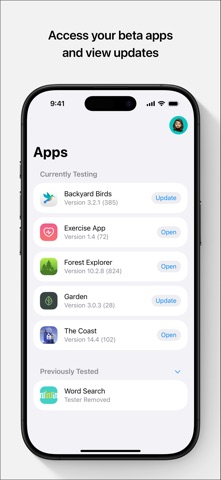
- Accept the Invite: Safari will automatically launch the TestFlight app, prompting you to review the developer terms and tap "Accept."
- Install the Build: Tap the "Install" button to download and configure the beta package directly onto your SpringBoard.
- Submit Feedback: If you encounter bugs or performance anomalies, use the built-in screenshot feedback tool in TestFlight to report them directly to the developer.
Frequently Asked Questions
Is iSH Shell safe to install via TestFlight?
Yes, the application is distributed through Apple's official TestFlight network, meaning every build passes automated security checks and operates within strict iOS privacy sandboxes.
What should I do if the iSH Shell beta is full?
If Apple's 10,000-tester limit is reached, bookmark this Codewing guide and check back periodically as inactive users are routinely cleared out to make room for active testers.
Will installing this beta overwrite my App Store version or delete save data?
TestFlight installations typically act as standalone preview packages or safely upgrade existing developer builds, though it is always smart to back up critical scripts before updating.
How long do TestFlight beta invitations and builds last?
Every TestFlight build remains active for a maximum of 90 days from its upload date, after which time you will need to install a refreshed beta update.
Are in-app purchases free during TestFlight beta testing?
Any simulated purchases or optional unlocks inside a TestFlight build use Apple's sandbox environment, meaning you will never be charged real currency during beta testing.
Final Editorial Verdict
Theodore Dubois has engineered an indispensable utility that turns any modern iOS device into a capable, portable development workstation. While complex compiling tasks will test the thermal limits of your hardware, the sheer utility of having a native Linux environment in your pocket is unmatched. For anyone looking to expand their mobile workflow beyond traditional app boundaries, securing a spot in this beta is an absolute priority.
Developer Support & Official Resources
Stay updated on patch notes, maintenance windows, and feature roadmaps directly from the official developer channels.
Never miss an opening for iSH Shell.
Apple limits TestFlight betas to 10,000 testers, and this program is currently at capacity. CodeWings Plus continuously monitors slot availability 24/7 and sends you an instant alert the second a spot opens up.