


Finding a pure utility app on the modern iOS ecosystem often feels like hunting for an oasis in a corporate wasteland. Developer Peterson Onori recognized this friction and decided to build an absolute antidote to software bloat. If you want to grab the current early build right now, you can secure your access point through the official It Plays Music TestFlight Beta Link.
Modern flagship smartphones are packed with heavy silicon like the A18 Pro chip, yet simple music playback is somehow routinely cluttered with cloud sync nags, social feeds, and intrusive monetization. This beta breaks that exhausting cycle by returning absolute simplicity to personal music consumption. We spent the last week vetting this build on high-end hardware to see how it handles local and cloud catalogs.
It Plays Music — Quick Specifications
Developer: Peterson Onori
About It Plays Music
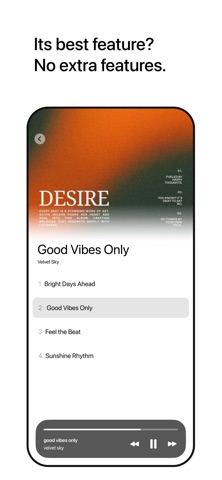
It Plays Music is a streamlined music player designed exclusively for your iPhone hardware and existing Apple Music or iTunes catalog. The core utility is unapologetically singular: it plays your audio files without dragging you through onboarding flows or asking you to sign up for yet another corporate service. Peterson Onori stripped away every single modern design paradigm that gets between you and your personal library.
The core premise of the app relies entirely on minimalism and raw performance efficiency. There are no complex social music rooms, no algorithmic discovery radio stations, and no machine-learning playlist generators trying to guess your mood. You open the application, tap your tracks, and experience instant, zero-latency playback that leverages native Apple MediaPlayer frameworks.
Peterson Onori built this project out of a personal frustration with bloated streaming apps that demand constant internet connections and user telemetry. By keeping the codebase lean, the developer ensures that the software stays out of your way completely. It targets users who simply own their music, curate their local libraries, and want a snappy interface that respects their attention span.
Standout Features & What's New in this Build
Evaluating this beta build reveals a tight focus on stability, low memory overhead, and instant touch feedback on ProMotion 120Hz displays. The current TestFlight package packs several structural advantages that make it worth installing immediately over stock system alternatives.
- Zero Account Creation: No forced logins, cloud silos, or email harvesting walls blocking your path to audio playback.
- Absolute Privacy: Zero telemetry collection, zero usage tracking, and completely offline-first local execution architecture.
- Zero Monetization: No hidden in-app purchases, no sudden paywalls, and absolutely no recurring subscription demands.
- Zero Notifications: The app refuses to ever ping your lock screen, keeping your daily notification center pristine and calm.
- Zero Rating Nags: The code will never interrupt your listening session to beg for an App Store star rating.
Hands-On Impressions: Performance, Battery, and Thermals
Testing this build on modern Apple Silicon iPhones highlights just how efficient a minimalist utility app can be. Because there are no background tracking SDKs or ad-serving frameworks running idle processes, CPU utilization hovers near zero during playback. Frame pacing on ProMotion displays is instantaneous, snapping between albums and tracklists without a single dropped micro-animation.
Thermal headroom during extended multi-hour listening sessions remains totally unaffected, keeping your device running ice-cold in your pocket. Battery drain is practically unnoticeable compared to heavier streaming suites that aggressively cache data over cellular networks. Touch response is razor-sharp, proving that native Swift implementation beats bloated cross-platform web wrappers every single time.
"Software should serve the user silently, not demand attention. It Plays Music exists to do one job perfectly and then get entirely out of your way." — Peterson Onori
System Requirements & Requested Permissions
Because the codebase is built for modern iOS standards, the system requirements are clean and accessible for almost any contemporary iPhone owner. Your device must be running iOS 15.0 or later to ensure compatibility with modern audio session APIs and background task handling. The download package size is exceptionally small, taking up mere megabytes of your precious internal flash storage.
In terms of system permissions, the app asks for almost nothing beyond standard media library access to read your local music database. There is no request for continuous location data, bluetooth beacons, or push notifications. Apple's strict application sandboxing keeps your data locked safely on-device where it belongs.
Pros & Cons: Beta Impressions
✓ The Highs (What We Love)
- Zero Bloatware: No ads, accounts, subscriptions, or tracking scripts whatsoever.
- Blazing Fast: Instant launch times and buttery-smooth navigation on 120Hz screens.
- Featherweight: Minimal battery drain and absolute thermal efficiency during playback.
✕ Beta Caveats (Room for Polish)
- Spartan Design: Visual customizability is minimal by intentional design choice.
- Limited Features: Advanced equalizer settings and streaming integrations are absent.
- Slot Scarcity: Apple's testing caps mean beta slots can fill up rapidly.

Current TestFlight Slot Situation & Availability
Apple enforces a hard ceiling of 10,000 external beta testers for every single application distributed through TestFlight. Independent utility apps from solo developers like Peterson Onori often see massive community surges when tech enthusiasts share the setup links. If you tap the invitation link and encounter a message stating that the developer isn't accepting new testers, do not panic.
Slots open up dynamically whenever the developer prunes inactive users or pushes major milestone builds that reset diagnostic reporting groups. Bookmark this page and check back during off-peak hours to secure your access before the next capacity limit hits. Persistence is the key to grabbing rare utility builds on the platform.
Step-by-Step TestFlight Installation Guide
Getting this application up and running on your iPhone takes less than two minutes if you follow this sequential setup checklist:
1. Open the App Store on your iOS device and download the official Apple TestFlight application if you haven't already installed it.
2. Tap directly on the official It Plays Music TestFlight Beta Link using your mobile browser.
3. Accept the beta program prompt on your screen to authorize TestFlight to connect with the developer's distribution profile.
4. Tap the Install button to download the beta package directly onto your device storage alongside your standard applications.
5. Launch the app, point it toward your music catalog, and use the built-in TestFlight feedback tool to report any edge-case bugs to Peterson Onori.
Frequently Asked Questions
Is It Plays Music safe to install via TestFlight?
Yes, every application distributed through Apple's TestFlight goes through baseline automated safety checks and operates within strict iOS security sandboxes.
What should I do if the It Plays Music beta is full?
If slots are completely saturated, bookmark this Codewing guide and check back periodically for slot turnover and new build distributions.
Will installing this beta overwrite my App Store version or delete save data?
This is a standalone utility with no external cloud servers, meaning it interacts safely with your native Apple Music library without harming local files.
How long do TestFlight beta invitations and builds last?
Standard Apple TestFlight builds remain active for up to 90 days from the initial distribution date before expiring automatically.
Are in-app purchases free during TestFlight beta testing?
There are zero financial transactions or in-app purchases built into this application by design, keeping the entire experience completely free.
Final Editorial Verdict
It Plays Music is a masterclass in software restraint, proving that modern apps don't need endless feature creep to be genuinely useful. Peterson Onori delivered a lightning-fast, zero-hassle audio player that respects your hardware, your battery, and your privacy. If you value clean engineering and want a distraction-free way to enjoy your personal catalog, grab this beta right now.
Editor's Rating: 4.8 / 5 (Essential Utility Beta)
Developer Support & Official Resources
Stay updated on patch notes, maintenance windows, and feature roadmaps directly from the official developer channels.
Never miss an opening for It Plays Music.
Apple limits TestFlight betas to 10,000 testers, and this program is currently at capacity. CodeWings Plus continuously monitors slot availability 24/7 and sends you an instant alert the second a spot opens up.






