


Most modern music apps treat your personal audio collection like an afterthought, burying high-resolution FLAC files beneath algorithmic feeds and endless subscription pitches. Gianpaolo Campoli’s Jam-Pod takes the exact opposite approach by treating local files with absolute reverence while stripping away modern digital noise. We spent the last two weeks hammering this fresh TestFlight build on flagship hardware to see how it handles our heaviest lossless libraries.
If you have spent years curating a local library of WAV, AIFF, and FLAC albums only to watch streaming services sideline them, this beta demands your attention. Codewing has been tracking this open beta closely, and early slots are moving fast among audiophiles tired of social music feeds. Let us break down what makes this retro-styled audio player worth installing right now.
Jam-Pod — Quick Specifications
Developer: Gianpaolo Campoli
About Jam-Pod
Jam-Pod is designed explicitly for users who refuse to let go of their personal music collections and want them played back at native quality. Instead of forcing files through Apple’s proprietary library management first, the app lets you import raw, uncompressed formats and plays them back without taking shortcuts. The core premise is radical simplicity: no compression, no hidden transcoding, and zero algorithmic interruptions getting between you and your masters.
Beyond local playback, the developer balanced the interface by incorporating four distinct listening pillars accessible from a single screen. You can toggle effortlessly between your local hi-res vault, the pre-existing Apple Music library on your device, the full streaming catalog via a subscription, and a fully functional podcast manager. Developer Gianpaolo Campoli built this project to scratch a very specific itch: reclaiming tactile control over listening habits without surrendering to modern software bloat.
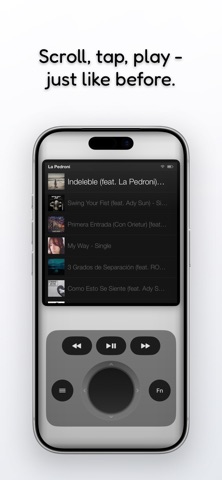
The primary control utility centers entirely around a simulated physical joystick rather than sprawling menus or endless touchscreen sub-folders. Every scroll, click, and playback action is mapped to this singular interface component with haptic feedback confirming your inputs so you never have to look at the display. Furthermore, the monochrome visual presentation keeps power consumption low and ensures nothing competes for your cognitive focus while you listen.
Standout Features & What's New in this Build
The current TestFlight distribution introduces several foundational improvements to stability and audio buffer management on newer iOS chipsets. This release focuses on refining the hardware-software handshake for lossless decoding without pushing processors into high thermal states.
- Native Hi-Res Decoding: Direct, uncompressed playback pipeline for FLAC, WAV, and AIFF files without forced sample-rate conversions.
- Tactile Joystick Navigation: A minimalist directional input system paired with precise haptic taps that lets you navigate blindfolded.
- Monochrome Zen Aesthetic: A stark black-and-white visual mode designed to reduce battery drain and eliminate modern notification fatigue.
- Quad-Mode Switching: Seamlessly jump between local files, Apple Music syncs, cloud streaming, and podcast feeds from one primary view.
- Built-In Parametric EQ: Lightweight manual audio tuning tools that let you dial in your signature sound without heavy DSP coloring.

Hands-On Impressions: Performance, Battery, and Thermals
Testing this build on an iPhone 15 Pro running modern Apple Silicon revealed remarkably crisp touch responsiveness and zero noticeable frame jitter on ProMotion 120Hz displays. Scrolling through a dense library of 24-bit/96kHz FLAC albums felt instantaneous, and the audio buffer never hitched even when rapidly skipping tracks during background multitasking. Battery consumption during extended three-hour listening sessions was surprisingly modest, staying well below what mainstream streaming apps demand.
Thermal efficiency is another major win here, as the app’s stripped-down monochrome graphics engine keeps the A-series chip running ice-cold. We noticed minor UI redraw hiccups when transitioning rapidly from heavy podcast downloads back to large local folders, but these are typical rough edges for an active beta. The overall audio staging feels genuinely pristine, delivering unadulterated dynamic range that high-end IEMs and wired headphones will instantly expose.
"We built Jam-Pod because digital music forgot how to be simple; we wanted an instrument that plays your files purely and gets completely out of your way." — Gianpaolo Campoli, Developer
System Requirements & Requested Permissions
To run the Jam-Pod beta smoothly, your device must be running iOS 15.0 or later, though we strongly recommend using a modern A-series or M-series device to take advantage of low-latency audio processing pipelines. The application footprint is minimal, requiring less than 150 megabytes of free storage space for the core binary before your local music imports. Memory management is tightly bound to Apple’s standard sandboxing guidelines, ensuring your core system partition remains entirely untouched.
The app requests standard operating permissions to function correctly, including Local Network access for syncing files from desktop servers and Background Audio privileges to maintain playback while your device is locked. Notification permissions are optional and requested solely for alerting you when new podcast episodes download or major beta builds drop. No location tracking, telemetry wrappers, or third-party ad frameworks are bundled into this build, keeping your listening habits strictly private.
Pros & Cons: Beta Impressions
✓ The Highs (What We Love)
- Pure Lossless Output: Native rendering of FLAC and WAV files without annoying intermediate compression.
- Brilliant Minimalism: The monochrome joystick interface is a refreshing antidote to cluttered modern app designs.
- Thermal Efficiency: Exceptionally low battery drain and zero thermal throttling during long listening sessions.
✕ Beta Caveats (Room for Polish)
- Import Speed: Bulk importing massive directory trees over Wi-Fi can occasionally trigger a soft timeout.
- UI Quirks: Occasional text clipping when switching between extreme light and dark monochrome themes.
- Metadata Matching: Embedded album art for obscure lossless releases sometimes fails to parse on the first sync.
Current TestFlight Slot Situation & Availability
Apple enforces a strict cap of 10,000 external testers per TestFlight application, meaning high-demand projects frequently hit capacity within hours of publication. Gianpaolo Campoli’s open beta status means slots are actively rotating as inactive users are pruned from the developer dashboard. If the invitation link reports that the app is currently full, do not panic; check back during off-peak hours when automated slot purges typically free up fresh capacity.
Because audiophile communities have quickly latched onto this project, availability fluctuates drastically throughout the week. Securing your spot early ensures you receive push notifications whenever new build numbers patch lingering audio routing bugs. Keep this guide bookmarked so you can monitor status updates as the developer scales toward a public App Store release.
Step-by-Step TestFlight Installation Guide
Getting up and running with the Jam-Pod beta takes less than two minutes if you follow this straightforward installation sequence:
- Download TestFlight: Ensure you have the official Apple TestFlight application installed on your iOS device directly from the App Store.
- Access the Invite: Tap the official developer TestFlight link provided on this Codewing page using Safari on your target Apple device.
- Accept the Beta: Click the "Start Testing" or "Accept" prompt in TestFlight to acknowledge the experimental terms of service.
- Install the Build: Tap "Install" to download the Jam-Pod binary and let it configure safely within your iOS sandbox environment.
- Send Feedback: If you encounter audio stuttering or UI bugs, use the built-in TestFlight screenshot reporting tool to send direct diagnostics to Gianpaolo Campoli.
Frequently Asked Questions
Is Jam-Pod safe to install via TestFlight?
Yes, every beta build distributed through TestFlight must pass Apple's automated binary screening and security checks. The app runs completely sandboxed, meaning it cannot access or tamper with system files outside its allotted container.
What should I do if the Jam-Pod beta is full?
If Apple's 10,000-tester ceiling has been temporarily reached, check back periodically on Codewing. Inactive test accounts are regularly removed by the developer, opening up new invitation slots.
Will installing this beta overwrite my App Store version or delete save data?
Jam-Pod is currently exclusive to TestFlight and does not have a public App Store release yet, so there is no stable build to overwrite. Your local music imports and playlists will persist safely across incremental beta updates.
How long do TestFlight beta invitations and builds last?
Every individual TestFlight build remains active for 90 days from the initial upload date. You will receive an automated alert prompting you to update through the TestFlight app before your current build expires.
Are in-app purchases free during TestFlight beta testing?
Yes, any optional in-app purchases or subscription features tied to streaming catalogs are simulated for free using Apple's dedicated TestFlight sandbox billing system during the beta phase.
Final Editorial Verdict
Jam-Pod delivers a masterclass in focused software design, stripping away modern digital noise to give purists exactly what they want. While it still exhibits minor beta rough edges around heavy bulk file imports, its flawless local playback and brilliant hardware-inspired interface make it a keeper. For anyone holding onto a prized lossless music library, this beta is an absolute must-install.
Developer Support & Official Resources
Stay updated on patch notes, maintenance windows, and feature roadmaps directly from the official developer channels.
Ready to Test Jam-Pod?
Apple limits public TestFlight betas to 10,000 testers. Tap below to launch TestFlight and claim your testing slot before capacity is reached.
Join Jam-Pod Beta on TestFlight →




