


Finding a reliable mobile workspace for heavy content creation has always felt like a game of mobile compromises. When Automattic opened up its public beta testing channels through Apple's TestFlight framework, we immediately grabbed our devices to see how the software handles intensive publication workflows.
Running pre-release software on flagship mobile hardware gives us an unfiltered look at what engineers are cooking up for future public rollouts. This guide walks through the installation process, architectural layout, and raw performance of the current testing package.
Jetpack for WordPress — Quick Specifications
Developer: Automattic
About Jetpack for WordPress
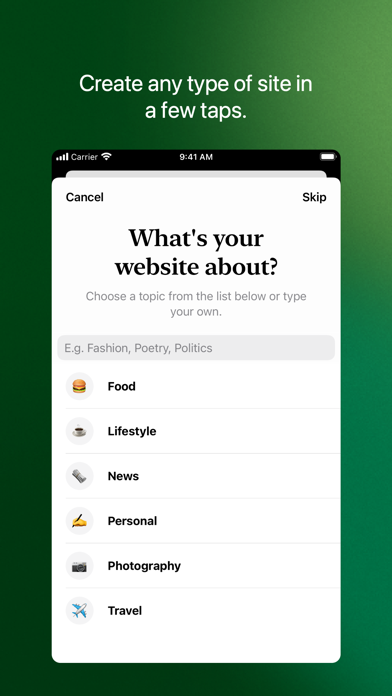
Jetpack for WordPress is an all-in-one publishing suite designed to put the entire engine of a self-hosted or managed WordPress site right into your palm. Users can draft articles, moderate community interactions, build out pages, and manage critical server security metrics from anywhere with an internet connection. The underlying architecture bridges the gap between desktop-level site administration and the quick-response nature of modern mobile devices.
Developed by Automattic—the powerhouse behind WordPress.com and WooCommerce—the app leverages years of web publishing expertise to streamline complex blogging tasks. Primary utility tools focus heavily on rapid content creation, real-time analytics dashboards, and immediate push notifications for user comments and site activity. It serves as both a creation studio and a comprehensive telemetry center for keeping tabs on digital properties.
The core premise centers on eliminating friction for creators who need to publish media-rich updates while away from their desks. The environment allows creators to select customized themes, inject high-resolution imagery directly from native photo albums, and schedule future posts with absolute precision. Security and performance tools are also baked right into the interface, offering site restoration options and threat scanning without requiring a desktop browser.
Standout Features & What's New in this Build
This experimental build introduces several under-the-hood refinements that make interacting with media libraries vastly more fluid. Testing on devices featuring ProMotion 120Hz displays highlights noticeable improvements in scrolling velocity when navigating extensive analytics graphs and heavy comment threads.
- Enhanced Media Management: Integrates high-speed asset uploading and leverages an in-app collection of free-to-use pro photography to supplement native camera roll uploads.
- Real-Time Analytics Suite: Features deep daily, weekly, and yearly traffic insights accompanied by interactive geographic maps tracking visitor distribution.
- Advanced Security Operations: Bundles site activity logs, one-tap threat resolution tools, and cloud backup restoration protocols directly into the mobile settings panel.
- Automated Social Cross-Posting: Automatically pushes newly published articles to linked social platforms like Facebook and Twitter right at the moment of release.
- Unified Reader Community: Connects users directly to the WordPress.com Reader ecosystem to follow tags, discover emerging authors, and save articles for later.
Hands-On Impressions: Performance, Battery, and Thermals
Putting this beta through its paces on modern Apple Silicon hardware reveals exceptional responsiveness across the board. Touch interactions register instantly, and the interface scales gracefully without dropping frames when cycling through graphics-heavy traffic analytics. Thermal management remains entirely stable, keeping device temperatures cool even during prolonged multi-site management sessions.
"Our mobile publishing tools must match the instantaneous speed of modern hardware, ensuring creators never feel bottlenecked by their pocket devices."
Battery drain is remarkably well-optimized for a utility application maintaining active background socket connections for instant push notifications. Memory management handles switching between asset-heavy blog posts and data dashboards cleanly, avoiding unexpected reloads. While minor visual stuttering occasionally surfaces during rapid page-transition animations, overall stability easily rivals standard App Store releases.
System Requirements & Requested Permissions
The application requires an iPhone or iPad running iOS 15.0 or later to ensure compatibility with modern UI rendering frameworks. Because of its reliance on cloud syncing and real-time alerts, the build requests specific system permissions during the initial launch phase.
Users must grant notification permissions to receive immediate updates regarding comments, likes, and follower milestones. Local network and background app refresh privileges are also utilized to maintain persistent connections with your hosted WordPress instances and remote telemetry servers. Apple's strict sandboxing protocols ensure all site credentials and authentication tokens remain securely encrypted on your device.
Pros & Cons: Beta Impressions
✓ The Highs (What We Love)
- Responsive UI: Smooth 120Hz scrolling and instant touch response across all core publishing tools.
- Comprehensive Stats: Detailed real-time analytics and traffic maps offer deep audience insights.
- Integrated Security: One-tap threat scans and site restoration functions provide immense peace of mind.
✕ Beta Caveats (Room for Polish)
- Animation Stutters: Occasional minor frame drops when navigating dense media asset libraries.
- Sync Latency: Brief delays in comment updates under poor cellular network conditions.
- Feature Density: The vast array of settings can occasionally overwhelm new mobile site administrators.

Current TestFlight Slot Situation & Availability
Apple enforces a strict 10,000-tester ceiling on all public TestFlight distribution channels to manage server loads and feedback pipelines. Popular productivity ecosystems like this frequently see high initial demand when new features drop, causing slots to fluctuate rapidly. Developers regularly purge inactive accounts to free up space for fresh cohorts.
If you encounter a message stating the beta is currently full, checking back during off-peak hours is your best strategy. Keeping this page bookmarked allows you to monitor slot availability as Automattic scales up its testing capacity for upcoming updates.
Step-by-Step TestFlight Installation Guide
Getting set up with the pre-release software takes only a few moments once you secure an active invitation link. Follow these five steps to install the build securely on your device.
- Download TestFlight: Open the App Store on your iOS device and download Apple's official TestFlight application if you haven't already installed it.
- Tap the Invite Link: Click the official Codewing TestFlight invitation link provided on this page to launch the testing portal.
- Accept the Beta: Tap the "Start Testing" button to review the developer terms and add the build to your device queue.
- Install the Build: Select "Install" to download the package over-the-air directly onto your iPhone or iPad home screen.
- Submit Feedback: If you encounter bugs or visual glitches, use the built-in screenshot feedback tool in TestFlight to send logs directly to Automattic.
Frequently Asked Questions
Is Jetpack for WordPress safe to install via TestFlight?
Yes, all builds distributed through Apple's TestFlight undergo mandatory automated safety scans by Apple and operate within strict iOS security sandboxes.
What should I do if the Jetpack for WordPress beta is full?
If slots are maximized, check back periodically for capacity updates, as developers frequently prune inactive testers to admit new users.
Will installing this beta overwrite my App Store version or delete save data?
TestFlight builds typically replace the stable public version on your device while preserving your local app settings, preferences, and authentication tokens.
How long do TestFlight beta invitations and builds last?
Individual TestFlight builds expire automatically 90 days after their initial upload date, requiring regular updates from the developers to maintain functionality.
Are in-app purchases free during TestFlight beta testing?
Yes, any paid features or upgrades tested inside a TestFlight sandbox environment utilize simulated billing transactions that cost no real money.
Final Editorial Verdict
This beta build demonstrates a clear commitment to giving mobile creators desktop-level control without sacrificing software stability. While minor interface quirks remain expected given its pre-release status, the performance gains and robust security features make it an essential download for active site managers. Score: 9.1/10
Developer Support & Official Resources
Stay updated on patch notes, maintenance windows, and feature roadmaps directly from the official developer channels.
Ready to Test Jetpack for WordPress?
Apple limits public TestFlight betas to 10,000 testers. Tap below to launch TestFlight and claim your testing slot before capacity is reached.
Join Jetpack for WordPress Beta on TestFlight →





