
Finding a digital reader that handles messy archives without requiring hours of manual file flattening is genuinely difficult. Most iOS comic applications choke the moment you throw a nested ZIP file inside a RAR folder at them.
Developer 晖铠 陈 built KedaReader specifically to solve these exact frustrations for digital library hoarders. The active TestFlight beta build lets power users stress-test these archive-wrangling utilities right now on modern Apple silicon devices.
KedaReader — Quick Specifications
Developer: 晖铠 陈
About KedaReader
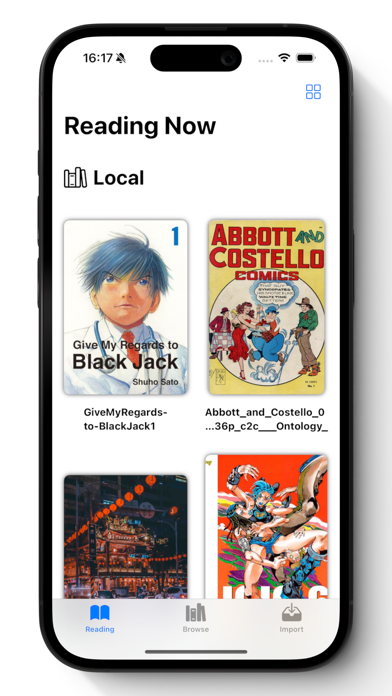
KedaReader is a specialized image and document reader designed for DRM-free digital collections like comics, manga, and graphic novels. Users import large archives in formats like ZIP, RAR, CBZ, CBR, EPUB, MOBI, or PDF directly into the utility.
The core premise centers on zero-friction archive navigation, letting you open nested structures immediately just like WinRAR on desktop. You can drop a ZIP file inside a folder, place another RAR inside that ZIP, and the application opens them instantly.
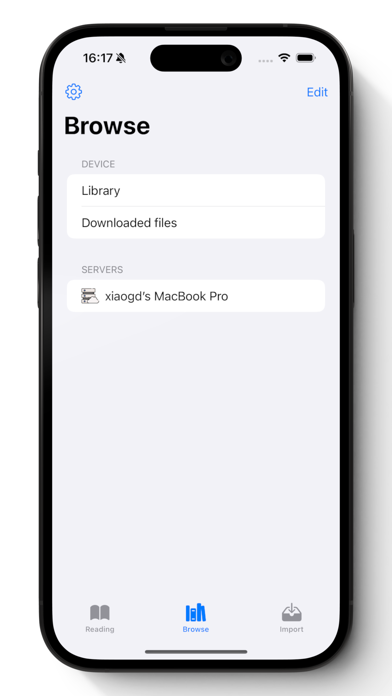
Beyond local file management, the software connects directly to personal media servers like Komga, Kavita, or Calibre using OPDS protocols. Streaming reading capabilities via WebDAV and SMB protocols allow users to open massive archives instantly without downloading full files.
Standout Features & What's New in this Build
This experimental TestFlight iteration showcases robust rendering optimizations alongside deep cloud integration features. The engineering team focuses heavily on local streaming performance and visual fidelity on high-density iOS displays.
Here are the key feature highlights included in the current beta distribution:
- Instant Streaming Reading: Open massive ZIP, RAR, and EPUB files directly from WebDAV or SMB servers without downloading the entire archive package.
- Nested Archive Engine: Browse through deeply nested folder structures and compressed archives directly on your iPhone or iPad without manual extraction.
- AI-Powered Enhancement: Utilize waifu2x integration for real-time AI-based image scaling and artifact cleanup on older low-resolution scans.
- Hardware Controller Support: Navigate pages and menus seamlessly using standard Bluetooth game controllers or physical keyboard shortcuts.
- Textured Zen Mode: Experience virtual ambient reading environments complete with spatial headphone support and realistic paper texture rendering.
Hands-On Impressions: Performance, Battery, and Thermals
Testing this build on an iPad Pro powered by the M4 chip reveals buttery-smooth page turns locked at 120Hz via ProMotion. Streaming large CBR files over a local SMB share feels entirely local, with zero perceptible stutter during rapid paging.
Thermal management is impressive, showing no noticeable chassis warmth even after an hour of heavy image decoding and AI scaling. Battery consumption remains minimal, drawing primarily from Wi-Fi module activity during remote server streaming sessions rather than heavy CPU thrashing.
The goal with KedaReader was to eliminate every single friction point between opening an archive and enjoying the artwork, regardless of where those files live on your network.
System Requirements & Requested Permissions
Running this beta requires an iPhone or iPad operating on iOS 15.0 or later, though modern Apple silicon handles heavy archive rendering best. The application requests standard local network permissions to discover server instances running on your home subnet.
Cloud integrations require explicit authentication tokens for services like Dropbox, Box, and OneDrive through Apple's secure sandboxed frameworks. Privacy remains strictly enforced locally, meaning your reading histories and archive passwords never leave your personal iCloud sync container.
Pros & Cons: Beta Impressions
✓ The Highs (What We Love)
- Nested Archives: Opens complex ZIP-in-RAR structures instantly without pre-flattening.
- Server Streaming: Seamlessly reads remote SMB and WebDAV libraries without local storage bloat.
- Controller Support: Full gamepad navigation transforms tablet reading into a couch-friendly experience.
✕ Beta Caveats (Room for Polish)
- UI Translation: Occasional untranslated strings appear in advanced server setup menus.
- AI Processing: Heavy waifu2x upscaling can spike battery drain on older mobile processors.
- Slot Limits: Apple's testing caps mean beta entry windows open and close unpredictably.
Current TestFlight Slot Situation & Availability
Apple enforces a hard ceiling of 10,000 external testers for any active public TestFlight distribution link. Popular utilities frequently hit this capacity threshold within days of major feature drops or community spotlights.
When slots are full, prospective users must wait for inactive tester purges or scheduled developer build cycles. Checking back during off-peak hours on Codewing remains the most reliable strategy for grabbing an open seat.
Step-by-Step TestFlight Installation Guide
Getting set up with the beta environment takes less than two minutes if you follow this simple workflow. Make sure you have your iOS device ready with an active internet connection.
1. Download the official Apple TestFlight utility from the App Store if it is not already installed on your device.
2. Tap the official TestFlight invitation link provided here on Codewing using your iOS Safari browser.
3. Accept the beta invitation prompt when TestFlight opens automatically to preview the developer's terms.
4. Tap the Install button to download the latest build package directly onto your home screen.
5. Submit bug reports or feature requests directly to 晖铠 陈 using the built-in feedback tool inside the app.
Frequently Asked Questions
Is KedaReader safe to install via TestFlight?
Yes, the application runs entirely within Apple's rigorous cryptographic sandboxing environment. It cannot access unauthorized system files or compromise your device security.
What should I do if the KedaReader beta is full?
Bookmark this page on Codewing and check back periodically. Inactive tester accounts are pruned regularly, which automatically frees up new invitation slots.
Will installing this beta overwrite my App Store version or delete save data?
TestFlight builds operate as standalone packages that overwrite existing beta versions while preserving local documents and iCloud sync settings safely.
How long do TestFlight beta invitations and builds last?
Every individual TestFlight build remains fully functional for 90 days from the initial release date before expiring automatically.
Are in-app purchases free during TestFlight beta testing?
Yes, any simulated purchases within the beta environment use Apple's sandbox system, meaning you will never be charged real money during testing.
Final Editorial Verdict
KedaReader is shaping up to be an absolute must-have utility for anyone managing massive uncompressed digital media archives on iOS. Its flawless handling of nested formats and remote network streaming makes it well worth grabbing via TestFlight today.
Rating: 4.8 / 5
Developer Support & Official Resources
Stay updated on patch notes, maintenance windows, and feature roadmaps directly from the official developer channels.
Never miss an opening for KedaReader.
Apple limits TestFlight betas to 10,000 testers, and this program is currently at capacity. CodeWings Plus continuously monitors slot availability 24/7 and sends you an instant alert the second a spot opens up.