


Language learning on mobile devices often relies heavily on flashing vocabulary cards and endless grammar drills. Kikoeru takes a completely different path by putting raw auditory comprehension at the very front of the learning experience.
As veteran testers evaluating builds on modern Apple hardware, we put this education app through its paces on the latest ProMotion displays. Developer Kaito Tochihara has crafted an uncluttered utility that challenges traditional study paradigms.
Kikoeru — Quick Specifications
Developer: Kaito Tochihara
About Kikoeru
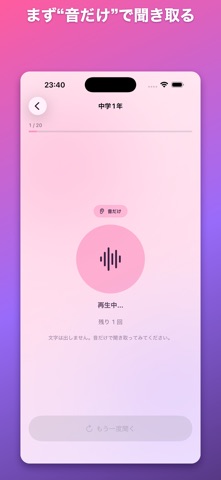
The core concept behind Kikoeru is simple yet effective: you listen to English audio without looking at any text during the initial phase. This forces your brain to process the sounds naturally before relying on visual crutches.
After your initial listening pass, the app reveals the English sentence alongside a native translation for instant answer checking. You then finish the cycle with a karaoke-style display where synchronized word highlighting tracks the speech pacing.
Standout Features & What's New in this Build
This open beta build brings several refined listening tools and optimized local processing pipelines to compatible iPhones and iPads. The application footprint is light, and the feature set is tailored specifically for steady daily progression.
- Pure Audio First: Eliminates text distractions on the first playback to train genuine ear-to-brain comprehension.
- On-Device Synthesis: Generates read-aloud audio locally inside your iPhone without relying on external server requests.
- Graduated Curriculum: Offers daily everyday English sentences spanning from junior high school year one up to senior high school.
- Karaoke Highlighting: Synchronizes text highlighting directly with the audio playback to visually connect sounds to written words.
- Strict Privacy Focus: Requires zero account registration, collects no personal telemetry, and saves progress exclusively on your device.
Hands-On Impressions: Performance, Battery, and Thermals
Running the Kikoeru beta on modern Apple Silicon hardware yields instantaneous audio generation and flawless touch response. Because the text-to-speech engine runs directly on the device chipset, playback remains completely stable even without an active cellular or Wi-Fi connection.
Thermal output is nonexistent, and battery draw is negligible during extended listening sessions on the go. The interface leverages smooth iOS typography and subtle feedback animations that feel entirely native to the platform.
“Kikoeru strips away the typical bloat of modern education apps, focusing entirely on local audio processing and a clean ear-first methodology.”
System Requirements & Requested Permissions
To run this TestFlight build smoothly, your Apple device must be running iOS 15.0 or later. The app scales cleanly across smaller iPhone screens as well as larger iPad displays with responsive layout adjustments.
Privacy is a major pillar of this release, meaning the app requests virtually zero intrusive system permissions. It operates entirely within a secure local sandbox without requiring camera access, location tracking, or continuous network connectivity.
Pros & Cons: Beta Impressions
✓ The Highs (What We Love)
- Local Audio: On-device speech generation works completely offline without lag.
- Privacy First: Zero account creation, tracking, or external data collection.
- Clean Design: Minimalist interface avoids visual clutter and distraction.
✕ Beta Caveats (Room for Polish)
- Limited Levels: Junior high first-year content is free, while higher grades require a subscription.
- Audio Variance: Synthesized speech can occasionally sound slightly mechanical depending on the sentence structure.
- Early Iteration: Future updates may introduce layout shifts as the developer expands the curriculum.

Current TestFlight Slot Situation & Availability
Apple enforces a hard ceiling of 10,000 external testers for any active TestFlight application distribution. Open betas for promising educational tools often see rapid surges in adoption as early-access communities share download links.
If you encounter a capacity warning when tapping the invitation link, do not panic. Developers frequently purge inactive user profiles or expand tester caps when rolling out major performance patches.
Step-by-Step TestFlight Installation Guide
Getting set up with the Kikoeru beta on your iOS device takes only a few moments. Follow these straightforward instructions to download the client and start testing right away.
1. Install the official Apple TestFlight application from the App Store if you do not already have it on your device. 2. Tap our official Codewing TestFlight invitation link directly from your iPhone or iPad browser. 3. Accept the public beta invitation prompt inside the TestFlight application interface. 4. Tap the Install button to download the Kikoeru beta build onto your local storage. 5. Launch the app, test the audio listening loops, and submit any feedback directly back to Kaito Tochihara via TestFlight.
Frequently Asked Questions
Is Kikoeru safe to install via TestFlight?
Yes, all applications distributed through Apple's official TestFlight infrastructure undergo automated safety checks and operate inside secure system sandboxes.
What should I do if the Kikoeru beta is full?
If slots are currently maxed out, bookmark this Codewing discovery page and check back during off-peak hours when inactive slots occasionally become available.
Will installing this beta overwrite my App Store version or delete save data?
TestFlight builds generally install as a standalone preview package or safely update existing beta instances while preserving local progress files.
How long do TestFlight beta invitations and builds last?
Every individual TestFlight build remains valid for up to 90 days from the initial release date before expiring, requiring routine updates through the app.
Are in-app purchases free during TestFlight beta testing?
Yes, any subscription tiers or simulated purchases within TestFlight environments utilize Apple's sandbox ledger, meaning no actual monetary charges occur.
Final Editorial Verdict
Kikoeru delivers a refreshing take on language study by prioritizing auditory familiarity before asking learners to decode written text. It is a streamlined, privacy-conscious utility that fits neatly into daily commutes or study breaks.
Final Score: 8.8 / 10 — Recommended for language learners looking to sharpen their ear using modern iOS local processing.
Developer Support & Official Resources
Stay updated on patch notes, maintenance windows, and feature roadmaps directly from the official developer channels.
Ready to Test Kikoeru?
Apple limits public TestFlight betas to 10,000 testers. Tap below to launch TestFlight and claim your testing slot before capacity is reached.
Join Kikoeru Beta on TestFlight →





