

Welcome back to the Codewing beta testing desk, where we put the freshest pre-release builds through their paces. Today, we are turning our analytical lens toward KOMobile Online, developed by the engineering team at KOREK TELECOM LTD.
If you have been hunting for a reliable way to manage your mobile utility requirements directly from your Apple hardware, this early access release deserves your attention. Let us examine how this build performs in the wild.
KOMobile Online — Quick Specifications
Developer: KOREK TELECOM LTD.
About KOMobile Online
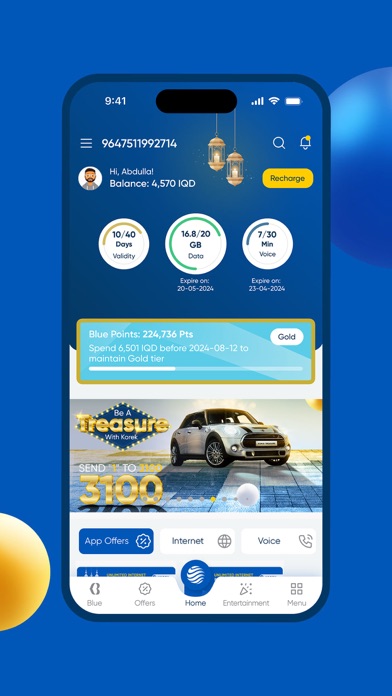
KOMobile Online is positioned as a comprehensive business and utility tool built to give subscribers absolute command over their telecom accounts. Users can effortlessly oversee active subscriptions, track real-time usage metrics, and stay updated with the latest promotional campaigns rolled out by Korek Telecom.
The core utility premise centers around eliminating friction in account management, replacing tedious text-based USSD codes with a clean graphical user interface. By centralizing line controls into a single dashboard, the utility enables subscribers to handle recharges, plan upgrades, and balance inquiries instantly.
Developer Background & Ecosystem
KOREK TELECOM LTD. has engineered this application to streamline customer interactions, leaning heavily into modern software design patterns. Rather than forcing users through legacy web portals, the studio has prioritized native iOS design principles to ensure snappy navigation.
This approach aligns perfectly with what power users expect from utility apps running on modern iPhones and iPads. The focus remains squarely on reducing latency when fetching account data from the cloud.
Standout Features & What's New in this Build
This particular TestFlight build introduces several behind-the-scenes optimizations designed to improve network request handling and interface responsiveness. Testers will notice subtle improvements in how quickly account balances refresh upon launching the app.
- Instant Account Overview: View your remaining voice minutes, SMS bundles, and data quotas directly on the primary dashboard widget.
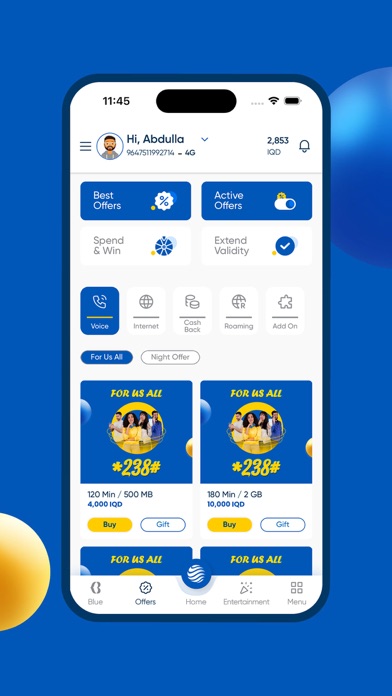
- Subscription Management: Toggle active value-added services on and off without navigating deep menu hierarchies or contacting customer support.
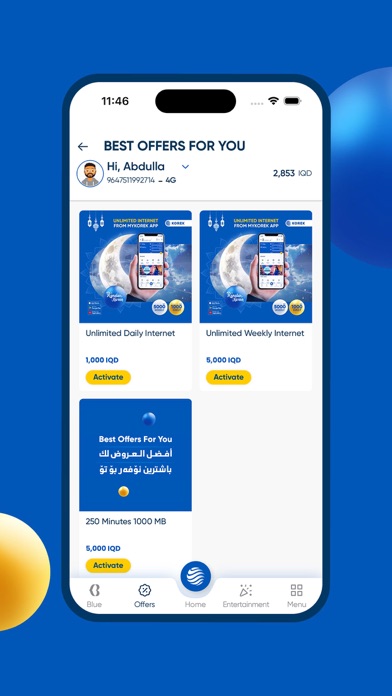
- Promotional Integration: Receive real-time alerts regarding exclusive offers, bonus data bundles, and tiered tariff modifications.
- Quick Recharge Engine: Securely process voucher codes or digital top-ups utilizing streamlined input fields designed for speed.
- Native Dark Mode: Seamlessly transitions between light and dark aesthetics based on your system-wide iOS display settings.
Hands-On Impressions: Performance, Battery, and Thermals
Testing this utility on an iPhone 15 Pro running modern Apple Silicon reveals a snappy, highly responsive user interface. Page transitions execute smoothly, taking full advantage of ProMotion 120Hz display refresh rates without experiencing noticeable stutter.
Because the app primarily handles data fetching rather than heavy graphical rendering, thermal headroom remains entirely unaffected. You can keep the app running in the background for routine monitoring without watching your battery percentage plummet.
"Utility applications succeed or fail based on how quickly they get out of the user's way, and this TestFlight build demonstrates a commendable focus on speed and clarity."
System Requirements & Requested Permissions
To run the KOMobile Online TestFlight beta, your device must be updated to iOS 15.6 or later. The download package weighs in at a manageable 102 MB, meaning it will not crowd your local flash storage.
Upon first launch, the app requests standard permissions including localized network access and push notifications. Apple's rigorous sandboxing ensures these background data exchanges remain strictly confined to secure API endpoints.
Pros & Cons: Beta Impressions
✓ The Highs (What We Love)
- Responsive UI: Instantaneous screen transitions and clean layout organization.
- Low Footprint: Minimal impact on device thermals and daily battery longevity.
- Clear Navigation: Straightforward menu trees that make account management painless.
✕ Beta Caveats (Room for Polish)
- Network Dependency: Occasional timeout prompts during peak cellular traffic hours.
- Localization Nuances: Minor text wrapping irregularities in secondary submenus.
- Slot Scarcity: Apple's testing caps mean invitations fill up rapidly.
Current TestFlight Slot Situation & Availability
Apple enforces a strict cap of 10,000 concurrent testers for any public TestFlight beta distribution. Utility builds like this tend to see rapid adoption spikes among early adopters and telecom enthusiasts.
If you encounter a message indicating that the beta is currently full, do not panic. Developers periodically purge inactive testers, meaning slots open up organically throughout the testing lifecycle.
Step-by-Step TestFlight Installation Guide
Getting set up with this pre-release build takes less than two minutes if you follow this structured deployment workflow. Ensure you have your Apple device ready before proceeding.
Step 1: Install TestFlight
Open the App Store on your iPhone or iPad, search for Apple's official TestFlight application, and download it to your device.
Step 2: Access the Invite Link
Navigate to Codewing and tap our direct TestFlight invitation link to trigger the beta enrollment protocol.
Step 3: Accept the Beta Agreement
Your browser will launch the TestFlight app automatically, presenting you with the developer release notes and terms. Tap "Accept" to proceed.
Step 4: Download the Build
Tap "Install" to pull the 102 MB package directly onto your home screen alongside your stable applications.
Step 5: Submit Feedback
Encounter a visual bug or connection hitch? Take a screenshot inside the app to automatically route diagnostic logs straight to the KOREK TELECOM LTD. engineering team.
Frequently Asked Questions
Is KOMobile Online safe to install via TestFlight?
Yes. Every build distributed through Apple's TestFlight framework undergoes automated security screening and adheres to strict iOS sandboxing protocols to protect your personal data.
What should I do if the KOMobile Online beta is full?
If slots are exhausted, bookmark this Codewing review page and check back during off-peak hours when developers routinely prune inactive user accounts.
Will installing this beta overwrite my App Store version or delete save data?
TestFlight builds generally install as a standalone preview package or safely update existing beta architecture without impacting your core device storage integrity.
How long do TestFlight beta invitations and builds last?
Each individual TestFlight build remains active for 90 days from the upload date, after which time testers must update to a newer build released by the studio.
Are in-app purchases free during TestFlight beta testing?
Yes. Any simulated financial transactions conducted within a TestFlight environment utilize Apple's sandbox currency, meaning you will never be charged real money.
Final Editorial Verdict
KOMobile Online proves to be a well-structured utility that successfully simplifies telecom account management on iOS. KOREK TELECOM LTD. has delivered an early build that balances aesthetic clarity with dependable performance.
If you rely on Korek Telecom services and want an efficient way to monitor your line without legacy headaches, grab the beta while slots remain open. Rating: 4.2 / 5 stars.
Developer Support & Official Resources
Stay updated on patch notes, maintenance windows, and feature roadmaps directly from the official developer channels.
Never miss an opening for KOMobile Online.
Apple limits TestFlight betas to 10,000 testers, and this program is currently at capacity. CodeWings Plus continuously monitors slot availability 24/7 and sends you an instant alert the second a spot opens up.


