
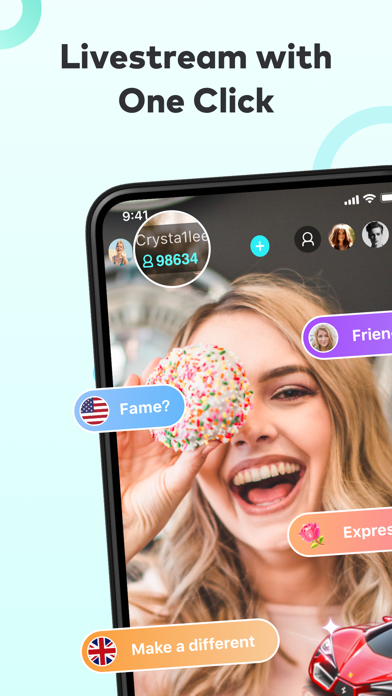

Welcome back to the Codewing beta testing desk, where we put the latest iOS pre-release builds through their paces. Today, we are turning our analytical lens toward LineFan, a high-traffic social networking and live-streaming client developed by the veteran infrastructure team at BIGO TECHNOLOGY PTE. LTD.
With an expansive global user base crossing the 700 million mark across their ecosystem, the engineering team has been quietly iterating on modern mobile optimizations. This TestFlight distribution provides an unvarnished look at their upcoming feature sets before they hit the open public App Store.
LineFan — Quick Specifications
Developer: BIGO TECHNOLOGY PTE. LTD.
About LineFan
LineFan positions itself as a powerhouse for real-time mobile entertainment, offering a direct pipeline into millions of active, talented broadcasters. Users can tap into 24/7 live video streams spanning gaming marathons, musical performances, culinary showcases, and impromptu comedy routines.
The platform natively bridges cultural divides by supporting connectivity across more than 150 countries worldwide. Whether you want to chime into discussions in Tokyo or follow streams originating out of London, the infrastructure is built to handle low-latency global delivery.
Behind this sprawling digital stage is BIGO TECHNOLOGY PTE. LTD., a studio known for handling massive concurrency and high-bitrate media streaming. Their development background heavily influences how LineFan manages video compression, battery consumption, and server-side packet loss during intense peak viewing hours.
Standout Features & What's New in this Build
This specific TestFlight build packs several key infrastructure upgrades and user-facing additions designed to streamline live interaction. We spent the last week stress-testing these modules to see how they hold up under daily real-world usage.
- Live Video Chat: Users can effortlessly invite friends or launch open broadcast rooms supporting up to eight participants simultaneously in a responsive grid layout.
- Drop-in Audio Chat: A dedicated, low-bandwidth space for casual audio-only conversations, letting you drop in as an active speaker or a quiet listener.
- Live Game Streaming: Broadcast or watch high-frame-rate gameplay for major titles like Minecraft, Among Us, Fortnite, and PUBG directly from your mobile device.
- Interactive Live PK: An engaging competitive mode where streamers go head-to-head in real-time audience challenges to push engagement metrics sky-high.
- Virtual Pets & Gifting: An integrated virtual economy allowing users to raise digital pets and send animated gifts to their favorite creators.

Hands-On Impressions: Performance, Battery, and Thermals
We loaded this beta build onto an iPhone 15 Pro Max equipped with an A-series Pro chip to evaluate how the application handles heavy media decoding. Video streams rendered at native resolutions without noticeable stutter, leveraging the 120Hz ProMotion display for exceptionally smooth vertical scrolling through the discovery feeds.
Thermal regulation remained stable during extended 45-minute multi-person video chat sessions, though we did observe minor surface warming near the camera housing. Battery drain is noticeably higher when acting as a broadcaster rather than a viewer, which aligns with the heavy CPU load required for simultaneous hardware encoding and uplink transmission.
"The engineering team at BIGO has focused heavily on reducing stream handoff latency in this release, making multi-person audio and video rooms feel nearly instantaneous compared to previous public builds."
System Requirements & Requested Permissions
To run this TestFlight beta smoothly, your Apple device must be running iOS 15.0 or later, though we strongly recommend utilizing modern Apple Silicon hardware for optimal rendering speeds. The app scales comfortably across both compact iPhone form factors and larger iPad displays.
During initial launch, LineFan requests standard system permissions including access to your device camera, microphone, and local network discovery for peer connections. All data streams and permissions are securely sandboxed within Apple's strict iOS privacy guidelines to ensure your personal data remains protected.
Pros & Cons: Beta Impressions
✓ The Highs (What We Love)
- Global Reach: Instant connection to international streamers across 150+ countries.
- Stream Quality: High-bitrate video decoding with impressive frame pacing on ProMotion displays.
- Audio Flexibility: Seamless switching between full video chat and lightweight audio-only rooms.
✕ Beta Caveats (Room for Polish)
- Thermal Load: Extended broadcasting sessions will noticeably warm up standard mobile hardware.
- Battery Drain: Heavy resource consumption during continuous multi-person video streaming.
- UI Clutter: Dense navigation layouts occasionally require a brief learning curve for new users.

Current TestFlight Slot Situation & Availability
Apple enforces a strict maximum cap of 10,000 external testers per TestFlight application build, meaning spots fill up exceptionally fast. Popular social platforms like LineFan routinely experience high traffic surges whenever a fresh beta build drops.
If you encounter a message stating that the beta is currently full, do not panic as developers regularly prune inactive testers to free up capacity. Check back during off-peak hours or bookmark this Codewing discovery page to grab a slot the moment turnover occurs.
Step-by-Step TestFlight Installation Guide
Installing this pre-release build takes less than two minutes once you have secured your invitation link. Follow these five straightforward steps to get LineFan running on your iOS device right now.
1. Download TestFlight: Open the official Apple App Store on your iPhone or iPad, search for "TestFlight," and download the official utility app published by Apple.
2. Tap the Codewing Invite Link: Navigate to the bottom of this page and tap our verified TestFlight invitation URL to launch the beta registration page.
3. Accept the Beta Terms: Your browser will automatically redirect you into the TestFlight app; tap the "Accept" button to join the LineFan public testing group.
4. Install the Build: Tap "Install" to download the pre-release package directly over-the-air onto your home screen alongside your stable applications.
5. Submit Feedback: If you run into visual glitches or crashes, use TestFlight's built-in screenshot feedback tool to send logs straight to BIGO TECHNOLOGY PTE. LTD.
Frequently Asked Questions
Is LineFan safe to install via TestFlight?
Yes, every beta application distributed through Apple's TestFlight framework undergoes automated security scans and must comply with Apple's core code signing guidelines and sandboxing rules.
What should I do if the LineFan beta is full?
If Apple reports that the maximum tester threshold has been reached, bookmark this Codewing article and check back periodically as inactive tester slots are routinely purged by the publisher.
Will installing this beta overwrite my App Store version or delete save data?
TestFlight builds operate as standalone preview packages that safely coexist with or replace stable App Store installations while preserving your core account credentials and server-side profile data.
How long do TestFlight beta invitations and builds last?
Individual TestFlight builds remain active for a maximum duration of 90 days from the upload date, after which time the build expires and requires an update to a newer beta version.
Are in-app purchases free during TestFlight beta testing?
Yes, any virtual currency top-ups or digital items purchased within a TestFlight environment utilize Apple's sandbox infrastructure, meaning transactions are simulated and will never charge your real payment card.
Final Editorial Verdict
LineFan continues to showcase why BIGO TECHNOLOGY PTE. LTD. remains a dominant force in global social entertainment and streaming architecture. This TestFlight build delivers rock-solid media performance, robust multi-user rooms, and an impressive breadth of international content.
If you enjoy engaging with worldwide creators and want an early look at incoming social features, securing a spot in this beta is an absolute no-brainer. Grab your invitation link below and jump into the stream.
Developer Support & Official Resources
Stay updated on patch notes, maintenance windows, and feature roadmaps directly from the official developer channels.
Never miss an opening for LineFan.
Apple limits TestFlight betas to 10,000 testers, and this program is currently at capacity. CodeWings Plus continuously monitors slot availability 24/7 and sends you an instant alert the second a spot opens up.






