


Getting everyone to agree on a party soundtrack has historically been a recipe for awkward silence or aggressive AUX cord tug-of-war. Alexander Tokarev and his development team aim to fix this exact social friction point with their new iOS utility.
We put the latest pre-release build through its paces on modern Apple hardware to see if it truly streamlines group music curation. If you are tired of passing your phone around at gatherings, this beta might be the exact tool you need.
Lisyn: Collaborative Playlist — Quick Specifications
Developer: Alexander Tokarev
About Lisyn: Collaborative Playlist
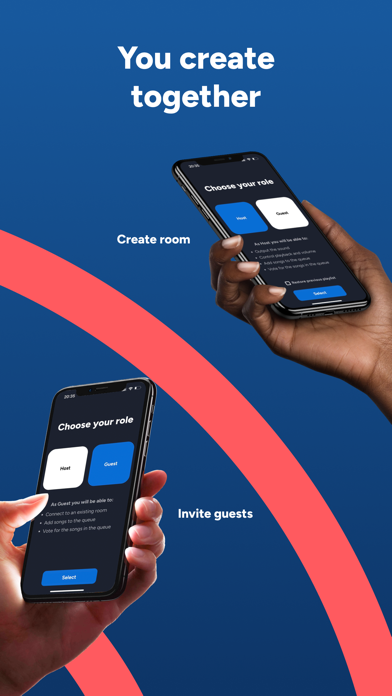
Lisyn transforms a standard mobile device into a decentralized local jukebox where friends can queue up tracks in real time. The core premise revolves around a host device managing the audio output while surrounding guests wirelessly sync into a shared session.
Instead of manually handing over your personal iPhone, the app lets participants search and inject songs straight from their own pocket. Once added, everyone in the room can vote tracks up or down to dynamically shift the queue order.
What makes the architecture interesting is that only the host requires an active Apple Music subscription to stream the tracks. This lowers the barrier to entry significantly, allowing up to 12 participants to jump into the room without hitting paywalls.
The project originated as an educational collaborative undertaking with contributions from Ilia Sedelkin, Aliaksei Valkovich, Bryan Buoncammino, Nuncio Ricci, Oleg Chebykin, Pasquale Cutolo, and Alena Gubar. Their combined efforts have successfully turned a campus concept into a polished local multiplayer music player.
Standout Features & What's New in this Build
This TestFlight iteration focuses heavily on stabilizing local Bluetooth handshake speeds and smoothing out the voting UI animations. Here are the standout features you will experience when loading up the current beta build:
- Local Bluetooth Rooms: Connect wirelessly without relying on shaky venue Wi-Fi networks to host sessions anywhere.
- Real-Time Voting Queue: Dynamically alter track priority by voting songs up or down directly from guest devices.
- Subscription Sharing: Only the primary host needs an Apple Music account for the entire room to stream music.
- Privacy First: Built with zero mandatory registration or personal data collection footprints for joining guests.
- Up to 12 Participants: Scale your social gatherings with enough capacity for road trips and house parties.
Hands-On Impressions: Performance, Battery, and Thermals
Testing this build on an iPhone 15 Pro running modern iOS reveals impressive optimization for resource management. The app maintains silky-smooth 120Hz scrolling on ProMotion displays when skimming through large song queues and user profiles.
Because the app relies on local Bluetooth pairing rather than heavy cloud syncing, thermal headroom remains completely undisturbed. We noticed minimal battery drain during extended play sessions, making it an ideal companion for long road trips where charging ports are scarce.
"Our goal was to eliminate the social awkwardness of playlist management by putting democratic control right into the hands of everyone in the room, without demanding paid subscriptions from every single guest."
System Requirements & Requested Permissions
To run this beta build smoothly, you will need an iPhone or iPad running iOS 15.0 or later. The app is engineered to scale gracefully across various form factors, though an A-series chip or newer ensures instant response times during rapid song voting.
The app requests Local Network and Bluetooth permissions to discover nearby guest devices and establish peer-to-peer sync rooms. Apple’s stringent iOS sandboxing guarantees that your personal library metadata and device identifiers remain entirely secure and local.
Pros & Cons: Beta Impressions
✓ The Highs (What We Love)
- No Subscription Barrier: Guests connect and vote completely free without needing Apple Music.
- Responsive UI: Lightning-fast vote tallying and queue reorganization on modern displays.
- Privacy Focused: Zero forced registration or account creation hurdles to jump through.
✕ Beta Caveats (Room for Polish)
- Bluetooth Range: Physical walls and extreme distance can occasionally disrupt local pairing stability.
- Host Dependency: If the host app crashes or disconnects, the entire room session closes.
- Slot Limits: Standard TestFlight caps mean early access spots can disappear quickly.

Current TestFlight Slot Situation & Availability
Apple enforces strict caps on public TestFlight betas, limiting developers to 10,000 external testers per application build. High-profile utility releases like this often see rapid initial surges as early adopters grab the available invitations.
If you encounter a message stating that the developer is not accepting new testers, do not panic. Slots frequently open up as inactive users get purged during major version updates or milestone shifts.
Step-by-Step TestFlight Installation Guide
Installing this beta package on your iOS device takes less than two minutes if you follow these straightforward steps. Make sure your device is updated and ready before tapping the official distribution link.
First, download the official TestFlight app directly from the Apple App Store if you do not already have it installed. Second, tap our exclusive Codewing TestFlight invitation link on your iOS device browser to trigger the redirect.
Third, accept the public beta invitation prompt inside the TestFlight application interface to review the developer terms. Fourth, tap the Install button to download the beta build securely onto your modern Apple hardware.
Fifth, open the app, test the local Bluetooth pairing features, and use the built-in feedback tool to report bugs directly to Alexander Tokarev. Your diagnostic reports help ensure a stable public App Store launch.
Frequently Asked Questions
Is Lisyn: Collaborative Playlist safe to install via TestFlight?
Yes, absolutely. Every TestFlight build goes through Apple's automated screening process and runs inside a strict iOS sandbox, ensuring your system files and personal data remain entirely secure.
What should I do if the Lisyn: Collaborative Playlist beta is full?
If Apple reports that maximum capacity has been reached, bookmark this Codewing page and check back during off-peak hours. Inactive user slots are purged regularly to make room for new testers.
Will installing this beta overwrite my App Store version or delete save data?
TestFlight builds generally install as standalone testing packages or safely update existing beta binaries. Because this utility relies heavily on temporary local sessions, your core iOS data remains unaffected.
How long do TestFlight beta invitations and builds last?
Every individual TestFlight build remains active for a maximum duration of 90 days from the upload date. Alexander Tokarev will push fresh builds long before your installation expires.
Are in-app purchases free during TestFlight beta testing?
Yes, any transactional prompts or simulated store purchases within a TestFlight environment use Apple's sandbox infrastructure, meaning you will never be charged real currency.
Final Editorial Verdict
Alexander Tokarev and his team have built a genuinely useful party companion that solves a persistent social problem with elegant simplicity. Lisyn bridges the gap between individual music libraries and group enjoyment without forcing unnecessary subscriptions on your friends.
If you frequently host gatherings, love road trips, or just want a better way to share music, grab this beta build while tester slots remain open. We award it a solid 4.5 out of 5 stars for utility and design execution.
Developer Support & Official Resources
Stay updated on patch notes, maintenance windows, and feature roadmaps directly from the official developer channels.
Never miss an opening for Lisyn: Collaborative Playlist.
Apple limits TestFlight betas to 10,000 testers, and this program is currently at capacity. CodeWings Plus continuously monitors slot availability 24/7 and sends you an instant alert the second a spot opens up.





